
- Catalogs
- ODOT Automation
- AIO-MT222F MiniBoxIO User Manual_V1


AIO-MT222F MiniBoxIO User Manual_V1

AIO-MT222F MiniBoxIO User Manual_V1
Product Introduction: The AIO-MT222F is an Ethernet-based integrated IO module with 16 digital output channels. It supports RS485 (Modbus-RTU) and Ethernet (Modbus-TCP) interfaces, allowing simultaneous access by up to 5 Modbus TCP clients. The module features a robust metal shell with anti-corrosion and anti-interference capabilities, and supports daisy chain topology for easy wiring.
Technical Parameters: The module operates with a 24V output, supports a wide input voltage range (9-36V DC), and functions within a temperature range of -40 to 85°C. It includes dual Ethernet ports, a Modbus RTU RS485 port, and supports up to 5 Modbus TCP clients. The module is IP20 rated and features optocoupler isolation for I/O to internal bus.
Hardware Description
Appearance and Indicators: The module includes power, fault, communication, and IO running indicators. It supports standard Modbus-TCP and Modbus-RTU/ASCII protocols.
System Power and Communication Interface: The module features dual Ethernet ports for cascading and an RS485 bus connection mode. It includes a detailed terminal wiring diagram for the 16 digital output channels.
Configuration Software Usage
The configuration process involves setting the computer and module IPs in the same network segment, using the AIO-Box config software to create and manage projects, and scanning for modules. Parameters can be modified and downloaded to the module, and online monitoring of IO module data is supported.
MODBUS POLL Software Test
Ethernet Port Test: Connect using MODBUS POLL software, input gateway IP, and set server port. Test involves setting channel values and verifying them in the configuration software.
Serial Port Test: Connect via RS485, configure serial settings, and establish communication to test data control functions.
Device Firmware Upgrade
Firmware upgrades are managed through the AIO-Box configuration software, allowing users to view current version information and perform upgrades if necessary.
Catalog excerpts

od-t Sichuan Odot Automation System Co., Ltd http: // www.odotautomation.com
Open the catalog to page 1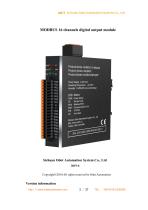
od-t Sichuan Odot Automation System Co., Ltd Product Name: AIOBOX10 Module Product Series: MiniBOX Product Model: AIOBOX-MT222F Power Supply- 9-36VDC Operating Temperature: -40-85‘C Humidity: 5~95%RH (non-condensing) LED Status PWR Power status DF Device Fault RUN Modbus RUN ERR Communication Error IRM 10 RUN NC Not Used Copyright©2010 All rights reserved by Odot Automation Version information http: // www.odotautomation.com
Open the catalog to page 2
od-t Sichuan Odot Automation System Co., Ltd Ownership information Without the consent of the copyright owner, part or whole of this document are not allowed to be republished in paper or electronic document. Disclaimer This document shall only be used to assist readers for the using of our products and the company shall not be responsible for any loss or error caused by the information in this document. The text and product described in this document is constantly developing and improving. Sichuan Odot Automation System Co., Ltd. has the right to modify this document without notifying users....
Open the catalog to page 3
http:// www.odotautomation.com
Open the catalog to page 4
Od-t Sichuan Odot Automation System Co., Ltd 1 Product Overview 1.1 Product Introduction MiniBox series IO module: AIO-MT222F is an Ethernet based integrated IO module, with 16 output channels. This product supports the use of RS485 interface (Modbus-RTU) and Ethernet interface (Modbus-TCP) for communication, and supports the simultaneous access of 5 Modbus TCP clients. It is simple and convenient to use with stable transmission, full metal shell and strong anti-interference ability. The internal PCB adopts anti-corrosion technique including anti-corrosion, anti-oxidation and anti-salt mist....
Open the catalog to page 5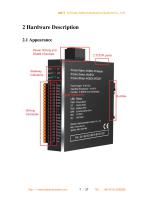
od-t Sichuan Odot Automation System Co., Ltd 2 Hardware Description2.1 Appearance Power Wiring and RS485 Channels Gateway Indicators Wiring Terminals http: // www.odotautomation.com Product Name: AIOBOX10 Module Product Series: MmiBOX Product Model: AIOBOX-MT222F Power Supply 9*36 VDC Operating Temperature -40'85'C Humidity. 5~95%RH (notwondensng) Status Power status Device Fault Modbus RUN Communication Error 10 RUN Not Used ^Automaton System Co Jd
Open the catalog to page 7
od-t Sichuan Odot Automation System Co., Ltd 2.3 System Power and Communication Interface A. System Power and Communication Ports Definition It supports standard Modbus-TCP and Modbus-RTU/ASCII protocol access. The Ethernet supports cascade function of dual Ethernet port switch, and the serial port supports RS485 bus connection mode. http: // www.odotautomation.com
Open the catalog to page 8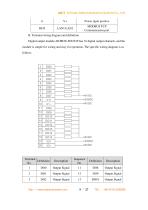
od-t Sichuan Odot Automation System Co., Ltd B. Terminal wiring diagram and definition Digital output module AIOBOX-MT222F has 16 digital output channels, and the module is simple for wiring and easy for operation. The specific wiring diagram is as follows. http: // www.odotautomation.com
Open the catalog to page 9
od-t Sichuan Odot Automation System Co., Ltd http: // www.odotautomation.com
Open the catalog to page 10
od-t Sichuan Odot Automation System Co., Ltd Dada description: MAC Address [0-5]: Device MAC address (read only) IP Address[0-3]: Device IP address (Default: 192.168.1.100) Net Mask[0-3]: Device subnet mask (Default: 255.255.255.0) Net Gateway[0-3]: Device subnet gateway (Default: 192.168.1.1) Modbus Port: Modbus Port no. (Default: 502) Effective range: 0-65535 Watchdog Enable: Modbus Watchdog enable (Default: 1) 0: Watchdog disabled 1 : Watchdog enabled Watchdog Time(s): Watchdog time (Default: 10) Effective range: 1-65535 Slave ID: Modbus slave station ID no. (Default: 1) Effective range: 1-247...
Open the catalog to page 11
BaudRate:serial port baud rate(Default:9600bps) Effective range:2400-115200 Data Bits:data bits(Default:8) 7:7 data bits 8:8 data bits Parity Bits:Parity bit(Default:0) 0:No parity 1:Odd 2:Even Stop Bits:stop bit(Default:1) 1:1 stop bit 2:2 stop bit Serial Mode:serial mode(Default:0) 0:RTU mode 1:ASCII mode Char Pitch:inter-frame space(Default:2) 0:1.5t 1:3.5t 2:5t 3:10t 4:20t 5:50t 6:100t 7:200t Respond Delay:Slave station replying delay time(Default:0
Open the catalog to page 12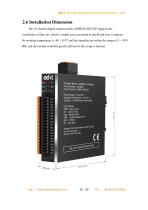
od-t Sichuan Odot Automation System Co., Ltd 2.6 Installation Dimension The 16-channel digital output module AIOBOX-MT222F supports the installation of Din-rail, which is simple and convenient to install and easy to operate. Its working temperature is -40 ~ 85°C and the humidity are within the range of 5 ~ 95% RH, and the module would be greatly affected if this scope is beyond. Prroduct Name AI0B0X10 Module Product Series: MiniBOX Product Model AIOBOX-MT222F Power Supply: 9-36 VDC Operating Temperature -40~85 C Humidity 5'95%RH(non-condensmg) LEO Sratus PWR Power status DF device Fault RUN Modbus...
Open the catalog to page 13
3 Configuration Software Usage 1. Double-clicking on my computer, open the network and sharing center under the control panel, and set the COMPUTER IP and module IP in the same network segment. If the default IP of module is 192.168.1.100, then the IP of computer should be 192.168.1. (1.. 99, 101.. 254). 2. After installing AIO-Box config software, opening the configuration software, clicking File → Project → New Project in the menu bar, or right clicking Project → New Project in the project directory bar, and entering the project name manually. http:// www.odotautomation.com
Open the catalog to page 14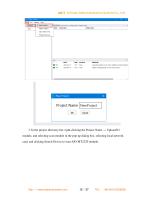
3. In the project directory bar, right-clicking the Project Name → Upload IO module, and selecting scan module in the pop-up dialog box, selecting local network card, and clicking Search Device to scan AIO-MT222F module. http:// www.odotautomation.com
Open the catalog to page 15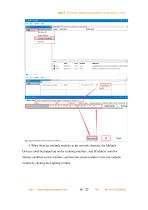
Network Card Subnet mask Gateway address Indicator light control Parameter set Lighting twinkle Search Device were seal state: Search comf 4. When there are multiple modules in the network structure, the Multiple Devices could be popped up on the scanning interface. And IP address could be directly modified on this interface, and then the actual modules in the site could be located by clicking the Lighting twinkle. http: // www.odotautomation.com
Open the catalog to page 16
Clicking ok after it is finished, and AIOBOX-MT222F would appear in the project bar. 5. Clicking the configuration to modify the parameters, and right clicking AIOBOX-MT222F to download IO parameters http:// www.odotautomation.com
Open the catalog to page 17All ODOT Automation catalogs and technical brochures
 C3351
C33518 Pages
 ODOT C series remote IO
4 Pages
 BOXIO 64
4 Pages
 ODOT remote IO catalogue
20 Pages
 PLC
PLC59 Pages
 New small ODOT brochure
16 Pages
 CN-8034
2 Pages
 CN-8033
2 Pages
 CN-8032
2 Pages
 CN-8012
2 Pages
 CN-8011
2 Pages
 CN-8031
2 Pages
 Remote I/O C Series
376 Pages
 ODOT-MS100T Serial User Manual
15 Pages
 Remote I/O module
36 Pages
 CT-7221
17 Pages
 CT5800
15 Pages
 CT4234
20 Pages
 CT3804
21 Pages
 CT-3713
19 Pages
 CT3238
19 Pages
 CT-3158
19 Pages
 CT2718
18 Pages
 CT2228
18 Pages
 CT623F
23 Pages
 CT-222F
19 Pages
 CT-121F
21 Pages
 ODOT-PNM02 User Manual_V1.5.
37 Pages
 MG-IOT03 User Manual_V1
24 Pages
 ODOT AIOBOX - Integrated IO module
149 Pages
 ODOT-S7PPIV2.0
31 Pages
 ODOT-PNM02
31 Pages
 ODOT-S4E2
56 Pages
 ODOT-IOT01
79 Pages
 ODOT-IOT02
44 Pages


Archived catalogs
 ODOT-S1E1 User Manual 20200720
30 Pages

- ODOT network switch
- ODOT industrial network switch
- ODOT digital I/O
- ODOT I/O module
- Gigabit Ethernet ethernet switch
- ODOT analog I/O
- ODOT RJ45 network switch
- ODOT digital I/O module
- ODOT DIN rail network switch
- Waterproof network switch
- Communication gateway
- ODOT unmanaged switch
- Redundant network switch
- Industrial gateway
- Fieldbus gateway
- ODOT Fieldbus I/O module
- Programmable logic controller
- ODOT analog I/O module
- ODOT serial I/O
- ODOT DIN rail converter