
- Catalogs
- NIHON PISCO CO., Ltd.
- VUS8-S series

- Company
- Products
- Catalogs
- News & Trends
- Exhibitions
VUS8-S series

VUS8-S series
- Dimensions: 8.2mm width, 34.3mm height, 62.2mm length, 17g weight.
- Display: 2-digit, 7-segment Red LED with 4.5mm font size.
- Pressure Range: Negative (-100 to 0kPa) and Compound (-100kPa to 0.3MPa).
- Operating Temperature: 0 to 50°C, Humidity: 35-85% RH.
- Power: DC12-24V, 30mA max current consumption.
- Protection: IEC/IP40, vibration resistance 100m/s², impact resistance 150m/s².
- Adjustable settings via two push buttons.
- Mounting options: Bracket, DIN rail, direct screw.
- Port types: Female Thread (M5), Push-In Fitting (ø1.8, 3, 4mm).
- Special functions: Panel lock, display magnification.
- Initial setup includes Display Setting, Switch Setting, Zero Adjusting Mode.
- Switch output: Separate Mode or Wind Comparator Mode.
- Zero point adjustment for accurate readings.
- Error messages for pressure range or zero-point adjustment issues.
- Cartridge fittings replaceable with a flathead screwdriver.
- Ensure proper setup and calibration for accuracy.
- Regularly check for errors and perform maintenance.
- Tube Insertion and Disconnection: Secure tubes in push-in fittings; release requires pressing the release-ring.
- Body Fixation: Use screws, brackets, or DIN rail with proper torque.
- Avoid corrosive, flammable, or explosive environments.
- Qualified personnel should handle equipment; preventive measures are necessary.
- Use stable DC power, surge absorption circuits, and proper grounding.
- Install backflow prevention diodes.
Catalog excerpts

VACUUM ACCESSORIES Pressure Switch with Super slim LED Display 8mm width LED Digital Pressure Sensor ● Super slim and light weight pressure sensor with a LED display. width: 8.2mm, height: 34.3mm, length: 62.2mm, weight: 17g Indicator font size on the LED display is 4.5mm high for better visibility. ● All settings are done by 2 push buttons. ● Three mounting options : Bracket, DIN rail or via screws directly. Port selection: Single Port and Inline Port. ● Port type: Female Thread (M5) and Push-In Fitting (ø1.8, 3, 4mm). 8mm LED Pressure Sensor LED Pressure Sensor Small Sensor Pressure Sensor Wi
Open the catalog to page 1
Vacuum Accessories Series VACUUM ACCESSORIES EXTERNAL VACUUM VACUUM CONTROLLER GENERATOR 8mm width LED Digital Pressure Sensor ■ Model Designation (Example) VUS8 8mm width LED Digital Pressure Sensor S ③ Bracket (option) ② Pressure range ① Port type Port type Inline Port code Single Port code Tube O.D.(mm) ② Pressure range Code Pressure range ③ Bracket (option) No code without Bracket Code Bracket (option) ■ Model Designation of Bracket (Example) 797 Small Vacuum Regulator Add-on Blow-off Controller Vacuum Filter Free Holder Fall Prevention Valve 8mm LED Pressure Sensor ※ 2 inner hexagonal bolts...
Open the catalog to page 2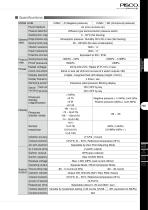
■ Specifications Model code Fluid medium Pressure detection Diffusion type semiconductor pressure switch Operating temp. range General Storage temperature range spec. Operating humidity range Air (non-corrosive air) 0 ~ 50°C (No freezing) Atmospheric pressure / Humidity: 65% RH or less (No freezing) 35 ~ 85%RH (No dew condensation) Vibration resistance Impact resistance Protective structure Current consumption 30mA or less (all LED and no-load of 2 switch outputs: ON) Display element Rated voltage Display frequency Monitoring system Excessive rated pressure: Blinking display Special Panel Lock...
Open the catalog to page 3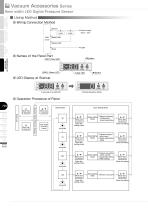
Vacuum Accessories Series ■ Using Method ■ Wiring Connection Method (Brown) Load Main circuit ■ Names of the Panel Part VACUUM ACCESSORIES EXTERNAL VACUUM VACUUM CONTROLLER GENERATOR 8mm width LED Digital Pressure Sensor Starting Operation Mode. ■ Operation Procedure of Panel Add-on Blow-off Controller Vacuum Filter Free Holder Fall Prevention Valve 8mm LED Pressure Sensor Panel Lock Small Vacuum Regulator ▲ More than 4 seconds ▼ More than 4 seconds Operation Mode (Pressure Display) ▲+▼ More than a second Select Mode “dl” Invalid operation for more than 5 seconds Each Setting Mode ▲+▼ More than...
Open the catalog to page 4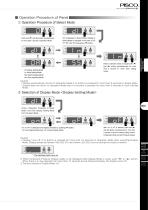
■ Operation Procedure of Panel ① Operation Procedure of Select Mode Push both (▼) and (▲) button simultaneously for more than a second in Operation Mode. “dl” is displayed in Select Mode. Display of Select Mode is changed in the order of “dl” , “In” “SS” and “0A” by pushing (▼) button. , VACUUM ACCESSORIES dl: Display Setting Mode In: Initial Setting Mode SS: Switch Setting Mode 0A: Zero Adjusting Mode Select a desired mode and push both (▼) and (▲) button simultaneously for more than a second to- enter each setting mode. Caution 1. isplay automatically returns to Operation Mode if no button...
Open the catalog to page 5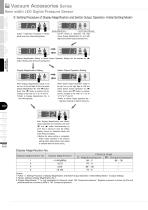
Vacuum Accessories Series ③ Setting Procedure of Display Magnification and Switch Output Operation Display Magnification Follow “①Operation Procedure of Select Mode” and enter Initial Setting Mode. Switch Output Operation Current setting is displayed. Left digit shows Display Magnification No. and right digit shows Switch Output Operation No.. VACUUM ACCESSORIES EXTERNAL VACUUM VACUUM CONTROLLER GENERATOR 8mm width LED Digital Pressure Sensor Display Magnification Setting or Switch Output Operation Setting can be selected by (▲) button. Blinking LED shows the setting item. Display Magnification...
Open the catalog to page 6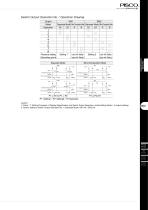
Switch Output Operation No. / Operation Drawing SW1 SW2 Separate Mode Wind Comparator Mode Separate Mode Wind Comparator Mode LO A B HI LO A HI B ○ ○ 1 ○ ○ 2 ○ ○ 3 ○ ○ 4 ○ ○ 5 ○ ○ 6 ○ ○ 7 ○ ○ 8 Pressure setting Setting 1 Lower limit: Setting 1 Setting 2 Lower limit: Setting 1 (Operating point) Upper limit: Setting 2 Upper limit: Setting 2 Output Mode Operation Wind Comparator Mode OFF S: Negative pressure -100kPa SR: Compound pressure -100kPa S: Negative pressure -100kPa SR: Compound pressure -100kPa VACUUM ACCESSORIES Separate Mode P1:SW1 S: Negative pressure -100kPa SR: Compound pressure -100kPa...
Open the catalog to page 7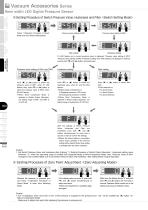
Vacuum Accessories Series ④ Setting Procedure of Switch Pressure Value, Hysteresis and Filter Follow “①Operation Procedure of Select Mode” and enter Switch Setting Mode. VACUUM ACCESSORIES Pressure value setting of SW1 Pressure value setting of SW2 Filter setting EXTERNAL VACUUM VACUUM CONTROLLER GENERATOR 8mm width LED Digital Pressure Sensor Hysteresis setting S1 LED flashes and a current pressure value is displayed. “Pressure value setting of SW1” , “Pressure value setting of SW2” “Hysteresis setting” and “Filter setting” are displayed in order by , pushing both (▼) and (▲) buttons simultaneously....
Open the catalog to page 8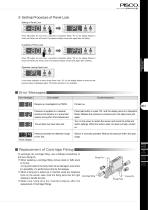
⑥ Setting Procedure of Panel Lock Setting of Panel Lock Press (▲) button for more than 4 seconds in Operation Mode. “PL” on the display flashes 3 times and Panel Lock will be set. The pressure display come back again after the setting. Unsetting of Panel Lock VACUUM ACCESSORIES Press (▼) button for more than 4 seconds in Operation Mode. “PA” on the display flashes 3 times and Panel Lock will be unset. The pressure display comes back again after unsetting. Operation during Panel Lock If any button operation is done during Panel Lock, “PL” on the display flashes 3 times and the pressure value is...
Open the catalog to page 9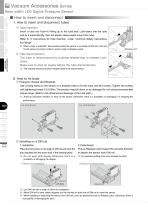
Vacuum Accessories Series ■ How to insert and disconnect 1. How to insert and disconnect tubes ① Tube insertion Insert a tube into Push-In Fitting up to the tube end. Lock-claws bite the tube and fix it automatically, then the elastic sleeve seals around the tube. Refer to “2. Instructions for Tube Insertion” under “Common Safety Instructions for Fittings”. ※ . When a tube is insterted / disconnected while the sensor is mounted on DIN rail, hold and fix the sensor by hand in order to avoid a load on Release Latch. Release Latch ② Tube disconnection The tube is disconnected by pushing release-ring...
Open the catalog to page 10All NIHON PISCO CO., Ltd. catalogs and technical brochures
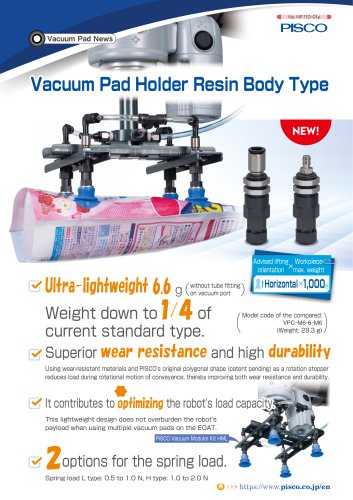 Vacuum Pad Holder Resin Body
9 Pages
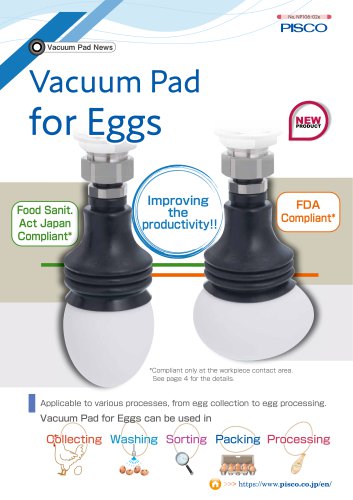 Vacuum Pad for Eggs
6 Pages
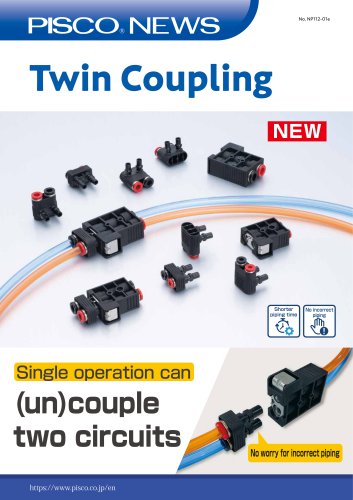 Twin Coupling
6 Pages
 General Product Guide
917 Pages
 CTB series
1 Page
 FUS8 series
3 Pages
 31 & 32 Series
20 Pages
 Vacuum Pad Soft Series
86 Pages
 VP series
106 Pages
 CHA series
8 Pages
 Gripper Series
15 Pages
 SVB Series
50 Pages
 SVA series
13 Pages
 SVR series
31 Pages
 NSB series
8 Pages
 Ball Valve SUS304 series
8 Pages
 BV series
8 Pages
 HV series
5 Pages
 Cable clamp & Dividing sheet
8 Pages
 Plarailchain SC
15 Pages
 Plarailchain SPO
12 Pages
 Plarailchain SP
14 Pages
 HPO
HPO12 Pages
 HPU
HPU12 Pages
 PJN series
15 Pages
 KJNC series
15 Pages
 SSJS series
6 Pages
 Flow Control Valve PP Series
12 Pages
 Stainless SUS316
13 Pages
 UE series
12 Pages
 FB series
1 Page
 CTA series
1 Page
 SFTN series
2 Pages
 SET series
1 Page
 SFT series
14 Pages
 ULF series
12 Pages
 UCQ series
2 Pages
 UQ series
12 Pages
 NB series
12 Pages
 NA series
12 Pages
 UD series
12 Pages
 UBS series
12 Pages
 UBT series
12 Pages
 UC series
1 Page
 UB series
12 Pages
 AK/AS series
26 Pages
 NK series
18 Pages
 Brass Series
30 Pages
 V-0 series
27 Pages
 EG Series
27 Pages
 PP Fitting series
12 Pages
 PP Series
26 Pages
 AP series
18 Pages
 SL series
16 Pages
 P-SUS series
33 Pages
 NS series
24 Pages
 SSP series
8 Pages
 ATS series
6 Pages
 Air Filter
20 Pages
 Combination Unit Series
25 Pages
 SFU series
9 Pages
 JP series
15 Pages
 ET series
11 Pages
 EQ series
19 Pages
 CVLU series
21 Pages
 CV series
24 Pages
 JN series
25 Pages
 Speed Controller Constant Flow
15 Pages
 JSD series
10 Pages
 JS Low-Flow series
17 Pages
 JSC series
13 Pages
 JS series
30 Pages
 Miniature Pressure Regulator
12 Pages
 MA series
16 Pages
 RH series
16 Pages
 R series
16 Pages
 PS series
16 Pages
 L series
41 Pages
 FUS20
FUS207 Pages
 Small Flow Sensor FUS8 Sries
3 Pages
 GP series
13 Pages
 VUS-32. SEU-32 Series
1 Page
 Small Pressure Sensor 11-series
24 Pages
 VUS12 series
2 Pages
 VUS21 series
14 Pages
 JSD series
10 Pages
 Orifice Fitting Series
6 Pages
 JK series
10 Pages
 RVFUP series
6 Pages
 VLF series
16 Pages
 VFL series
8 Pages
 VF series
22 Pages
 ECV series
8 Pages
 VPLFC, VPLFD series
17 Pages
 VPKE series
4 Pages
 RPV06 Series
8 Pages
 VZ Series
34 Pages
 VX Series
42 Pages
 VQ Series
4 Pages
 VN Series
40 Pages
 VK series
53 Pages
 VJ Series
34 Pages
 VG series
21 Pages
 VRL series
17 Pages
 VVV series
11 Pages
 VLS series
4 Pages
 VM | VC series
28 Pages
 VY series
24 Pages
 VB series
11 Pages
 VH | VS series
28 Pages
 VPHMP series
12 Pages
 VYR series
5 Pages
 HS series
13 Pages
 HML series
14 Pages
 VRG series
18 Pages
 Dry Unit Series
33 Pages
 Fiber Membrane Air Dryer
12 Pages
 VLM series
12 Pages
 VSPE series
5 Pages
 VT series
21 Pages
 PB series
13 Pages
 JSG series
17 Pages
 pararel
3 Pages
 fitting
4 Pages
 BJSU series
4 Pages
 SC
SC15 Pages
 SPO
SPO12 Pages
 SP
SP13 Pages
 RPV pump
8 Pages
 Pre-set
6 Pages
 Stainless Steel Ball Valve
8 Pages
 SUS316 Flow Control Valve
6 Pages
 Flange
13 Pages
 HML
HML14 Pages
 End of Arm Vacuum Gripper
12 Pages
 VYR
VYR5 Pages
 EOAT VRG | VMG series
18 Pages
 VPLFC
VPLFC17 Pages
 SVB
SVB172 Pages
 SVR
SVR39 Pages
 8mm Sensor
22 Pages
 Vacuum Filter
28 Pages
 Fall Prevention
18 Pages
 Vacuum Pen
21 Pages
 Push-Rod Release
4 Pages
 cylinder
22 Pages
 FDAbellows
6 Pages
 Oval
Oval80 Pages
 sponge
50 Pages
 mark-free
34 Pages
 flat
flat42 Pages
 Ultrathin
34 Pages
 packaging bag
13 Pages
 multi-bellow
46 Pages
 bellows pad
74 Pages
 Skid proof pad
42 Pages
 soft bellow pad
60 Pages
 soft pad
66 Pages
 VRL
VRL17 Pages
 VH VS VC VUM VU VY VB
336 Pages
 VZ
VZ34 Pages
 VX
VX42 Pages
 VVV
VVV11 Pages
 VQ
VQ42 Pages
 VN
VN40 Pages
 VLS
VLS4 Pages
 VLM
VLM12 Pages
 VK
VK53 Pages
 VJ
VJ34 Pages
 VG
VG21 Pages
 Vacuum Tube
12 Pages
 Twin Coiling
12 Pages
 Tube Cutter
12 Pages
 Polyurethane Tube
12 Pages
 Nylon Tube Series
12 Pages
 Multi-core Planar Tube
12 Pages
 Low-Friction Polyurethane Tube
12 Pages
 Insert Ring
12 Pages
 Fluororesin (PFA) Tube
14 Pages
 UL series
12 Pages
 Anti-spatter Tube
12 Pages
 Tube Fitting PP Series
26 Pages
 Tube Fitting Mini Series
41 Pages
 Tube Fitting Chemical Series
18 Pages
 K series
30 Pages
 Stop Fitting Series
16 Pages
 Rotary Joint Series
16 Pages
 Multi-Circuit Rotary Block
12 Pages
 Minimal Fitting Series
20 Pages
 Main Block Series
24 Pages
 Light Coupling Series
24 Pages
 High Rotary Joint Series
16 Pages
 Connector Series
16 Pages
 Color Cap
12 Pages
 Brass Compression Fitting Series
18 Pages
 2-Circuit Junction Block Series
16 Pages
 Vacuum EOAT Kit HML
14 Pages
 Vacduum gripper
18 Pages
 Mounting Flange for EOAT.pdf
13 Pages
 SSNC series
13 Pages
 SJSC series
24 Pages
 Speed Controller Series
32 Pages
 Speed Controller PP Series
17 Pages
 Speed Controller Low Flow
17 Pages
 Speed Controller High Flow
13 Pages
 Speed Controller Brass Series
15 Pages
 KJSC series
17 Pages
 Silencer Series
13 Pages
 Quick Exhaust Valve Series
19 Pages
 Pressure Gauge Series
13 Pages
 Miniture quick-exhaust
17 Pages
 Fixed Orifice Joint Series
22 Pages
 Check Valve
4 Pages
 SUS304_Ball Valve Series
8 Pages
 Parallel Gripper
6 Pages
 JSG
JSG17 Pages
 GENERAL
106 Pages
 Mechanical Valve Series
19 Pages
 Ball Valve Series
19 Pages
 Stainless Steel ball valve
6 Pages
 Hand Valve Series
15 Pages
 Change Valve
11 Pages
 SVA21 Series
21 Pages
 P Series
71 Pages
 SVA20 Series
43 Pages
 RegulatorPL031821m
12 Pages
 BJSU series
6 Pages
 NP68-01e
17 Pages


- NIHON PISCO manual valve
- NIHON PISCO stainless steel valve
- Control valve
- NIHON PISCO hydraulic fitting
- Vessel
- Water valve
- Ball valve
- Screw-in fitting
- NIHON PISCO pneumatic valve
- NIHON PISCO pneumatic fitting
- NIHON PISCO threaded valve
- Electrically operated valve
- NIHON PISCO vacuum generator
- NIHON PISCO metal fitting
- Regulating valve
- On/off valve
- Vacuum pump