
- Catalogs
- NIHON PISCO CO., Ltd.
- VUS21 series

- Company
- Products
- Catalogs
- News & Trends
- Exhibitions
VUS21 series

VUS21 series
- General Safety Measures: Ensure machines are powered off and air systems are exhausted before maintenance. Restart machines cautiously to avoid sudden movements.
- Danger and Warning Notices: Improper use of PISCO products can lead to serious injury or death. Specific applications and conditions where PISCO products should not be used are outlined.
- Maintenance and Handling: Ensure no residual air pressure before maintenance. Use appropriate tools for installation and removal of fittings, adhering to recommended torque specifications.
- PISCO disclaims responsibility for indirect losses or damages due to misuse, natural disasters, or modifications of their products. Liability is limited to the cost of the product.
- Fittings and Tubes: Ensure proper tube insertion and disconnection to prevent leaks. Follow guidelines for using non-PISCO tubes and adhere to specified tolerances.
- Pressure Sensors: Avoid physical stress on sensors and ensure a clean air supply to prevent malfunctions.
- Tables provide recommended tightening torques for various thread types and sizes, ensuring proper installation and preventing leaks.
Catalog excerpts

VACUUM ACCESSORIES Vacuum Switch with LED display LED Digital Pressure Sensor 21-series ● To improve visibility, an LED display is adopted for the vacuum switch. ● LED displays indicates set-up pressure and working pressure. Two types of vacuum switch selection: Two switch output type, and one switch output and an analog output. A connector wiring realize easy layout. ● Three pipe connection methods are available: Push-in Fitting, M5 metric female thread, and direct mount. ● Output detection accuracy is enhanced by the use of semiconductor switch. LED Pressure Sensor Small Sensor Pressure Sensor With
Open the catalog to page 1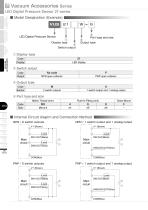
Vacuum Accessories Series VACUUM ACCESSORIES EXTERNAL VACUUM VACUUM CONTROLLER GENERATOR LED Digital Pressure Sensor 21-series ■ Model Designation (Example) VUS LED Digital Pressure Sensor ④ Port type and size ③ Output type ① Display type 21 LED display Code Display ② Switch output No code NPN open collector Code Output A 1 switch output and 1 analog output ③ Output type Code Sensor ④ Port type and size 813 Small Vacuum Regulator Add-on Blow-off Controller Code Size NPN / 1 switch output and 1 analog output Free Holder ■ Internal Circuit diagrm and Connection Method Vacuum Filter Fall Prevention...
Open the catalog to page 2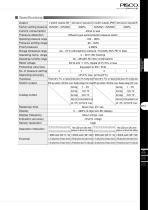
2 switch outputs (W) 1 switch output and 1 analog output (A) 2 switch outputs (PW) 1 switch output and 1 analog output (PA) Factory setting pressure -50kPa(SW1), -10kPa(SW2) Current consumption Pressure detection Diffusion type semiconductor pressure switch Operating pressure range Pressure setting range Proof pressure Storage temperature range 0.2MPa -20 ~ 70°C (Atmospheric pressure / Humidity: 60% RH or less) 0 ~ 50°C (No freezing) Operating humidity range Rated voltage Protective structure No. of pressure setting Operating accuracy VACUUM ACCESSORIES Operating temp. range Fixed (2% F.S. or...
Open the catalog to page 3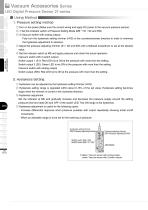
Vacuum Accessories Series VACUUM ACCESSORIES EXTERNAL VACUUM VACUUM CONTROLLER GENERATOR LED Digital Pressure Sensor 21-series ■ Using Method 1. Pressure setting method ① Turn on the power (Make sure the correct wiring and apply DC power to the vacuum pressure sensor). ② -1 Set the indicator switch at Pressure Setting Mode (ME → S1 / S2 and SW) ② -2 (Vacuum switch with analog output) Fully turn the hysteresis setting trimmer (HYS) in the counterclockwise direction in order to minimize the hysteresis adjustment in advance. ③ Adjust the pressure adjusting trimmer (S1 / S2 and SW) with a flathead...
Open the catalog to page 4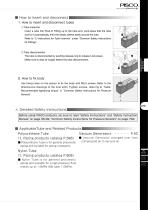
■ How to insert and disconnect 1. How to insert and disconnect tubes ① Tube instertion Insert a tube into Push-In Fitting up to the tube end. Lock-claws bite the tube and fix it automatically, then the elastic sleeve seals around the tube. Refer to “2. Instructions for Tube Insertion” under “Common Safety Instructions for Fittings” . ② Tube disconnection The tube is disconnected by pushing release-ring to release Lock-claws. VACUUM ACCESSORIES Make sure to stop air supply before the tube disconnection. 2. How to fix body Use fixing holes on the sensor to fix the body with M2.5 screws. Refer to...
Open the catalog to page 5
Vacuum Accessories Series VACUUM ACCESSORIES EXTERNAL VACUUM VACUUM CONTROLLER GENERATOR LED Digital Pressure Sensor 21-series Safety Instructions ● Avoid using the sensor under the condition of corrosive gas. Otherwise, it may cause a sensor trouble. ● Wrong wire arrangement generating noise (or surge) can cause mulfunctions of the sensor. ● Avoid using this product in the flammable explosive gas, liquid or ambience. This product is not designed to be explosive-proof and may cause fire or explosion under these conditions. ● Keep the product away from water / oil drops or dusts, since it is not...
Open the catalog to page 6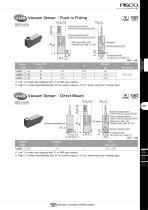
VUS Vacuum Sensor / Push-In Fitting compliant LED display Operation displaying LED VACUUM SWITCH MODEL; VUS21A LOT; MODE switch (ME / SW) ※)MODE switch (ME / S1 / S2) Pressure adjusting trimmer ※)SW1 Pressure adjusting trimmer 2-ø2.6(Screw hole) Counterbore ø4.5 Depth 2.5 VACUUM ACCESSORIES Hysteresis setting trimmer ※)SW2 Pressure adjusting trimmer Model code ※ . Left □ in model code: Replaced with “P” for PNP open collector ※ . Right □ in model code:Replaced with “W” for 2 switch outputs or “A” for 1 switch output and 1 analog output VUS Vacuum Sensor / Direct Mount Hysteresis setting trimmer...
Open the catalog to page 7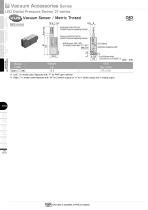
Vacuum Accessories Series VUS Vacuum Sensor / Metric Thread VACUUM ACCESSORIES MODE switch (ME / SW) ※) MODE switch (ME / S1 / S2) Pressure adjusting trimmer ※)SW1 Pressure adjusting trimmer VACUUM SWITCH MODEL; VUS21A LOT; Hysteresis setting trimmer ※)SW2 Pressure adjusting trimmer LED display Operation displaying LED EXTERNAL VACUUM VACUUM CONTROLLER GENERATOR LED Digital Pressure Sensor 21-series 2-ø2.6(Screw hole) Counterbore ø4.5 Depth 2.5 Model code ※ . Left □ in model code: Replaced with “P” for PNP open collector ※ . Right □ in model code:Replaced with “W” for 2 switch outputs or “A”...
Open the catalog to page 8
Safety Instructions SAFETY Instructions This safety instructions aim to prevent personal injury and damage to properties by requiring proper use of PISCO products. Be certain to follow ISO 4414 and JIS B 8370 ISO 4414Pneumatic fluid power…Recomendations for the application of equipment to transmission and control systems. JIS B 8370General rules and safety requirements for systems and their components. This safety instructions is classified into “Danger”, “Warning” and “Caution” depending on the degree of danger or damages caused by improper use of PISCO products. Danger Hazardous conditions....
Open the catalog to page 9
http://www.pisco.co.jp http://www.pisco.co.jp Disclaimer 1. PISCO does not take any responsibility for any incidental or indirect loss, such as production line stop, interruption of business, loss of benefits, personal injury, etc., caused by any failure on use or application of PISCO products. 2. PISCO does not take any responsibility for any loss caused by natural disasters, fires not related to PISCO products, acts by third parties, and intentional or accidental damages of PISCO products due to incorrect usage. 3. PISCO does not take any responsibility for any loss caused by improper usage...
Open the catalog to page 10All NIHON PISCO CO., Ltd. catalogs and technical brochures
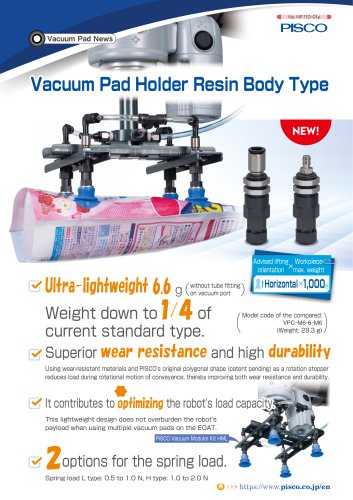 Vacuum Pad Holder Resin Body
9 Pages
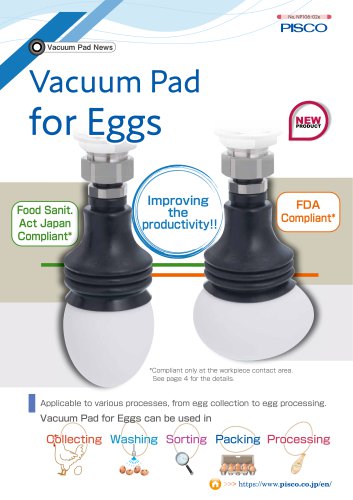 Vacuum Pad for Eggs
6 Pages
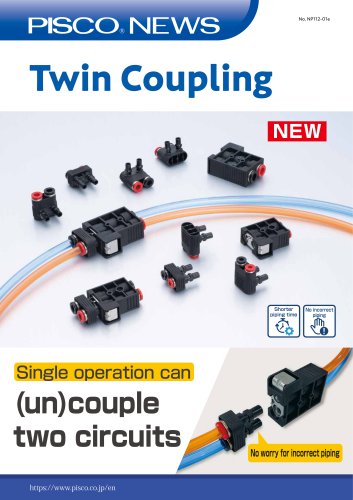 Twin Coupling
6 Pages
 General Product Guide
917 Pages
 CTB series
1 Page
 FUS8 series
3 Pages
 31 & 32 Series
20 Pages
 Vacuum Pad Soft Series
86 Pages
 VP series
106 Pages
 CHA series
8 Pages
 Gripper Series
15 Pages
 SVB Series
50 Pages
 SVA series
13 Pages
 SVR series
31 Pages
 NSB series
8 Pages
 Ball Valve SUS304 series
8 Pages
 BV series
8 Pages
 HV series
5 Pages
 Cable clamp & Dividing sheet
8 Pages
 Plarailchain SC
15 Pages
 Plarailchain SPO
12 Pages
 Plarailchain SP
14 Pages
 HPO
HPO12 Pages
 HPU
HPU12 Pages
 PJN series
15 Pages
 KJNC series
15 Pages
 SSJS series
6 Pages
 Flow Control Valve PP Series
12 Pages
 Stainless SUS316
13 Pages
 UE series
12 Pages
 FB series
1 Page
 CTA series
1 Page
 SFTN series
2 Pages
 SET series
1 Page
 SFT series
14 Pages
 ULF series
12 Pages
 UCQ series
2 Pages
 UQ series
12 Pages
 NB series
12 Pages
 NA series
12 Pages
 UD series
12 Pages
 UBS series
12 Pages
 UBT series
12 Pages
 UC series
1 Page
 UB series
12 Pages
 AK/AS series
26 Pages
 NK series
18 Pages
 Brass Series
30 Pages
 V-0 series
27 Pages
 EG Series
27 Pages
 PP Fitting series
12 Pages
 PP Series
26 Pages
 AP series
18 Pages
 SL series
16 Pages
 P-SUS series
33 Pages
 NS series
24 Pages
 SSP series
8 Pages
 ATS series
6 Pages
 Air Filter
20 Pages
 Combination Unit Series
25 Pages
 SFU series
9 Pages
 JP series
15 Pages
 ET series
11 Pages
 EQ series
19 Pages
 CVLU series
21 Pages
 CV series
24 Pages
 JN series
25 Pages
 Speed Controller Constant Flow
15 Pages
 JSD series
10 Pages
 JS Low-Flow series
17 Pages
 JSC series
13 Pages
 JS series
30 Pages
 Miniature Pressure Regulator
12 Pages
 MA series
16 Pages
 RH series
16 Pages
 R series
16 Pages
 PS series
16 Pages
 L series
41 Pages
 FUS20
FUS207 Pages
 Small Flow Sensor FUS8 Sries
3 Pages
 GP series
13 Pages
 VUS-32. SEU-32 Series
1 Page
 Small Pressure Sensor 11-series
24 Pages
 VUS12 series
2 Pages
 VUS8-S series
22 Pages
 JSD series
10 Pages
 Orifice Fitting Series
6 Pages
 JK series
10 Pages
 RVFUP series
6 Pages
 VLF series
16 Pages
 VFL series
8 Pages
 VF series
22 Pages
 ECV series
8 Pages
 VPLFC, VPLFD series
17 Pages
 VPKE series
4 Pages
 RPV06 Series
8 Pages
 VZ Series
34 Pages
 VX Series
42 Pages
 VQ Series
4 Pages
 VN Series
40 Pages
 VK series
53 Pages
 VJ Series
34 Pages
 VG series
21 Pages
 VRL series
17 Pages
 VVV series
11 Pages
 VLS series
4 Pages
 VM | VC series
28 Pages
 VY series
24 Pages
 VB series
11 Pages
 VH | VS series
28 Pages
 VPHMP series
12 Pages
 VYR series
5 Pages
 HS series
13 Pages
 HML series
14 Pages
 VRG series
18 Pages
 Dry Unit Series
33 Pages
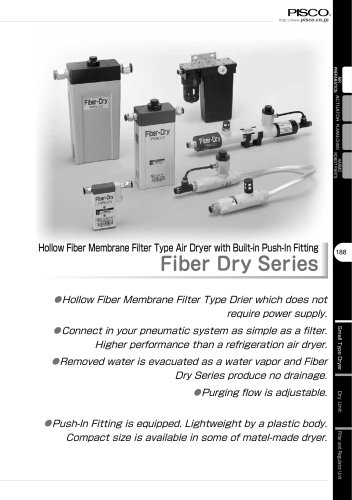
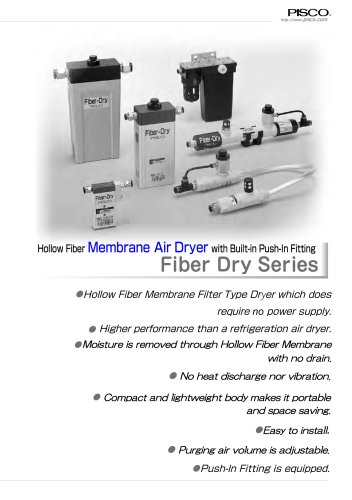 Fiber Membrane Air Dryer
12 Pages
 VLM series
12 Pages
 VSPE series
5 Pages
 VT series
21 Pages
 PB series
13 Pages
 JSG series
17 Pages
 pararel
3 Pages
 fitting
4 Pages
 BJSU series
4 Pages
 SC
SC15 Pages
 SPO
SPO12 Pages
 SP
SP13 Pages
 RPV pump
8 Pages
 Pre-set
6 Pages
 Stainless Steel Ball Valve
8 Pages
 SUS316 Flow Control Valve
6 Pages
 Flange
13 Pages
 HML
HML14 Pages
 End of Arm Vacuum Gripper
12 Pages
 VYR
VYR5 Pages
 EOAT VRG | VMG series
18 Pages
 VPLFC
VPLFC17 Pages
 SVB
SVB172 Pages
 SVR
SVR39 Pages
 8mm Sensor
22 Pages
 Vacuum Filter
28 Pages
 Fall Prevention
18 Pages
 Vacuum Pen
21 Pages
 Push-Rod Release
4 Pages
 cylinder
22 Pages
 FDAbellows
6 Pages
 Oval
Oval80 Pages
 sponge
50 Pages
 mark-free
34 Pages
 flat
flat42 Pages
 Ultrathin
34 Pages
 packaging bag
13 Pages
 multi-bellow
46 Pages
 bellows pad
74 Pages
 Skid proof pad
42 Pages
 soft bellow pad
60 Pages
 soft pad
66 Pages
 VRL
VRL17 Pages
 VH VS VC VUM VU VY VB
336 Pages
 VZ
VZ34 Pages
 VX
VX42 Pages
 VVV
VVV11 Pages
 VQ
VQ42 Pages
 VN
VN40 Pages
 VLS
VLS4 Pages
 VLM
VLM12 Pages
 VK
VK53 Pages
 VJ
VJ34 Pages
 VG
VG21 Pages
 Vacuum Tube
12 Pages
 Twin Coiling
12 Pages
 Tube Cutter
12 Pages
 Polyurethane Tube
12 Pages
 Nylon Tube Series
12 Pages
 Multi-core Planar Tube
12 Pages
 Low-Friction Polyurethane Tube
12 Pages
 Insert Ring
12 Pages
 Fluororesin (PFA) Tube
14 Pages
 UL series
12 Pages
 Anti-spatter Tube
12 Pages
 Tube Fitting PP Series
26 Pages
 Tube Fitting Mini Series
41 Pages
 Tube Fitting Chemical Series
18 Pages
 K series
30 Pages
 Stop Fitting Series
16 Pages
 Rotary Joint Series
16 Pages
 Multi-Circuit Rotary Block
12 Pages
 Minimal Fitting Series
20 Pages
 Main Block Series
24 Pages
 Light Coupling Series
24 Pages
 High Rotary Joint Series
16 Pages
 Connector Series
16 Pages
 Color Cap
12 Pages
 Brass Compression Fitting Series
18 Pages
 2-Circuit Junction Block Series
16 Pages
 Vacuum EOAT Kit HML
14 Pages
 Vacduum gripper
18 Pages
 Mounting Flange for EOAT.pdf
13 Pages
 SSNC series
13 Pages
 SJSC series
24 Pages
 Speed Controller Series
32 Pages
 Speed Controller PP Series
17 Pages
 Speed Controller Low Flow
17 Pages
 Speed Controller High Flow
13 Pages
 Speed Controller Brass Series
15 Pages
 KJSC series
17 Pages
 Silencer Series
13 Pages
 Quick Exhaust Valve Series
19 Pages
 Pressure Gauge Series
13 Pages
 Miniture quick-exhaust
17 Pages
 Fixed Orifice Joint Series
22 Pages
 Check Valve
4 Pages
 SUS304_Ball Valve Series
8 Pages
 Parallel Gripper
6 Pages
 JSG
JSG17 Pages
 GENERAL
106 Pages
 Mechanical Valve Series
19 Pages
 Ball Valve Series
19 Pages
 Stainless Steel ball valve
6 Pages
 Hand Valve Series
15 Pages
 Change Valve
11 Pages
 SVA21 Series
21 Pages
 P Series
71 Pages
 SVA20 Series
43 Pages
 RegulatorPL031821m
12 Pages
 BJSU series
6 Pages
 NP68-01e
17 Pages


- NIHON PISCO valve
- NIHON PISCO manual valve
- Control valve
- NIHON PISCO stainless steel valve
- NIHON PISCO hydraulic fitting
- Vessel
- Water valve
- Ball valve
- Screw-in fitting
- NIHON PISCO pneumatic valve
- NIHON PISCO pneumatic fitting
- NIHON PISCO threaded valve
- Electrically operated valve
- NIHON PISCO vacuum generator
- NIHON PISCO metal fitting
- Regulating valve
- On/off valve
- Vacuum pump