


N8352 series User Manual bi-directional battery emulator

N8352 series User Manual bi-directional battery emulator
The manual introduces the N8352 series battery simulator by Hunan Next Generation Instrumental T&C Tech. Co., Ltd., focusing on high-quality test and control instruments for industries like consumer electronics and new energy vehicles. It provides guidance on installation, operation, and specifications.
Users must follow safety instructions to ensure proper operation and avoid hazards, including confirming AC input voltage, ensuring reliable grounding, and avoiding operation under hazardous conditions. Safety symbols are defined for reference.
The N8352 series is designed for testing portable battery-operated products, featuring dual-channel operation, high accuracy, and a touch screen interface. It supports a wide range of current and voltage settings for various testing scenarios.
- Current Range: -1~1A/-2~2A/-3~3A/-5~5A
- Voltage Range: 0-6V/0-15V/0-20V
- Four-wire system test function
- Ultra-high accuracy and resolution
- Fast dynamic response without overshoot
- Built-in high-accuracy DVM measurement
The package includes the N8352 unit, power cord, fuse, connectors, test leads, Ethernet and RS232 cables, and a USB flash drive with the user manual and software.
The front panel includes a screen, USB port, power switch, and control buttons. The rear panel features channel interfaces, RS232 interface, and LAN ports.
The manual covers interface navigation, local/remote operation, power on/off procedures, and other basic functionalities.
The N8352 supports various modes such as Power Mode, Charge Mode, and SOC Test, allowing for channel selection and parameter setting tailored to specific testing needs.
Details on using the RS232 interface and LAN port for remote operation are provided, enabling integration into automated testing setups.
Guidelines for regular maintenance and fault self-inspection are included to ensure the longevity and reliability of the instrument.
The manual concludes with technical specifications, ensuring users have all necessary information for effective use of the N8352 series.
The rear panel includes interfaces and ports such as LAN, RS232, and AC power socket, along with channel interfaces for connecting devices under test (DUT).
Includes terminals for different connections: DVM inputs, output terminals for two-wire and four-wire connections, and sense terminals for remote sensing.
The RS232 interface is used for remote control, while the LAN ports support both remote control and cascade mode.
Ensure the output is off before connecting a DUT to prevent electric shock. Use sockets with protective grounding and ensure wires are securely connected.
Local sense does not compensate for voltage drop, while remote sense does. Instructions are provided for connecting DUTs using both methods.
The device includes a built-in dual-channel DVM, with wiring instructions provided.
The default IP address is 192.168.0.123, and the baud rate is 115200.
The device can be operated locally via front panel buttons or remotely via a PC. The local mode is the default upon power-up.
The interface includes areas for specification, readback, channel status, parameter setting, device status, function mode, and channel control.
The device supports switching between local and remote operation modes, with the front panel buttons locked in remote mode.
Output can be controlled via front panel buttons, with indicators showing the current status.
The front panel buttons can be locked to prevent accidental operation.
The device supports taking screenshots and has a configurable beeper for button presses.
The device offers multiple functions including power, charge, battery simulation, SOC tests, sequence tests, fault simulation, and graphing.
Allows for basic and DVM measurements, with options for channel selection, parameter setting, and current range adjustment.
Simulates battery charge and discharge, with similar options for channel and parameter settings.
Simulates battery behavior with parameters for cycle mode, current range, and end conditions.
The document provides detailed instructions for operating the NGI N8352 Series High-accuracy Dual-channel Programmable Battery Simulator, covering parameter settings, SOC and SEQ editing and testing, fault simulation, graph viewing, system configuration, remote operation, and maintenance.
Users can set parameters such as capacity, constant voltage, and current limits through manual input or by using the device's interface. The simulator allows for up to 200 steps in SOC Edit mode.
SOC Edit mode is used to simulate battery charge and discharge functions. Users can input various parameters and edit multiple steps. SOC Test mode allows users to run these steps and monitor the battery simulation process.
SEQ Edit mode enables users to create sequences of up to 200 steps, with options to set voltage, current limits, resistance, and dwell time. SEQ Test mode executes these sequences based on the selected file.
The simulator can simulate faults such as short-circuits and open-circuits. Users can select fault states manually or through the device interface.
Users can view voltage and current curves for two channels in real-time.
The system settings include IP address configuration, baud rate selection, and language options. Users can also set other parameters like sense rate and mode.
The device supports RS232 and LAN interfaces for remote operation, allowing control of multiple devices from a single computer.
Regular maintenance includes cleaning the device with a dry cloth. The document emphasizes the importance of keeping the device clean for optimal performance.
Ensure the device is powered off before cleaning. Use a slightly wet cloth for cleaning the exterior and avoid wiping the interior.
In case of device malfunction due to system upgrades or hardware issues, perform checks such as verifying power, inspecting the fuse and connectors, ensuring correct system configuration, checking for error messages, and testing with a replacement device if necessary. Contact NGI if issues persist.
The N8352 series should be calibrated annually.
Measurement accuracy is valid within one year post-calibration, at 18℃ to 28℃, and up to 80% relative humidity. Warm up the device for 30 minutes to ensure accuracy.
- N8352A/B/C: Current: ±1A/CH to ±3A/CH, Voltage: 6V/CH, Power: 6W/CH to 18W/CH.
- N8352D/E/F: Current: ±5A/CH to ±3A/CH, Voltage: 15V/CH to 20V/CH, Power: 75W/CH to 60W/CH.
- CV Mode Range: 0~6V or 0~20V depending on the model.
- Setting and Readback Resolution: 0.1mV.
- Output Voltage Settling Time: ≤10ms.
- Load and Line Regulation: 0.01%+mV.
- Ripple Noise: 2mVrms to 7mVrms.
- Temperature Coefficient: 25ppm/℃ to 50ppm/℃.
- Voltage Rise and Fall Time: <40μs to <100μs depending on load conditions.
- Transient Voltage Drop: 200mV with recovery time <100μs.
- Operating Temperature: 0℃~40℃, Storage Temperature: -20℃~60℃.
- Operating Environment: Altitude <2000m, 5%~90%RH non-condensing.
- Dimensions: 2U, 88(H)*214(W)*388(D) mm, Net Weight: Approx. 3.5kg.
Specifications are subject to change without notice. For further details, contact NGI.
Catalog excerpts

Hunan Next Generation Instrumental T&C Tech. Co., Ltd. N8352 Series High-accuracy Dual-channel Programmable Battery Simulator User Manual © Copyright Hunan Next Generation Instrumental T&C Tech. Co., Ltd. Version: V20211116 N8352 Series High-accuracy Dual-channel Programmable Battery Simulator
Open the catalog to page 1
Hunan Next Generation Instrumental T&C Tech. Co., Ltd. N8352 Series High-accuracy Dual-channel Programmable Battery Simulator
Open the catalog to page 2
Hunan Next Generation Instrumental T&C Tech. Co., Ltd. N8352 Series High-accuracy Dual-channel Programmable Battery Simulator
Open the catalog to page 3
Hunan Next Generation Instrumental T&C Tech. Co., Ltd. 1 Preface Dear Customers, First of all, we greatly appreciate your choice of N8352 series battery simulator (N8352 for short). We are also honored to introduce our company, Hunan Next Generation Instrumental T&C Tech. Co., Ltd.( NGI for short). About Company NGI is a professional manufacturer of intelligent equipment and test & control instruments, committed to developing, manufacturing battery simulators, power supplies, electronic loads, and many more instruments. The products can be widely used in the industries of battery, power supply,...
Open the catalog to page 4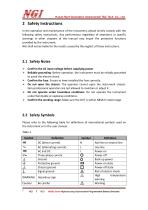
Hunan Next Generation Instrumental T&C Tech. Co., Ltd. 2 Safety Instructions In the operation and maintenance of the instrument, please strictly comply with the following safety instructions. Any performance regardless of attentions or specific warnings in other chapters of the manual may impair the protective functions provided by the instrument. NGI shall not be liable for the results caused by the neglect of those instructions. 2.1 Safety Notes > Confirm the AC input voltage before supplying power. > Reliable grounding: Before operation, the instrument must be reliably grounded to avoid the...
Open the catalog to page 5
Hunan Next Generation Instrumental T&C Tech. Co., Ltd. 3 Product 3.1.1 Brief Introduction N8352 series is specially designed for the R&D and test of portable battery-operated products, such as Bluetooth headsets, mobiles, AR/VR smart terminals, electric tools, etc. The current flows in both directions and can be used as either a power supply or a load. N8352 is easy to use with touch screen and UI design. The output features are comparable to actual batteries, with fast dynamic response, no overshoot in voltage rise and fall, and stable waveform. The resolution is up to μA level, which can test...
Open the catalog to page 6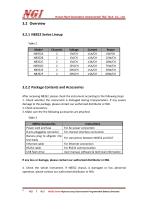
3.2 Overview 3.2.1 N8352 Series Lineup 4. Check the whole instrument. If N8352 chassis is damaged or has abnormal operation, please contact our authorized distributor or NGI. NGI l NGI N8352 Series High-accuracy Dual-channel Programmable Battery Simulator
Open the catalog to page 7
Hunan Next Generation Instrumental T&C Tech. Co., Ltd. Front Panel Dimension(mm) Rear Panel Dimension(mm) Side Dimension(mm) N8352 Series High-accuracy Dual-channel Programmable Battery Simulator
Open the catalog to page 8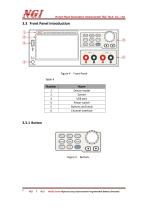
__ . -Hunan Next Generation Instrumental T&C Tech. Co., Ltd. NGI l NGI N8352 Series High-accuracy Dual-channel Programmable Battery Simulator
Open the catalog to page 9
Hunan Next Generation Instrumental T&C Tech. Co., Ltd. NGI l NGI N8352 Series High-accuracy Dual-channel Programmable Battery Simulator
Open the catalog to page 10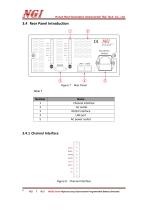
Hunan Next Generation Instrumental T&C Tech. Co., Ltd. DVM + DVM -OUTH OUTL OUT + OUTS + S- Figure 8 Channel Interface NGI l NGI N8352 Series High-accuracy Dual-channel Programmable Battery Simulator
Open the catalog to page 11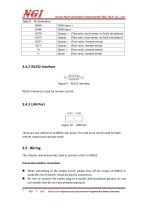
Hunan Next Generation Instrumental T&C Tech. Co., Ltd. RS232 interface is used for remote control. Figure 10 LAN Port There are two LAN ports at N8352 rear panel. The LAN ports can be used for both remote control and cascade mode. 3.5 Wiring This chapter mainly describes how to connect a DUT to N8352. Precautions before connection ■ When connecting to the output circuit, please shut off the output of N8352 to avoid the risk of electric shock during the connection. ■ Be sure to connect the power plug to a socket with protective ground. Do not use sockets that do not have protective ground. NGI...
Open the catalog to page 12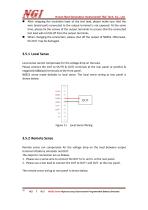
Hunan Next Generation Instrumental T&C Tech. Co., Ltd. ■ After stripping the insulation layer of the test lead, please make sure that the wire (metal part) connected to the output terminal is not exposed. At the same time, please fix the screws of the output terminals to ensure that the connected test lead will not fall off from the output terminals. ■ When changing the connection, please shut off the output of N8352. Otherwise, the DUT may be damaged. Local sense cannot compensate for the voltage drop on the lead. Please connect the DUT to OUTH & OUTL terminals at the rear panel or positive...
Open the catalog to page 13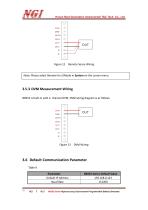
Hunan Next Generation Instrumental T&C Tech. Co., Ltd. Note: Please select Remote for S/Mode in System on the screen menu. N8352 is built-in with 2- channel DVM. DVM wiring diagram is as follows. DVM+ DVM-OUTH OUTL OUT + OUTS + S- NGI l NGI N8352 Series High-accuracy Dual-channel Programmable Battery Simulator
Open the catalog to page 14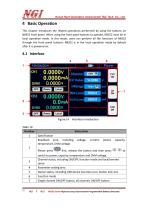
Hunan Next Generation Instrumental T&C Tech. Co., Ltd. 4 Basic Operation This chapter introduces the related operations performed by using the buttons on N8352 front panel. When using the front panel buttons to operate, N8352 must be in local operation mode. In this mode, users can perform all the functions of N8352 through the front panel buttons. N8352 is in the local operation mode by default after it is powered on. 4.1 Interface Channel' BSiiAi CV Value! 14.9986 i-Kanti Auia y IN/I-Limit| 5000.0 NGI l NGI N8352 Series High-accuracy Dual-channel Programmable Battery Simulator
Open the catalog to page 15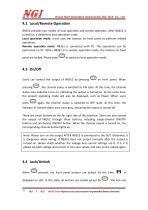
Hunan Next Generation Instrumental T&C Tech. Co., Ltd. 4.2 Local/Remote Operation N8352 provides two modes of local operation and remote operation. After N8352 is turned on, it defaults to local operation mode. Local operation mode: Users uses the buttons on front panel to perform related operations. Remote operation mode: N8352 is connected with PC. The operations can be performed on PC. When N8352 is in remote operation mode, the buttons on front panel are locked. Please press to switch to local operation mode. 4.3 On/Off Users can control the output of N8352 by pressing pressing on front panel....
Open the catalog to page 16All NGI Tech catalogs and technical brochures










- DC power supply
- AC/DC power supply
- Measuring device
- IO module
- CE power supply
- Single-output power supply
- Analog I/O
- Power supply for industrial applications
- Switched-mode power supply
- Compact power supply
- Tabletop power supply
- Industrial tester
- Fieldbus I/O module
- Voltage testing system
- Analog IO module
- Variable-output power supply
- Power supply with overload protection
- Laboratory power supply
- Single-phase power supply