


SSD1306
SSD1306
Catalog excerpts
SOLOMON SYSTECH SEMICONDUCTOR TECHNICAL DATA This document contains information on a new product. Specifications and information herein are subject to change without notice. Copyright © 2008 Solomon Systech Limited SYSTECH
Open the catalog to page 1
Solomon Systech
Open the catalog to page 2
Solomon Systech
Open the catalog to page 4
Solomon Systech
Open the catalog to page 5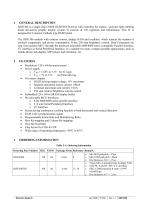
SSD1306 is a single-chip CMOS OLED/PLED driver with controller for organic / polymer light emitting diode dot-matrix graphic display system. It consists of 128 segments and 64commons. This IC is designed for Common Cathode type OLED panel. The SSD1306 embeds with contrast control, display RAM and oscillator, which reduces the number of external components and power consumption. It has 256-step brightness control. Data/Commands are sent from general MCU through the hardware selectable 6800/8000 series compatible Parallel Interface, I2C interface or Serial Peripheral Interface. It is suitable for...
Open the catalog to page 6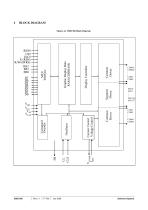
BLOCK DIAGRAM Current Control Voltage Control Common Driver Segment Driver VCOMH IREF Command Decoder Common Driver Display Controller Graphic Display Data RAM (GDDRAM) Figure 4-1 SSD1306 Block Diagram Solomon Systech
Open the catalog to page 7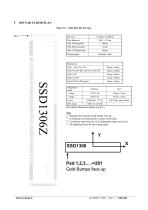
Bump size (For details dimension please see p.9 ) (1) Diagram showing the Gold bumps face up. (2) Coordinates are referenced to center of the chip. (3) Coordinate units and size of all alignment marks are in um. (4) All alignment keys do not contain gold Pad 1,2,3,...->281Gold Bumps face up Solomon Systech
Open the catalog to page 8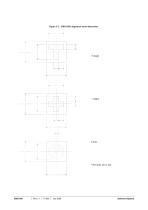
Figure 5-2 : SSD1306Z alignment mark dimensions Solomon Systech
Open the catalog to page 9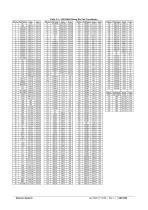
Solomon Systech
Open the catalog to page 10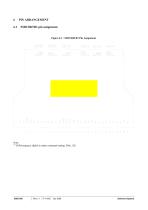
zoou . . .uuozz Note:(1) COM sequence (Split) is under command setting: DAh, 12h Solomon Systech
Open the catalog to page 11
Solomon Systech
Open the catalog to page 13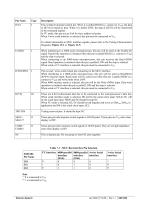
Solomon Systech
Open the catalog to page 14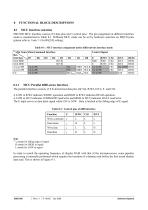
SSD1306 MCU interface consist of 8 data pins and 5 control pins. The pin assignment at different interface mode is summarized in Table 8-1. Different MCU mode can be set by hardware selection on BS[2:0] pins (please refer to Table 7-1 for BS[2:0] setting). Table 8-1 : MCU interface assignment under different bus interface mode (1) i stands for falling edge of signal H stands for HIGH in signal L stands for LOW in signal In order to match the operating frequency of display RAM with that of the microprocessor, some pipeline processing is internally performed which requires the insertion of a dummy...
Open the catalog to page 15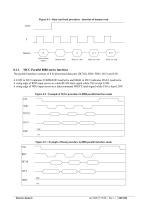
Figure 8-1 : Data read back procedure - insertion of dummy read R/W# Write column address Dummy read The parallel interface consists of 8 bi-directional data pins (D[7:0]), RD#, WR#, D/C# and CS#. A LOW in D/C# indicates COMMAND read/write and HIGH in D/C# indicates DATA read/write. A rising edge of RD# input serves as a data READ latch signal while CS# is kept LOW. A rising edge of WR# input serves as a data/command WRITE latch signal while CS# is kept LOW. Figure 8-2 : Example of Write procedure in 8080 parallel interface mode CS# WR# D[7:0] Figure 8-3 : Example of Read procedure in 8080 parallel...
Open the catalog to page 16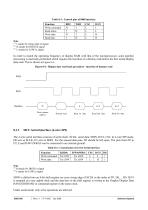
Table 8-3 : Control pins of 8080 interface (1) H stands for HIGH in signal SDIN is shifted into an 8-bit shift register on every rising edge of SCLK in the order of D7, D6, ... D0. D/C# is sampled on every eighth clock and the data byte in the shift register is written to the Graphic Display Data RAM (GDDRAM) or command register in the same clock. Under serial mode, only write operations are allowed. Solomon Systech
Open the catalog to page 17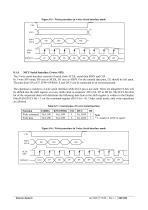
Figure 8-5 : Write procedure in 4-wire Serial interface mode Figure 8-6 : Write procedure in 3-wire Serial interface mode Solomon Systech
Open the catalog to page 18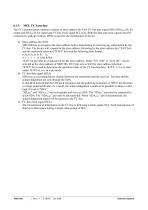
The I2C communication interface consists of slave address bit SA0, I2C-bus data signal SDA (SDAOUT/D2 for output and SDAIN/D1 for input) and I2C-bus clock signal SCL (D0). Both the data and clock signals must be connected to pull-up resistors. RES# is used for the initialization of device. a) Slave address bit (SA0) SSD1306 has to recognize the slave address before transmitting or receiving any information by the I2C-bus. The device will respond to the slave address following by the slave address bit (“SA0” bit) and the read/write select bit (“R/W#” bit) with the following byte format, b7 b6...
Open the catalog to page 19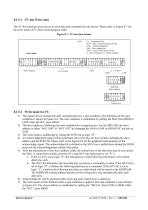
The I2C-bus interface gives access to write data and command into the device. Please refer to Figure 8-7 for the write mode of I2C-bus in chronological order. Figure 8-7 : I2C-bus data format D/C# - Data / Command Selection bit R/W# - Read / Write Selection bit Write mode S - Start Condition / P - Stop Condition Slave Address Data byte 8.1.5.2 Write mode for I2C 1) The master device initiates the data communication by a start condition. The definition of the start condition is shown in Figure 8-8. The start condition is established by pulling the SDA from HIGH to LOW while the SCL stays HIGH....
Open the catalog to page 20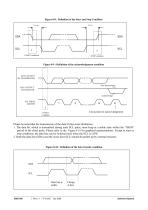
Figure 8-8 : Definition of the Start and Stop Condition tSSTOP START condition STOP condition Figure 8-9 : Definition of the acknowledgement condition DATA OUTPUT BY TRANSMITTER DATA OUTPUT BY RECEIVER Acknowledge SCL FROM MASTER Clock pulse for acknowledgement START Condition Please be noted that the transmission of the data bit has some limitations. 1. The data bit, which is transmitted during each SCL pulse, must keep at a stable state within the “HIGH” period of the clock pulse. Please refer to the Figure 8-10 for graphical representations. Except in start or stop conditions, the data line...
Open the catalog to page 21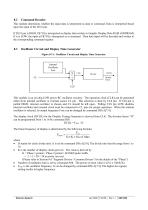
Command Decoder This module determines whether the input data is interpreted as data or command. Data is interpreted based upon the input of the D/C# pin. If D/C# pin is HIGH, D[7:0] is interpreted as display data written to Graphic Display Data RAM (GDDRAM). If it is LOW, the input at D[7:0] is interpreted as a command. Then data input will be decoded and written to the corresponding command register. Oscillator Circuit and Display Time Generator Figure 8-11 : Oscillator Circuit and Display Time Generator Internal Oscillator Fosc M U X Display Clock This module is an on-chip LOW power RC oscillator...
Open the catalog to page 22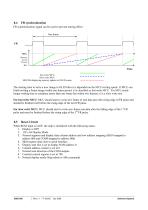
FR synchronization signal can be used to prevent tearing effect. One frame 100% Memory Access Process 0% Time Fast write MCU Slow write MCU SSD1306 displaying memory updates to OLED screen The starting time to write a new image to OLED driver is depended on the MCU writing speed. If MCU can finish writing a frame image within one frame period, it is classified as fast write MCU. For MCU needs longer writing time to complete (more than one frame but within two frames), it is a slow write one. For fast write MCU: MCU should start to write new frame of ram data just after rising edge of FR pulse...
Open the catalog to page 23All NEWHAVEN DISPLAY INTERNATIONAL catalogs and technical brochures
 FT5426G
19 Pages
 FT5336GQQ
13 Pages
 FT5x16
15 Pages
 PT6324
5 Pages
 PT6321
6 Pages
 PT6314
42 Pages
 PT6302
43 Pages
 HT16528
40 Pages
 ILI9341V
249 Pages
 ST7735S
201 Pages
 ST7735P3
197 Pages
 EK79202D
78 Pages
 LT6911C
21 Pages
 SSD1305
70 Pages
 SEPS525
46 Pages
 SEPS114
43 Pages
 SSD1333
36 Pages
 SSD1353
75 Pages
 IST3602
64 Pages
 SSD1333
36 Pages
 SSD1353
75 Pages