


FT5426G
FT5426G
The FT5426G is a capacitive touch panel controller featuring a 16-bit microcontroller unit (MCU). It offers full-screen common mode scan technology, fast response, and high accuracy, supporting up to 16 driving and 30 sensing lines.
Features
- Mutual capacitive sensing techniques
- Multi-touch capability for up to 10 points
- High immunity to RF and power interferences
- Supports up to 16TX + 30RX
- Automatic mode switching (Active, Monitor, Sleep)
- 11-bit ADC accuracy
- I2C interface up to 400Kbps
- Operating voltage: 2.7V to 3.6V
- Operating temperature: -30°C to +85°C
- Package: QFN56 6x6x0.6mm
Overview
Suitable for tablets, mobiles, navigation systems, game consoles, POS devices, and digital cameras, supporting touch panels up to 7 inches.
Functional Block Description
- Touch Panel Interface Circuits: Interfaces with TX and RX functions.
- Enhanced MCU with DSP Accelerator: Supports complex signal processing and communication protocols.
- External Interface: Includes I2C for data exchange, interrupt, and reset signals.
Operation Modes
- Active Mode: 100 frames per second scanning.
- Monitor Mode: 25 frames per second scanning with simpler algorithms.
- Sleep Mode: Power down, responds only to reset signals.
Interface
The interface includes a serial interface, interrupt signal, and reset signal. The I2C interface is in Slave mode with a default address of 0x70.
Electrical Specifications
- Operating voltage: 2.7V to 3.6V, temperature: -30°C to +85°C.
- DC Characteristics: Typical values for a 16Tx × 28Rx sensor at 103 Hz report rate.
- AC Characteristics: Includes oscillator clock frequency and TX clock range.
I/O Ports Circuits
I/O ports can be configured as push-pull or open-drain, necessary for the SDA of the I2C interface.
Power ON/Reset Sequence
Reset must be low before power on/off. During reset, I2C should not be used by other devices. After initialization, an INT signal is sent to the host. Power supply voltage must drop below 0.3V with a Tpdt of more than 1ms.
Power Supply Configurations
Two configurations: one where VDD supplies the entire chip except for communication I/O and GPIO, and another where VDD supplies the whole chip.
Pin Configurations
Details the pin list for FT5426G, including power supply pads, regulator & pump pads, and IO interface pads.
Package Information
Describes the QFN-6x6-56L package dimensions and tolerances.
Power Consumption Reference
Provides power consumption data under various conditions, noting that actual current depends on sensor design and firmware.
Disclaimer
Information is believed accurate but not warranted. Products are intended for normal commercial applications, not for military or medical life support without additional processing.
Revision History
Document version 0.1 dated May 21, 2021, is the first preliminary release.
Catalog excerpts

DATA SHEET FT5426G Preliminary True Multi-Touch Capacitive Touch Panel Controller FocalTech Systems reserves the right to change this documentation without prior notice. and reliable. Information provided by FocalTech Systems is believed to be accurate However, FocalTech Systems makes no warranty for any errors which may appear in this document. Contact FocalTech Systems to obtain the latest version of device specifications before placing your order. No responsibility is assumed by FocalTech Systems for any infringement of patent or other rights of third parties which may result from its use. In addition, FocalTech Systems products are not authorized for use as critical components in life support devices/ systems or aviation devices/systems, where a malfunction or failure of the product may reasonably be expected to result in significant injury to the user, without the express written approval of FocalTech Systems
Open the catalog to page 1
© FocalTech Systems Co., Ltd. Proprietary & Confidential
Open the catalog to page 2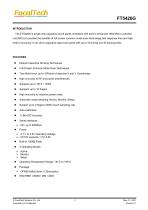
The FT5426G is single-chip capacitive touch panel controllers with built-in enhanced 16bit Micro-controller unit (MCU).It provides the benefits of full screen common mode scan technology, fast response time and high level of accuracy. It can drive capacitive type touch panel with up to 16 driving and 30 sensing lines. • Mutual Capacitive Sensing Techniques • Full Screen Common Mode Scan Techniques • True Multi-touch up to 10Points of absolute X and Y Coordinates • High immunity to RF and power Interferences • High immunity to inductive power noise • Automatic mode switching (Active, Monitor,...
Open the catalog to page 3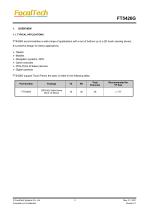
FT5426G accommodates a wide range of applications with a set of buttons up to a 2D touch sensing device; It‘s powerful design for below applications. > POS (Point of Sales) devices FT5426G support Touch Panel, the spec is listed in the following table, © FocalTech Systems Co., Ltd. Proprietary & Confidential
Open the catalog to page 4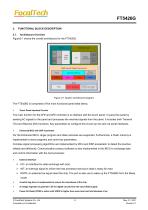
FT5426G 2. FUNCTIONAL BLOCK DESCRIPTION 2.1. Architecture Overview Figure2-1 shows the overall architecture for the FT5426G. High speed Digital processor Figure 2-1 System Architecture Diagram The FT5426G is comprised of five main functional parts listed below, > Touch Panel Interface Circuits The main function for the AFE and AFE controller is to interface with the touch panel. It scans the panel by sending AC signals to the panel and processes the received signals from the panel. It includes both Transmit (TX) and Receive (RX) functions. Key parameters to configure this circuit can be sent...
Open the catalog to page 5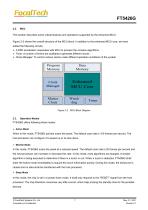
This section describes some critical features and operations supported by the enhanced MCU. Figure 2-2 shows the overall structure of the MCU block. In addition to the enhanced MCU core, we have added the following circuits, > A DSP accelerator cooperates with MCU to process the complex algorithms > Timer: A number of timers are available to generate different clocks > Clock Manager: To control various clocks under different operation conditions of the system Figure 2-2 MCU Block Diagram FT5426G offers following three modes: When in this mode, FT5426G actively scans the panel. The default scan...
Open the catalog to page 6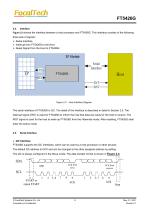
Figure 2-3 shows the interface between a host processor and FT5426G. This interface consists of the following three sets of signals: > Interrupt from FT5426G to the Host > Reset Signal from the Host to FT5426G Interface Figure 2-3 Host Interface Diagram The serial interface of FT5426G is I2C. The detail of the interface is described in detail in Section 2.5. The interrupt signal (/INT) is used for FT5426G to inform the host that data are ready for the host to receive. The /RST signal is used for the host to wake up FT5426G from the Hibernate mode. After resetting, FT5426G shall enter the Active...
Open the catalog to page 7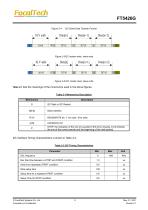
FT5426G Figure 2-4 I2C Serial Data Transfer Format © FocalTech Systems Co., Ltd. Proprietary & Confidential
Open the catalog to page 8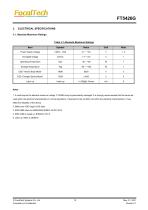
FT5426G 3. ELECTRICAL SPECIFICATIONS 3.1. Absolute Maximum Ratings Table 3-1 Absolute Maximum Ratings 1. If used beyond the absolute maximum ratings, FT5426G may be permanently damaged. It is strongly recommended that the device be used within the electrical characteristics in normal operations. If exposed to the condition not within the electrical characteristics, it may affect the reliability of the device. 2. Make sure VDD (high) >VSS (low) © FocalTech Systems Co., Ltd. Proprietary & Confidential
Open the catalog to page 9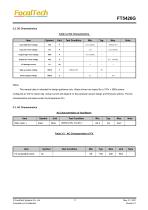
FT5426G 3.2. DC Characteristics Table 3-2 DC Characteristics © FocalTech Systems Co., Ltd. Proprietary & Confidential
Open the catalog to page 10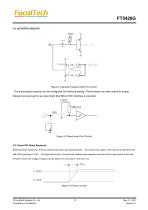
Figure 3-1General Purpose In/Out Port Circuit. The input/output property can be configured via firmware setting. The firmware can also control its output behavior as push-pull or as open-drain that SDA of I2C interface is required. Figure 3-2 Reset Input Port Circuits 3.5. Power ON/ Reset Sequence Reset should be pulled down to be low before powering on and powering down. I2C shouldn’t be used by other devices during Reset time after VDD powering on (Trtp). INT signal will be sent to the host after initializing all parameters and then start to report points to the host. If Power is down, the...
Open the catalog to page 11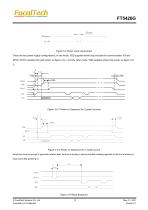
Figure 3-4 Power Cycle requirement There are two power supply configurations, in one mode, VDD supplies whole chip exclude the communication I/O and GPIO, IOVCC supplies this part power, as figure 3-5-1. And the other mode, VDD supplies whole chip power, as figure 3-52; Tivd Trtp Figure 3-5-1 Power on Sequence for 2 power sources Tvdr Tvdr Figure 3-5-2 Power on Sequence for 1 power source Reset time must be enough to guarantee reliable reset, the time of starting to report point after resetting approach to the time of starting to report point after powering on. Trsi Trst Figure 3-6 Reset Sequence...
Open the catalog to page 12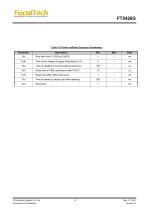
FT5426G Table 3-5 Power on/Reset Sequence Parameters © FocalTech Systems Co., Ltd. Proprietary & Confidential
Open the catalog to page 13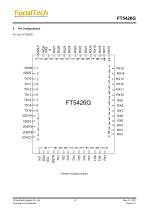
© FocalTech Systems Co., Ltd. Proprietary & Confidential
Open the catalog to page 14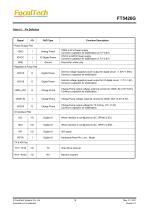
© FocalTech Systems Co., Ltd. Proprietary & Confidential
Open the catalog to page 15All NEWHAVEN DISPLAY INTERNATIONAL catalogs and technical brochures
 FT5336GQQ
13 Pages
 FT5x16
15 Pages
 PT6324
5 Pages
 PT6321
6 Pages
 PT6314
42 Pages
 PT6302
43 Pages
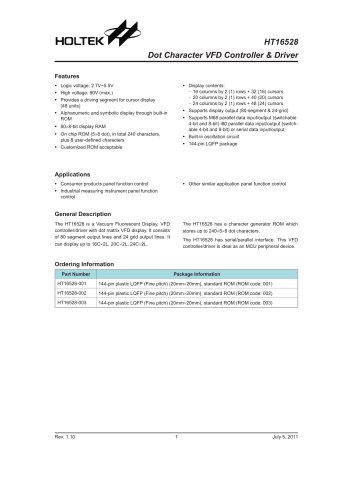 HT16528
40 Pages
 ILI9341V
249 Pages
 ST7735S
201 Pages
 ST7735P3
197 Pages
 EK79202D
78 Pages
 LT6911C
21 Pages
 SSD1306
59 Pages
 SSD1305
70 Pages
 SEPS525
46 Pages
 SEPS114
43 Pages
 SSD1333
36 Pages
 SSD1353
75 Pages
 IST3602
64 Pages
 SSD1333
36 Pages
 SSD1353
75 Pages