


WN1000RP_DS

WN1000RP_DS
- Boost WiFi: Amplifies network coverage both indoors and outdoors.
- Mobile Optimization: Extends WiFi for mobile devices, reducing 3G/4G data usage.
- Easy Installation: Simple browser-based setup without the need for a CD.
- Push ‘N’ Connect: Quick and secure connection using Wi-Fi Protected Setup (WPS).
- Universal Compatibility: Works with b/g/n WiFi signals from various routers and gateways.
- Security: Supports WPA-PSK, WPA2-PSK, mixed mode, and WEP security standards.
- Green Features: Includes a power on/off button and 80% recycled packaging.
- Dimensions: 67 x 55 x 34 mm (2.64 x 2.17 x 1.34 in).
- Weight: 0.1 kg (0.22 lb).
- System Requirements: Compatible with 802.11 b/g/n 2.4 GHz WiFi routers or gateways and browsers like Internet Explorer, Firefox, Chrome, or Safari.
- Advanced Features: Extends internet access for various wireless devices and displays real-time network connection status with dynamic LEDs.
Catalog excerpts
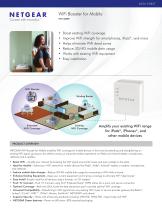
WiFi Booster for Mobile WN1000RP • Boost existing WiFi coverage • Improve WiFi strength for martphones, iPads®, and more s • Helps eliminate WiFi dead zones • Reduce 3G/4G mobile data usage • Works with existing WiFi equipment • Easy installation WiFi Devices Existing Router Extended WiFi Coverage Existing WiFi Coverage Amplify your existing WiFi range for iPads®, iPhones®, and other mobile devices PRODUCT OVERVIEW NETGEAR WiFi Booster for Mobile amplifies WiFi coverage for mobile devices in the home by extending and strengthening an existing WiFi signal, giving you the ability to enjoy an improved wireless experience on iPads and Android tablets, smartphones, netbooks and e-readers. • Boost WiFi—Amplify your network by boosting the WiFi signal around the house and even outside on the patio • Ideal for Mobile—Extend your WiFi network for mobile devices like iPads®, iPods®, Android® tablets, e-readers, smartphones, and netbooks • Reduce mobile data charges—Reduce 3G/4G mobile data usage by connecting to WiFi while at home • Enhance Existing Equipment—Keep your current equipment and improve coverage to eliminate WiFi “dead zones” • Easy Install–Simple install for all devices using a browser, no CD needed • Push ‘N’ Connect—Push ‘N’ Connect using Wi-Fi Protected Setup® (WPS) allows for a quick and secure connection • Optimal Coverage—Real-time LEDs locate the best placement spot to provide optimal WiFi coverage • Universal Compatibility—Extends b/g/n WiFi signals from any existing WiFi router or service provider gateway like Belkin®, Linksys®, D-Link®, AT&T™, 2Wire®, Verizon, EarthLink®, NETGEAR® and others‡ • Superior Security—Works with all security standards including WPA-PSK, WPA2-PSK, mixed mode and WEP • NETGEAR Green features—Power on/off button, 80% recycled packaging
Open the catalog to page 1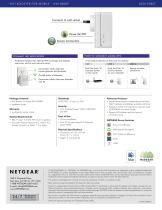
Connects to wall socket Power On/Off Secure Connection PUSH ‘N’ CONNEC T USING WPS DYN A MIC LE D INDIC ATORS Finds best location for optimal WiFi coverage and displays real-time, end-to-end network status Connection status between router/gateway and Extender A secured connection at the push of a button1 STEP 1 Push the Push ‘N’ Connect button on the router Push the Push ‘N’ Connect button on your extender Secure wireless connection On/off status of Extender Connection status between Extender and PC Package Contents Advanced Features • WiFi Booster for Mobile (WN1000RP) • Installation guide Warranty...
Open the catalog to page 2All NETGEAR catalogs and technical brochures
 ReadyDATA 516
4 Pages
 ReadyNAS 2120 series
4 Pages
 WNDAP660
3 Pages
 WNDAP360
3 Pages
 WAC120
3 Pages
 M7300 Series
14 Pages
 M4100 series
35 Pages
 200 Series Data Sheet
2 Pages
 ProSAFE® M6100 Chassis Series
13 Pages
 200 Series
2 Pages
 WAC104
5 Pages
 WC9500
10 Pages
 WAC124
4 Pages
 FVS318N
3 Pages
 MK62
MK626 Pages
 CBR40
CBR404 Pages
 RBK23W
4 Pages
 RBK12
RBK124 Pages
 CBK40
CBK404 Pages
 BR500
BR5005 Pages
 WC7500
9 Pages
 WC7600
9 Pages
 WAC740
4 Pages
 RN100 series
4 Pages
 SC101
SC1012 Pages
 SC101T
2 Pages
 JFS516v2-JFS524v2
5 Pages
 600 Series Data Sheet
2 Pages
 GS108P Data Sheet
3 Pages
 GS728TXS Data Sheet (PDF)
4 Pages
 WN802T Wireless Access Point
2 Pages
 WN604 Wireless Access Point
2 Pages
 GS105v3/GS108v3
3 Pages
 UTM S Series
7 Pages
 UTM Series
6 Pages
 ProSAFE VPN Firewall Family
5 Pages
 WN203
WN2033 Pages
 WN370
WN3703 Pages
 GS605 qand GS608
2 Pages
 FS205, GS205 and GS208
2 Pages
 FS605 and FS608
2 Pages
 WND930
3 Pages
 ReadyDATA 5200
3 Pages
 WNAP320 DATA SHEET
3 Pages
 FVS318 REFERENCE MANUAL
222 Pages
 SRXN3205 DATA SHEET
4 Pages
 GS105v3, GS108v3 DATA SHEET
3 Pages
 GS108E DATA SHEET
3 Pages
 ReadyNAS 4200
2 Pages
 ReadyNAS 3200
2 Pages
 RNRP4420
2 Pages
 fvs336gv2
3 Pages
 UTMS_Series_DS
5 Pages
 VZSM220
4 Pages
 Catalog 2012
60 Pages
 R6300 WiFi Router
3 Pages
 CENTRIA WNDR4700/4720
4 Pages
 D6300 WiFi Modem Router
3 Pages
 ReadyNAS® Pro Family
4 Pages




Archived catalogs
 AC1900
3 Pages
 ProSAFE_Web_Managed_Switches_D
10 Pages
 WNDAP620
3 Pages
 NETGEAR® 8800 Series
18 Pages
 wireless router
2 Pages


- Power supply unit
- DC power supply
- AC/DC power supply
- Ethernet switch
- Managed switch
- Gigabit Ethernet ethernet switch
- RJ45 network switch
- Unmanaged switch
- Redundant network switch
- Transceiver module
- PoE network switch
- Layer 2 network switch
- Ethernet communication router
- Single-phase power supply
- SFP+ network switch
- Rack-mount ethernet switch
- 8 ports network switch
- Cellular communication router
- Communication router with VPN
- Wall-mount ethernet switch