- Catalogs
- movizon GmbH
- movizon CONTROL Installation Guide


movizon CONTROL Installation Guide

movizon CONTROL Installation Guide
movizon CONTROL (mC) is a software package designed to control Automated Guided Vehicles (AGVs) in industrial settings. It consists of Java servlets that require hosting on a Java servlet container or application server.
FOSS List
mC v4.1.3 utilizes several open-source software packages, including H2 Database, HikariCP, Gson, and Monaco Editor, each serving specific functions like database management and JSON serialization.
System Requirements
Server Hardware: Specific requirements depend on the AGV system's architecture. The CPU is crucial for performance, with a preference for fewer but faster cores.
RAM: Should be at least the size of the production database.
Hard Disk Space: Requires space for the database and log files, with a maximum of 1 GB for logs.
Server Software: Requires Oracle GraalVM for JDK 20 and a Java web container supporting Jakarta Servlet 6.0 or higher.
Browser UI: Needs an up-to-date browser with the Blink engine.
Network: Full WLAN coverage and infrastructure supporting WebSocket connections are necessary.
System Preparation
mC runs with default servlet container configurations. Security settings should align with organizational policies. Firewall settings must allow UDP communication on a configurable port.
Database Connection
mC uses an embedded H2 database by default but can connect to external databases like MySQL or Oracle via JNDI entries.
Deployment
mC is provided as a zipped folder, which can be deployed by renaming to .war or unpacking into the deployment directory.
Startup
After deployment, verify startup through log files and access the UI via specified URLs. Licensing is required for operation.
Maintenance
mC is maintenance-free but regular backups of log files and databases are recommended. Updates require redeployment.
Example Installation on Windows Server with Apache Tomcat
Steps include installing GraalVM, Apache Tomcat, deploying mC, applying the license, and starting the application.
Data Flow
A typical system running mC involves various interconnected elements, as depicted in the accompanying chart.
Catalog excerpts
movizon CONTROL Installation Guide moi/izonmovizon CONTROL Installation GuideSystem Overview movizon CONTROL (mC) is a software that is specialized in controlling Automated Guided Vehicles (AGVs) in an industrial environment. mC is no executable application on its own, but a package of Java servlets ready to be hosted by a Java servlet container or application server. For more details please see the chart displayed on the last page of this document. The following free and open-source software (FOSS) packages are used in mC v4.1.3: Server Hardware A manufacturer of an application has to provide system requirements. The application in this case is your AGV system: mC as a framework plus its modules and project specific customization together with the interfaces and network architecture needed to communicate with your AGVs and other connected systems. Since your AGV system most likely is or will be first of its kind, it is impossible to define exact system requirements in advance. What we can do here is to give you insights into how mC is working to help you to build a suitable hosting environment. Resource Sharing All information in this document regarding hardware requirements assumes that any provided hardware is solely dedicated to operate mC. In reality, the available resources have to be shared. Every layer that is superordinate to mC only offers a share of the allocated resources based on its configuration - which is not the responsibility of movizon. When dimensioning the server hardware, please keep the surrounding architecture in mind which, in simplified form, could look like this:
Open the catalog to page 1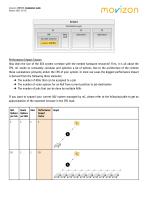
movizon CONTROL Installation Guide moi/izon Performance Impact Factors How does the size of the AGV system correlate with the needed hardware resources? First, it is all about the CPU. mC needs to constantly calculate and optimize a lot of options. Due to the architecture of the runtime these calculations primarily utilize the CPU of your system. In most use cases the biggest performance impact is derived from the following three elements: The number of AGVs that can be assigned to a job The number of route options for an AGV from current position to job destination The number of jobs that can...
Open the catalog to page 2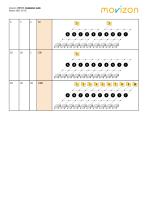
movizon CONTROL Installation Guide
Open the catalog to page 3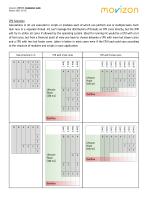
movizon CONTROL Installation Guide Calculations in mC are executed in scripts or modules each of which can perform one or multiple tasks. Each task runs in a separate thread. mC can’t manage the distribution of threads on CPU cores directly, but the JVM will try to utilize all cores if allowed by the operating system. Ideal for running mC would be a CPU with a lot of fast cores, but from a financial point of view you have to choose between a CPU with more but slower cores and a CPU with less but faster cores. Latter is better in most cases even if the CPU load could vary according to the structure...
Open the catalog to page 4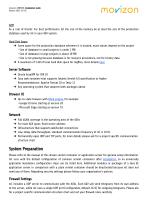
movizon CONTROL Installation Guide Version 2023-10-05 RAM As a rule of thumb: For best performance let the size of the memory be at least the size of the production database used by mC in your AGV system. Hard Disk Space ➔ Some space for the production database wherever it is located, exact values depend on the project • Size of database in small projects is under 1 MB • Size of database in large projects is about 10 MB • Size is not growing because database is for resource persistence, not for history data ➔ A maximum of 1 GB of local hard disk space for logfiles, more details here Server Software...
Open the catalog to page 5
movizon CONTROL Installation Guide moi/izon ATTENTION: If no target shows up inside mC (see browser UI or server logs), one can safely assume that there is a network or firewall problem. Tools like Wireshark listen to telegrams right after the network adapter, so communication might still be cut off by the firewall of the server’s operating system. mC reads all resources from the production database on startup and keeps them in memory. During runtime there is no read access any more. Changes to the resources are collected and written to the database once per core loop run (default setting 10...
Open the catalog to page 6
movizon CONTROL Installation Guide moi/izon Example of JNDI entry to connect an LDAP authentication service to mC <Resource name="ldap/tcAuthentication" auth="Container" type="javax.naming.Idap.LdapContext factory="de.movizon.control.kernel.LDAPFactory" singleton="false" java.naming.factory.initial="com.sun.jndi.Idap.LdapCtxFactory" java.naming.provider.url="ldap://192.168.178.88:389" java.naming.security.authentication="simple" mC will be provided as a zipped folder whose size is less than 20 MB. If the hosting environment demands a war archive simply rename *.zip to *.war and deploy. If not,...
Open the catalog to page 7
movizon CONTROL Installation Guide Version 2023-10-05 Licensing It is not possible to log in and work with mC without a valid license. Licenses are deposited on a remote license server. To retrieve a license it is necessary that mC was started on the customer system beforehand. So if you are greeted with the licensing screen after calling mC's browser UI, please follow the displayed instructions. You should have an email stating the ID of the registered license owner to use in order to request your license. ATTENTION: mC ensures that a user for the registered owner of the license is always present...
Open the catalog to page 8
movizon CONTROL Installation Guide moi/izon Example: Installation on Windows Server with Apache Tomcat Follow these steps to create a basic hosting environment for mC: 1. Download and install GraalVM for Java 20 (20.0.2) a. Currently there is no installer for GraalVM, so just unzip the downloaded archive and copy its content to an appropriate location, referred to as [GRAALVM_BASE] in this example 2. Install GraalVM’s JavaScript Engine a. Run Windows Command Prompt (cmd.exe) as administrator b. Change directory to [GRAALVM_BASE]\bin c. Execute the following command: gu.cmd install js 3. Download...
Open the catalog to page 9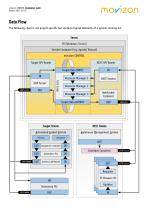
movizon CONTROL Installation Guide Version 2023-10-05 Data Flow The following chart is not project specific but contains typical elements of a system running mC:
Open the catalog to page 10All Movizon GmbH catalogs and technical brochures
 movizon CONTROL Script API
4 Pages
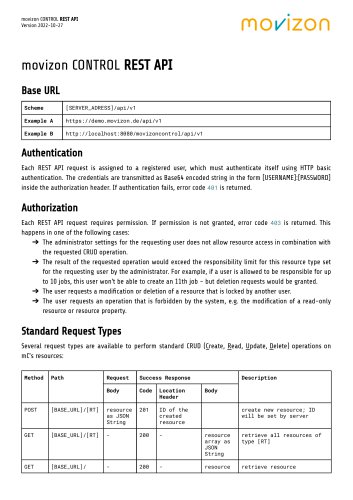 movizon CONTROL REST API
11 Pages