
- Catalogs
- MicroControl GmbH & Co. KG
- CAN-Monitor

- Products
- Catalogs
- News & Trends
- Exhibitions
CAN-Monitor
CAN-Monitor
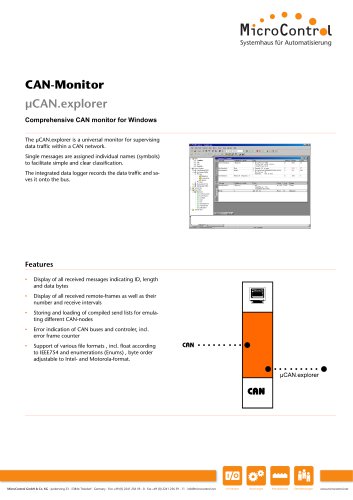
The document provides a detailed description of the µCAN.explorer, a comprehensive CAN monitor for Windows developed by MicroControl GmbH & Co. KG. It is designed to supervise data traffic within a CAN network, offering features such as symbolic display of messages, error indication, and support for various file formats.
Key Features
- Displays all received messages with ID, length, and data bytes.
- Shows received remote-frames, their count, and receive intervals.
- Allows storing and loading of send lists for emulating different CAN-nodes.
- Indicates errors in CAN buses and controllers, including error frame counters.
- Supports various file formats, including IEEE754 float and enumerations, with adjustable byte order.
- Includes a configurable integrated data logger and functional keys for sending messages or macros.
- Facilitates easy integration of external tools and add-ins to extend functionality.
System Requirements
- Minimum 256 MB free RAM.
- Compatible with Windows Vista, Windows 7, and Windows 8.
Optional Add-Ins
- Plotter Add-In: Provides graphic representation of CAN data with multiple channels.
- Instruments Panel 3 Add-In: Offers graphic display of digital and analogue signals using various instruments.
- SAE J1939 Add-In: Supports definitions by parameter groups of the standard, providing easy access to parameter options.
- CANdb Import Add-In: Facilitates import of CANdb files by converting them into PCAN-explorer symbol format.
Contact Information
MicroControl GmbH & Co. KG, Junkersring 23, 53844 Troisdorf, Germany. Phone: +49 (0) 2241 256 59 - 0, Fax: +49 (0) 2241 256 59 - 11, Email: [email protected], Website: www.microcontrol.net
Catalog excerpts
Comprehensive CAN monitor for Windows The gCAN.explorer is a universal monitor for supervising data traffic within a CAN network. Single messages are assigned individual names (symbols) to facilitate simple and clear classification. The integrated data logger records the data traffic and saves it onto the bus. Features • Display of all received messages indicating ID, length and data bytes • Display of all received remote-frames as well as their number and receive intervals • Storing and loading of compiled send lists for emulating different CAN-nodes • Error indication of CAN buses and controler, incl. error frame counter • Support of various file formats , incl. float according to IEEE754 and enumerations (Enums) , byte order adjustable to Intel- and Motorola-format. MicroControl GmbH & Co. KG • Junkersring 23 • 53844 Troisdorf • Germany • Fon +49 (0) 2241 256 59 - 0 • Fax +49 (0) 2241 256 59 - 11 • [email protected] I/O Module Steuerungen Protokollstacks Dienstleistungen www.microcontrol.ne
Open the catalog to page 1
Short description Performance features Display of all received messages indicating ID, length and data bytes Display of all received remote-frames as well as their number and receive intervals Messages can be stored in a send list to be transmitted at pre-set times either manually or as a response to a remote frame Storing and loading of compiled send lists for emulating different CAN-nodes Error indication of CAN buses and controler, incl. error frame counter Symbolic display of messages through assignment of identifiers Symbolic display of data within the data bytes by marking of bit groups,...
Open the catalog to page 2
Universal monitor for supervising data traffic within a CAN-network 20.03.008 pCAN.explorer Plotter Add-In Optional functional add-ins for pCAN explorer The process recorder allows a graphic representation of the CAN data with any number of channels 20.03.006 pCAN.explorer Instruments Panel 3 Add-In Optional functional add-ins for pCAN.explorer The instruments panel add-in allows graphic display of digital and analogue signals by means of different indication instruments. Optional functional add-ins for pCAN.explorer The add-in J1939 for the PCAN.explorer 5 supports all definitions which are...
Open the catalog to page 3All MicroControl GmbH & Co. KG catalogs and technical brochures
 Protocol Stacks
6 Pages
 Control Systems
6 Pages
 I/O Module
6 Pages