

GT90>120 SOLDERING SYSTEM QUICK Start Guide

GT90>120 SOLDERING SYSTEM QUICK Start Guide
The document highlights essential safety measures for using the GT90/GT120 soldering station. Users should avoid contact with metallic parts, use the cartridge removal pad, and ensure the system is off when changing cartridges. It is important to operate in a well-ventilated area, away from flammable items, and connect to grounded outlets to prevent electric shock. Supervision is required for individuals with reduced capabilities.
Users are advised to recycle the GT90/GT120 station and power adapter per the Waste Electrical and Electronic Equipment Directive (2012/19/EU) instead of disposing of them as unsorted waste. European users should contact their OK International distributor for recycling options.
Instructions include inserting the hand-piece into the port, connecting the power adapter, and assembling the cartridge heater and tip. Users are cautioned against touching the tip without the removal pad.
The GT90/GT120 operates between 200 to 450°C (392 to 842°F) and is suitable for ambient temperatures of 10 to 40°C (50 to 104°F). It features a single port, 90W or 120W power input, and a 2.5” monochrome LCD display. Standby and sleep timers are included.
Firmware upgrades are possible via USB. The system meets J-STD-001 specifications and does not require calibration due to its design. A programmable offset feature is available for tighter specifications.
The system supports multiple languages and includes a 4-digit admin password, adjustable brightness, and configurable tip temperature presets.
The document details the soldering systems' specifications, including a 1.5 m heat-resistant, ESD-safe cable, and compliance with J-STD-001 standards. Calibration is unnecessary due to built-in compensations.
To update firmware, save the latest version on a USB stick, turn off the station, disconnect the iron, insert the USB, and hold 'Menu' and '⮠' while turning on the system. Reconnect the iron and restart to verify the update.
GT systems offer temperature settings from 200 to 450°C with preset options, support multiple languages, and include password management, brightness adjustment, and standby/sleep modes. They feature a 2.5” monochrome LCD and tactile buttons.
GT90 and GT120 models have different power ratings (90W and 120W) and dimensions. They operate within 10-40°C and have a maximum casing temperature of 55°C. They support USB firmware upgrades and meet IPC J-STD-001 standards.
OK International offers a warranty against defects for one year for GT90 and two years for GT120 from purchase. The warranty excludes normal maintenance and misuse or damage.
For more information, users are directed to Metcal’s website.
Catalog excerpts
With power applied, the tip temperature can be > 200°C. Failure to observe the following precautions may lead to injury to users or damage the equipment: Do not touch any metallic parts of the cartridge. Always use cartridge removal pad and turn off system when changing cartridges. Do not use near flammable items. Do not use unit for any function other than described in this manual. Use only genuine Metcal replacement parts. Use in a well-ventilated area or with fume extraction. Do not use the equipment with wet hands. Connect only to properly grounded outlets to prevent risk of electric shock....
Open the catalog to page 2
sólo piezas de repuesto originales de Metcal. Use en un área bien ventilada o con extracción de humos. No utilice el aparato con las manos mojadas. Conecte sólo a las tomas de tierra adecuadas para prevenir el riesgo de descarga eléctrica. Siempre coloque la pieza de mano de nuevo en el trabajo destaque para evitar la quema accidental de uno mismo o de los objetos circundantes. Los niños deben ser supervisados para asegurarse de que no jueguen con el aparato. Este aparato no está diseñado para ser utilizado por personas (incluidos niños) con capacidades físicas, sensoriales o mentales, o con...
Open the catalog to page 3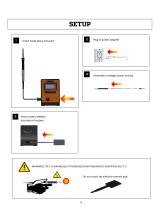
Plug in power adapter Insert hand-piece into port Assemble cartridge heater and tip Insert power adapter into back of system WARNING// 警告// WARNUNG// ATTENZIONE//AVERTISSEMENT// ADVERTENCIA//경고 Do not touch tip without remov
Open the catalog to page 4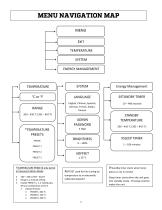
MENU EXIT TEMPERATURE SYSTEM ENERGY MANAGEMENT Energy Management ◊STANDBY TIMER English, Chinese, Spanish, German, French, Italian, Korean ADMIN PASSWORD *TEMPERATURE PRESETS RANGE ◊SLEEP TIMER 1 – 100 minutes *TEMPERATURE PRESETS only active in Password Admin Mode • • • STANDBY TEMPERATURE 200 – 450 C (392 – 842 F) Range is a manual setting Enable PRESET 1, 2, 3 individually OR any combination of the 3 • Default Presets: • PRESET1: 400 °C • PRESET2: 350 °C • PRESET3: 300 °C ¤OFFSET used for fine tuning tip temperature to an externally calibrated setpoint ◊ Standby timer starts when handpieces...
Open the catalog to page 7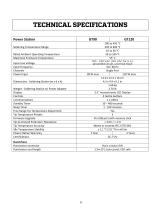
Power Station Soldering Temperature Range Rated Ambient Operating Temperature Maximum Enclosure Temperature Input Line Voltage Input Frequency Channels Power Input 120 W max 11.0 x 12.5 x 16 cm 4.3 x 4.9 x 6.1 in 1.68 kg 3.70 lb 2.5” monochrome LCD Display 4 tactile buttons 1 x USB A 10 – 480 seconds 1 - 100 minutes Yes 3 Via USB port with memory stick < 2mV / < 2 Ω Meets or exceeds IPC J-STD-001 ± 1.1 °C (2.0 °F) in still air 1 Year 2 Years CE, TUV Dimensions - Soldering Station (w x d x h) Weight - Soldering Station w/ Power Adapter Display Controls Communications Standby Timer Sleep Timer...
Open the catalog to page 8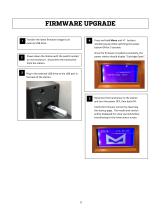
Press and hold Menu and ⮠ buttons simultaneously while switching the power button ON for 3 seconds. Transfer the latest firmware image to an external USB drive. Once the firmware is loaded successfully, the power station should display “Cartridge Open”. Power down the Station with the switch located on rear enclosure. Disconnect the hand-piece from the station. Plug in the external USB drive to the USB port in the back of the station. Reconnect the hand-piece to the station and turn the power OFF, then back ON. Verify the firmware version by observing the startup page. The model and version will...
Open the catalog to page 9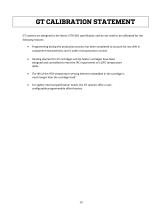
GT systems are designed to the latest J-STD-001 specification and do not need to be calibrated for the following reasons: • Programming during the production process has been completed to account for any drift in component characteristics and is under microprocessor control. Heating element for GT cartridges and tip heater cartridges have been designed and controlled to meet the IPC requirement of ±10⁰C temperature delta. The life of the RTD temperature sensing element embedded in the cartridge is much longer than the cartridge itself. For tighter internal specification needs, the GT systems...
Open the catalog to page 10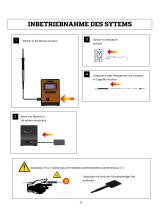
Stecker in Steckdose stecken Stecker in die Buchse stecken Lötpatrone oder Heizpatrone mit Lötspitze in Lötgriffel stecken Steck von Netzteil in Lötsystem einstecken Lötspitzen nie ohne das hitzebeständige Pa
Open the catalog to page 11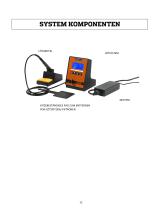
NETZTEIL HITZEBESTÄNDIGES PAD ZUM ENTFERNEN VON LÖTSPITZEN/-PATRONEN
Open the catalog to page 12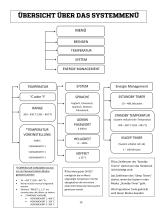
MENÜ BEENDEN TEMPERATUR SYSTEM ENERGIE MANAGEMENT Energie Management ◊STANDBY TIMER Englisch, Chinesisch, Spanisch, Deutsch, Französisch, STANDBY TEMPERATUR ADMIN PASSWORT *TEMPERATUR VOREINSTELLUNG WERTE (System reduziert die Temperatur) 200 – 450 °C (392 – 842 °F) ◊SLEEP TIMER (System schaltet sich ab) ◊ Das Zeitfenster des “Standby *TEMPERATUR VORGABEN Können nur im Password Admin Modus geändert werden • • • 93 – 450 °C (200 – 842 °F) Werte müssen manuel eingestellt werden. Aktiviere “PRESET 1, 2, 3” um einzelne oder alle Werte zu ändern. • STANDARD VORGABE: • VORGABEWERT 1: 400 °C • VORGABEWERT...
Open the catalog to page 14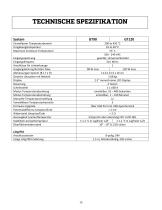
System Einstellbarer Temperaturbereich Umgebungstemperatur Maximum Enclosure Temperature Eingangsspannung Eingangsfrequenz Anschlüsse für Lötwerkzeuge Ausgangsleistung Netzteil, Max. Abmessungen System (B x T x H) Gewicht Lötsystem mit Netzteil Display Steuerung Schnittstelle Modus Temperaturabsenkung Modus Temperaturabschaltung Manuelle Temperatureinstellung Vorwählbare Temperaturbereiche Firmware Upgrade Potentialdifferenz Lötspitze/Erde Widerstand Lötspitze/Erde Genauigkeit Leerlauftemperatur Stabilität Leerlauftemperatur Oberflächenwiderstand 200 to 450 °C 10 to 40 °C 55° C 100 - 240 VAC...
Open the catalog to page 15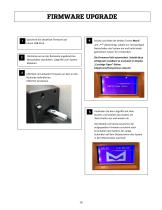
Speichere die aktuellste Firmware auf einem USB-Stick. Drücke und halte die beiden Tasten Menü“ Lötstation am an der Rückseite angebrachten Netzschalter abschalten. Lötgriffel vom System abziehen Die Firmware lädt automatisch. Sobald diese erfolgreich installiert ist erscheint im Displas „Cartridge Open“ (Keine Lötpatrone/Heizpatrone erkannt) und „⮠ " gleichzeitig, schalte am rückwärtigen Netzschalter das System ein und halte beide gedrückten Tasten für 3 Sekunden. USB-Stick mit aktueller Firmware an dem an der Rückseite befindlichen USB-Port einstecken. Verbinden Sie den Lötgriffel mit dem System...
Open the catalog to page 16All METCAL catalogs and technical brochures
 900 Series Syringe Barrels
2 Pages
 AC-BP Brass Cleaning Pad
1 Page
 Pumps Equipment Sales program
72 Pages
 SALOMIX™ side-mounted agitators
16 Pages
 PS-900
4 Pages
 Metcal MFR-1100 Series
9 Pages
 GT120
GT1202 Pages


- Piping
- Structure hose
- Manual gun
- Suction hose
- Industrial fume extractor
- Mobile fume extractor
- Dispensing gun
- Glue gun
- Dust fume extractor
- Compact fume extractor
- Soldering iron tip
- Tubular cartridge heater
- Compact dispenser
- Hot air hose
- Soldering fume extractor
- Preheater module
- Fume extraction hose
- Digital dispenser
- Hot air hand tool