Contact Information: The document provides contact details for The MathWorks, including web resources, newsgroups, and email addresses for various inquiries such as technical support and sales. Phone and fax numbers are also included.
License and Copyright: The software is licensed and cannot be reproduced without consent. Specific terms apply to federal acquisitions, classifying the software as commercial computer software.
Trademarks and Patents: MATLAB and Simulink are registered trademarks, protected by U.S. patents.
Getting Started: Introduces object-oriented programming (OOP) in MATLAB, discussing its benefits and usage. It provides guidance for programmers with varying levels of OOP experience.
MATLAB Classes Overview: An overview of MATLAB classes, including syntax, class building blocks, properties, methods, events, and listeners. It includes examples and discusses compatibility with previous MATLAB versions.
Working with Classes: Details on defining classes, organizing them, class precedence, and saving/loading objects. It also covers importing classes and defining named constants.
Value or Handle Class: Compares handle and value classes, explaining when to use each type, with examples.
Building on Other Classes: Discusses class hierarchies, subclassing, and modifying superclass methods and properties, with examples.
Properties — Storing Class Data: Explains using properties in classes, including defining, accessing, and specifying attributes. It covers property access methods and dynamic properties.
Introduction to Object-Oriented Programming in MATLAB: Provides a comprehensive guide to OOP in MATLAB, detailing the structure and functionality of classes, methods, and events.
Dynamic Properties: Discusses dynamic properties in MATLAB, allowing properties to be added to objects at runtime.
Methods and Class Operations: Outlines various types of methods, including class methods, static methods, and constructor methods, and discusses their attributes and usage.
Class Constructor Methods: Explains constructor methods used to initialize new instances of a class.
Static Methods: Describes static methods associated with a class rather than any particular object instance.
Overloading MATLAB Functions: Discusses overloading MATLAB functions for specific classes to enable customized behavior.
Events and Listeners: Describes the event model, how to define events and listeners, and their usage.
Implementing a Class for Polynomials: Provides an example of a polynomial class, demonstrating arithmetic operations and function overloading.
Designing Related Classes: Discusses designing a class hierarchy for financial assets, including stocks, bonds, and savings.
Getting Started with Object-Oriented Design: Provides guidance on starting with OOP in MATLAB, explaining the advantages of using OOP.
Overview of MATLAB Classes: Details the components and concepts of MATLAB classes, including class definitions, properties, methods, events, attributes, listeners, objects, subclasses, superclasses, and packages.
Class Hierarchies and Reuse: Discusses organizing classes into hierarchies to promote code reuse.
Objects and Encapsulation: Explains how objects encapsulate information, ensuring data integrity and security.
Examples and Learning Resources: Provides examples and references for learning object-oriented programming.
Defining Classes: Syntax Overview: Describes class definitions in MATLAB, including classdef, properties, methods, and events blocks.
Conclusion: Emphasizes the importance of encapsulation and code reuse in object-oriented programming within MATLAB.
Overview: Provides a comprehensive guide on defining and implementing MATLAB classes, focusing on methods, events, attributes, and workflows.
Methods: Describes defining methods within a classdef block, including constructor methods.
Private Methods: Explains creating private methods using the Access attribute.
Events and Listeners: Discusses declaring events and registering listeners.
Attributes: Describes attributes that modify class behavior.
Sample Class Syntax: Provides a sample class definition for an employee class.
Developing Classes: Illustrates the workflow of formulating, implementing, and using a class with a BankAccount example.
Using Objects: Discusses using objects alongside ordinary functions in MATLAB.
Overview: Provides a detailed explanation of using MATLAB classes for file handling through object-oriented programming.
Filewriter Class: Describes the Filewriter class for managing file writing operations.
Usage Example: Provides examples of using the Filewriter class.
MATLAB Classes Overview: Discusses the structure and syntax of MATLAB classes.
Compatibility and Differences: Outlines compatibility issues with previous MATLAB versions and differences from other object-oriented languages.
Common OO Techniques: Provides references to sections discussing common object-oriented techniques in MATLAB.
Example - Structured Data: Illustrates defining a class for structured data storage.
Overview: Provides a detailed explanation of representing structured data using MATLAB classes.
Data Structure: Describes key elements of the data structure for tensile stress/strain measurements.
Class Definition: Defines the TensileData class with properties for each data element.
Property Management: Discusses restricting values and dependent properties.
Class Methods: Describes methods for constructing objects, displaying them, and plotting data.
Linked Lists Example: Includes an example of implementing doubly linked lists using a dlnode class.
Conclusion: Illustrates the advantages of using MATLAB classes for structured data representation.
Overview: Provides a comprehensive guide on implementing and managing doubly linked lists and classes in MATLAB.
Node Operations: Describes node creation, disconnection, insertion, display, and deletion.
Specialized Classes: Discusses the NamedNode class and its usage.
Graphing Functions: Describes the Topo class for graphing mathematical functions.
Class Definitions and Attributes: Discusses class syntax and attributes.
Conclusion: Provides a detailed explanation of MATLAB class structures, focusing on linked lists and graphing functions.
Overview: Provides detailed guidance on working with classes in MATLAB, focusing on class definitions, directory organization, class precedence, and package scoping.
Class Definitions and Attributes: Explains setting class attributes and organizing classes in directories.
Class Precedence: Describes class precedence rules based on directory location.
InferiorClasses Attribute: Explains using the InferiorClasses attribute to declare class precedence.
Scoping Classes with Packages: Describes defining a scope for classes and functions using packages.
Saving and Loading Objects: Discusses saving objects to MAT-files and modifying the save/load process.
Key Takeaways: Emphasizes the importance of directory organization, class precedence, and package scoping in MATLAB.
Overview: Provides a detailed explanation of handling object loading and saving in MATLAB.
Key Sections:
- Object Loading with loadobj: Explains the purpose of the loadobj method.
- Updating Object Properties: Provides an example of updating an object's property.
- Processing Objects During Save and Load: Describes saving object data in a struct.
- Reconstructing Objects: Demonstrates adding a new property to a class.
- Handling Class Changes: Discusses updating saveobj and loadobj methods.
- Checking for Properties: Introduces a static method to check for properties.
- Importing Classes: Explains syntax for importing classes and class members.
- Defining Named Constants: Describes creating classes for named constants.
- Meta-Classes: Provides information about class definitions.
- Value vs. Handle Classes: Compares value and handle classes.
Conclusion: Serves as a comprehensive guide for managing object persistence in MATLAB.
Introduction: Provides a detailed explanation of value and handle classes in MATLAB.
Value Classes: Describes value classes and their use cases.
Creating a Value Class: Explains how to create a value class.
Handle Classes: Describes handle classes and their use cases.
Creating a Handle Class: Explains how to create a handle class.
Comparing Handle and Value Classes: Compares handle and value classes.
Deleting Handles: Describes deleting handle objects.
Conclusion: Discusses the choice between value and handle classes.
Access Control for Object Destruction: Describes preventing explicit destruction of objects.
Finding Handle Objects and Properties: Describes using findobj and findprop methods.
Implementing a Set/Get Interface for Properties: Describes using set and get methods for managing object properties.
Building on Other Classes: Discusses class hierarchies and subclassing.
Creating Subclasses: Describes defining subclasses and multiple inheritance.
Modifying Superclass Methods and Properties: Describes modifying superclass methods and properties.
Overview: Provides a comprehensive guide on subclassing in MATLAB.
Subclassing Methods: Describes overriding specific methods in subclasses.
Redefining Superclass Methods and Properties: Describes redefining superclass methods and properties.
Subclassing from Multiple Classes: Describes handling conflicts in multiple inheritance.
Subclassing MATLAB Built-In Classes: Describes subclassing built-in classes.
Behavior of Built-In Functions with Subclass Objects: Describes behavior of built-in functions with subclass objects.
Abstract Classes and Interfaces: Describes abstract classes and interfaces.
Abstract Methods: Describes abstract methods in a class.
Interfaces and Abstract Classes: Describes interfaces and abstract classes.
Example - Interface for Graph Classes: Provides an example of an interface for graph classes.
Defining the Interface: Describes defining an interface for graph classes.
Static Method: Describes a static method for adding zoom buttons.
Concrete Class - linegraph: Describes the linegraph class implementing the graph interface.
Properties - Storing Class Data: Describes properties for storing class data.
Defining Properties: Describes defining properties in blocks.
Introduction to Class Properties: Discusses implementation and management of properties within a MATLAB class.
Inheritance of Properties: Describes inheritance of properties in subclasses.
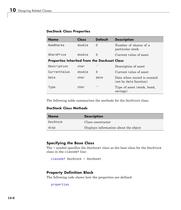
Specifying Property Attributes: Describes specifying property attributes.
Table of Property Attributes: Provides a table of property attributes.
Controlling Property Access: Describes property access methods.
Property Set and Get Methods: Describes set and get methods for properties.
Dynamic Properties: Describes dynamic properties in MATLAB.
Dynamic Properties and Methods in MATLAB: Discusses attaching data to objects using dynamic properties.
Example Implementation: Provides an example of implementing dynamic properties.
Property Access Methods: Describes defining property access methods for dynamic properties.
Dynamic Properties and Events: Describes dynamic properties and events.
Class Methods Overview: Discusses various types of methods in MATLAB classes.
Method Attributes: Outlines method attributes that modify method behavior.
Defining Methods: Describes defining methods within a class definition block.
Method Invocation: Describes the process of determining which method to invoke.
Overview: Provides a comprehensive guide on MATLAB class methods.
Dynamic Reference: Describes dynamic referencing of object properties and methods.
Method Access Control: Describes controlling method access using attributes.
Superclass Method Invocation: Describes invoking superclass methods in subclasses.
Constructor Methods: Describes constructor methods for initializing class instances.
Static Methods: Describes static methods associated with a class.
Conclusion: Outlines the structured approach to defining and using methods in MATLAB classes.
Overloading MATLAB Functions: Describes overloading existing functions for class instances.
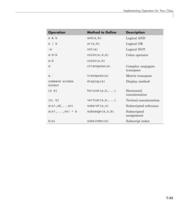
Implementing MATLAB Operators: Describes overloading operators for class instances.
Rules for Naming to Avoid Conflicts: Describes naming rules to avoid conflicts in class definitions.
Methods for MATLAB Classes: Describes supporting typical behavior for user-defined objects.
Implementing Operators for Your Class: Describes overloading operators for class instances.
Class Methods for Graphics Callbacks: Describes using class methods as callbacks for graphics objects.
Overview: Provides a technical guide on implementing a class in MATLAB that uses a slider to adjust the color limits of an indexed image.
Class Implementation: Describes the SeaLevelAdjuster class and its implementation.
Using the Class: Describes using the SeaLevelAdjuster class to visualize sea level changes.
Events and Listeners: Describes concepts of events and listeners in MATLAB classes.
Key Takeaways: Describes key takeaways for using events and listeners in MATLAB classes.
Defining Listener Callback Functions: Describes defining callback functions for listeners.
Adding Arguments to a Callback Function: Describes adding arguments to a callback function using anonymous functions.
Creating Property Listeners: Describes creating property listeners for events.
Example — Using Events to Update Graphs: Provides an example of using events to update graphs.
Summary of fcneval Class: Describes the fcneval class for evaluating MATLAB expressions.
Summary of fcnview Class: Describes the fcnview class for displaying surface graphs.
Implementing the UpdateGraph Event and Listener: Describes implementing the UpdateGraph event and listener.
Overview: Provides a detailed explanation of implementing property events and listeners in MATLAB.
1. Updating Surface Data: Describes updating surface data in a graphical object.
2. Implementing the PostSet Property Event and Listener: Describes using the PostSet event to update graphs.
3. Enabling and Disabling Listeners: Describes enabling and disabling listeners using a context menu.
4. Implementing a Class for Polynomials: Describes creating a DocPolynom class for polynomial objects.
5. Class Methods and Properties: Describes methods and properties of the DocPolynom class.
6. Example Usage: Provides examples of using polynomial objects.
Overview: Provides a detailed guide on implementing a class for polynomials in MATLAB.
Defining Arithmetic Operators for DocPolynom: Describes implementing arithmetic operations for the DocPolynom class.
Overloading MATLAB Functions: Describes overloading MATLAB functions for the DocPolynom class.
Designing Related Classes: Describes designing a class hierarchy for financial assets.
Key Points: Describes key points for designing related classes.
Overview: Provides a detailed explanation of designing related classes in MATLAB for financial assets.
DocStock Class: Describes the DocStock class for representing stock assets.
DocBond Class: Describes the DocBond class for representing bond assets.
DocSavings Class: Describes the DocSavings class for representing savings assets.
DocPortfolio Class: Describes the DocPortfolio class for aggregating asset types into a portfolio.
Conclusion: Illustrates the use of MATLAB classes to model financial assets.
Overview: Provides a technical guide on visualizing a financial portfolio using MATLAB's pie3 function.
Specifications: Describes using a DocPortfolio object to manage and visualize financial assets.
Procedures: Describes steps for categorizing and displaying asset values in a pie chart.
Example: Provides an example of using the pie3 method to display asset mix.
Key Functions: Highlights overloading the pie3 function for customization.



 MATLAB Production Server
 Database Toolbox
 MATLAB Report Generator
 Stateflow
 SimEvents
 SimDriveline
 SimHydraulics
 SimPowerSystems
 Simulink Control Design
 Aerospace Blockset
 SimRF
SimRF Simulink Coder
 Embedded Coder
 Simulink PLC Coder
 Fixed-Point Designer
 MATLAB Coder
 Simulink 3D Animation
 Gauges Blockset
 Simulink Report Generator
 Polyspace Bug Finder
 global-optimization-toolbox
 Phased Array System Toolbox
 OPC Toolbox
 Simulink Design Verifier
 Simulink Design Optimization
 Filter Design HDL Coder
 Bioinformatics Toolbox
 SimBiology
 Computer Vision System Toolbox
 DSP System Toolbox
 Fuzzy Logic Toolbox
 Polyspace Client for C/C++
 xPC Target
 SimMechanics
 Simscape
 Simulink
 Data Acquisition Toolbox
 Image Processing Toolbox
 Signal Processing Toolbox
 Control System Toolbox
 Symbolic Math Toolbox?
 Parallel Computing Toolbox?
 MATLAB®
 Mapping Toolbox 3.2
 Instrument Control Toolbox
 Optimization Toolbox 6.0


 MATLAB Release Notes
 C and Fortran API Reference
 External Interfaces
 Function Reference: Volume 3 (P-Z)
 Function Reference: Volume 2 (F-O)
 Function Reference: Volume 1 (A-E)
 Creating Graphical User Interfaces
 3-D Visualization
 Graphics
 MATLAB Programming Tips
 Programming Fundamentals
 Data Analysis
 Mathematics
 MATLAB® Getting Started Guide