

mill turn

mill turn
Mastercam Mill-Turn is designed to simplify machining on modern multi-stream machining centers by automating complex processes, allowing for faster and more efficient part programming. It integrates with Mastercam’s milling and turning toolpaths to provide advanced cutting techniques and machine management.
Streamlined Workflow
- Job Setup: Automates part transfers, toolplane creation, stock definition, setup, and multi-stream machining based on the initial machine environment.
- Tooling and Toolpaths: Combines milling and turning strategies with automated toolplanes and simplified toolpath selection, reducing programming complexities.
- Automated Part Transfer: Utilizes pre-defined strategies to simplify and ensure successful part transfers.
- Interactive Synchronization Management: The Sync Manager allows for operation synchronization across multiple streams, G-code customization, and toolpath sequencing optimization.
- Machine Simulation: Simulates operations, synchronizations, and part transfers to identify potential issues before actual machining.
- Post Your Code and Cut Your Part: Ensures G-code is ready for machine use with minimal modifications.
Synchronization Made Easy
Mastercam Mill-Turn provides tools for optimizing part cycle times and avoiding collisions. The Sync Manager supports unlimited streams, drag-and-drop operations, and timeline adjustments for better process visualization.
Fast and Accurate Simulation
- Simulates all machine components and detects collisions in a virtual environment.
- Allows for detailed analysis of material removal and machining statistics.
System Requirements
- Processor: 64-bit Intel or AMD.
- Operating System: 64-bit Windows 7 or 8.
- Memory: 8GB.
- Hard Disk: 100GB with 5GB free.
- Graphics: Dual monitors, 1280 x 1024 resolution, 256 MB graphics memory, OpenGL support.
- Microsoft Products: IE v6.0 or higher, Excel and Word 2007 or higher.
Machine Environment
Mastercam Mill-Turn uses an advanced machine environment for precise simulation and programming. Multiple environments are available, with options to purchase additional ones as needed.
Code Expert
Mastercam Code Expert offers tools for managing multitasking applications, including syncing, simulation, and G-code editing from a single interface.
For more information, contact Mastercam at (800) 228-2877 or visit www.mastercam.com.
Catalog excerpts
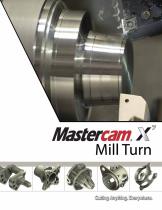
Mill Turn
Open the catalog to page 1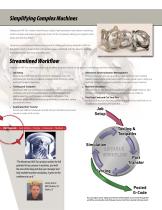
Simplifying Complex Machines Mastercam Mill-Turn makes machining on today’s high-powered, multi-stream machining centers simpler and easier. It automates much of the complexity, letting you program parts faster and with less effort. Designed to compliment Mastercam’s powerful milling and turning toolpaths, Mill-Turn delivers the best in shop-tested cutting techniques combined with the latest in machine and toolpath management and verification. Streamlined Workflow Mastercam Mill-Turn eliminates steps and simplifies programming for multi-stream, multitasking machine environments: 1. Job Setup...
Open the catalog to page 2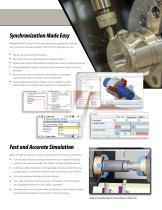
Synchronization Made Easy Mastercam Mill-Turn has all of the tools necessary to graphically optimize part cycle times and avoid collisions. With the Sync Manager, you can: Usean unlimited number of streams. Drag, drop, and sync operations across multiple streams. Expand and contract the timeline for trouble-free viewing of the part process Graphical feedback, tooltips, and color-coded operations keep you better Vertical Stream and Gantt timeline views helps you coordinate machining operations and track cycle time estimates. Customizable programming "tokens" let you tailor theG-code representation...
Open the catalog to page 3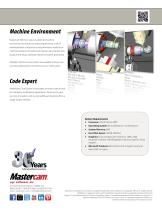
Machine Environment Mastercam Mill-Turn uses an advanced machine environment to ensure accurate programming. A set of interdependent components and parameters model your machine’s behavior for precise simulation, part transfer, tool location and setup, operation libraries and post processing. Multiple machine environments are available, and you can purchase additional environments as your needs grow. Code Expert Mastercam Code Expert incorporates an entire suite of tools for managing multitasking applications. Easily access your syncing, simulation, and G-code editing and posting from a single...
Open the catalog to page 4All MASTERCAM catalogs and technical brochures
 LATHE_2017
2 Pages
 Multiaxis
4 Pages
 art
art6 Pages
 MASTERCAM FOR SOLIDWORKS
4 Pages
 MILL
MILL4 Pages
 router
5 Pages
 mill 2013
5 Pages
 swiss exper
3 Pages
 X6-Mill-brochure-web
5 Pages
 X6-Router-brochure
5 Pages
 X6-MCfSW-webPDF
3 Pages
 X6-Wire-brochure-web
3 Pages
 X6-Lathe-brochure
3 Pages


Archived catalogs
 lathe_2013
3 Pages
- Process software
- Computer-aided design software
- Design software solution
- 3D software solution
- Simulation software solution
- Programming software solution
- Reporting software
- Machine software
- Creation software
- 2D software
- Modeling software
- CAM software
- CAD/CAM software
- Machining software
- Cutting software
- Process control software
- 2D/3D software
- SolidWorks software
- Nesting software
- CNC machine software