
- Catalogs
- Madison Company
- CK4808-13540 Mini Ultrasonic Kit

CK4808-13540 Mini Ultrasonic Kit

CK4808-13540 Mini Ultrasonic Kit
- Ultrasonic Level Sensor (U3M-148): Provides non-contact measurement up to 6 feet using ultrasonic technology. Features include push-button programmable calibration, microprocessor-based reliability, temperature compensation, and a self-cleaning sensor face.
- Panel Meter (MD4815-110-02): Features a 1/8 DIN digital panel meter with NEMA 4X, IP65 front, dual-line 6-digit display, and selectable inputs (4-20 mA, 0-20mA, 0-5 V, and ±10 V). It includes an isolated 24 VDC transmitter power supply, two relays with interlocking capability, multi-pump alternation control, and operates in temperatures ranging from -40 to 65°C.
- Wiring Hookup: Instructions for wiring a 3-wire 4-20 mA input using internal power and for internal relays operation are provided.
- MeterView Pro Software Setup: The meter can be configured using the MeterView Pro software or through front panel function buttons. Calibration involves setting the sensor at specific distances to establish 20mA and 4mA values, verified by LED color changes.
- Preprogrammed for turnkey tank level measurement with a 6-foot sensing range.
- Includes two programmable relays preset for 10% and 90%, adjustable for other ranges.
- Panel meter readout can display in gallons, inches, or percentage.
- Free PC-based MeterView Pro USB programming software included.
Catalog excerpts

CK4808-13540 Mini Ultrasonic Kit Ultrasonic Level Sensor with Configured Panel Meter Madison Company’s CK4808-13540 kit includes an Ultrasonic Level Sensor and advanced Process Panel Meter, and is ideal for non contact liquid level measurement and control. This kit is preprogrammed for turn key tank level measurement for 6’ sensing range, and includes two programable relays, pre-set for 10% and 90%. They can be field configured for other ranges, and the panel meter readout can be displayed in gallons, inches, or % as desired. Features: U3M‐148 ‐ Ultrasonic Con nuous Level Sensor Non‐contact measurement to 6’ . Ultrasonic technology Push‐bu on Programmable Calibra on Microprocessor‐based reliability Temperature compensa on Self‐cleaning sensor face is unaffected by condensa on Features: MD4815‐110‐02 ‐ Panel Meter 1/8 DIN Digital Panel Meter with NEMA 4X, IP65 Front Dual‐Line 6‐Digit Display, 0.6" (15 mm) & 0.46" (12 mm) Standard Input Power 85‐265 VAC 4‐20 mA, 0‐20mA, 0‐5 V, and ±10 V Selectable Inputs Isolated 24 VDC @ 200 mA Transmi er Power Supply 2 Relays with Interlocking Capability Mul ‐Pump Alterna on Control Opera ng Temperature Range: ‐40 to 65°C (‐40 to 150°F) Programmable Display, Func on Keys & Digital Input Free PC‐Based MeterView Pro USB Programming So ware included Non‐Contact Con nuous Measurement Various liquids
Open the catalog to page 1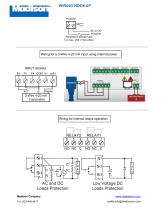
WIRING HOOKUP IAC or DC r\j- POWER Required External Fuse: 5 A max, 250 V Slow Blow Wiring for a 3-Wire 4-20 mA input using internal power INPUT SIGNAL Wiring for internal relays operation. Madison Company www.madisonco.com
Open the catalog to page 2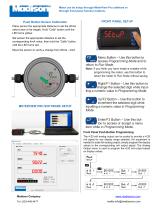
Meter can be setup through MeterView Pro software or through front panel function buttons. Menu Button - Use this button to access Programming Mode and to return to Run Mode. Note: If you think you have made a mistake while programming the meter, use this button to return the meter to Run Mode without saving. Right/FI Button - Use this button to ^change the selected digit while inputting a numeric value in Programming Mode. Up/F2 Button - Use this button to increment the selected digit while inputting a numeric value in Programming Mode. Enter/F3 Button - Use this button to access or accept a...
Open the catalog to page 3All Madison Company catalogs and technical brochures
 Madison catalog
28 Pages
 M5600
M56001 Page
 PH4201
2 Pages
 MD4814
1 Page
 M8000
M80002 Pages
 M4189
M41891 Page
 M5917 High Temp SS
1 Page
 SPDT SS Float Switch
1 Page


Archived catalogs
 Temperature Sensors
22 Pages
 Conductivity Switch (M3784)
2 Pages


- Flowmeter
- Volume flow monitor
- Liquid flow monitor
- Level limit switch
- Liquid level detector
- Liquid level sensor
- Water flow monitor
- Float level switch
- Analog level sensor
- Stainless steel level detector
- Digital output level sensor
- Threaded level switch
- Vessel level sensor
- Magnetic float level switch
- Plastic level switch
- Stainless steel level sensor
- Flow switch
- Liquid flow switch
- Water level sensor