

Log Max
1 /4Pages

Log Max
1 /4Pages
Catalog excerpts
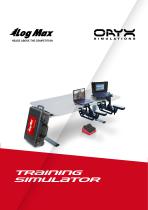
Log Max Desktop Simulator User Guide HEADS ABOVE THE COMPETITION TRAINING SIMULATOR
Open the catalog to page 1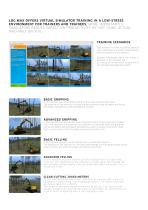
LOG MAX OFFERS VIRTUAL SIMULATOR TRAINING IN A LOW-STRESS TRAINERS AND TRAINEES, MORE IMPORTANTLY, SIMULATORS REDUCE IMPACT ON PRODUCTIVITY BY NOT USING ACTUAL MACHINES ON-SITE. Log Max Desktop Simulator UserFOR Guide ENVIRONMENT Version A 6. Select a training scenario using the arrow keys on the keyboard and start a scenario by pressing Enter key. TRAINING SCENARIOS Each scenario is either a specified exercise with a clear goal, or an unrestricted scenario where the goals are less defined. Detailed information about the results is available in the statistics and by looking at the end-result...
Open the catalog to page 2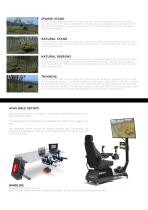
Sparse Stand In this unrestricted scenario you start next to sparsely populated areas of birch, pine or spruce. The area is generally flat and easy to navigate. Any felling of trees marked with ribbons is tracked, allowing for a different exercise if they’re taken into consideration. Since this is an unrestricted scenario, it will finish when you press and hold the 0 key on the numpad for two seconds. As in all unrestricted scenarios, the scoring equals the number of trees felled. Log Max Desktop Simulator User Guide Version A In this unrestricted scenario you start next to sparsely populated...
Open the catalog to page 3
2017-05-001 - Specifications may vary depending on equipment selected .We reserve the right to make changes in product specifications without prior notice.
Open the catalog to page 4All Log Max catalogs and technical brochures
 Log Max 6000Twin
241 Pages
 Log Max 12000XT
193 Pages
 Log Max 7000XT
341 Pages
 Log Max 7000C
329 Pages
 Log Max 5000D
307 Pages
 Log max E6
223 Pages
 log max 7000XT Fixed Head
101 Pages
 Log Max 10000XT
205 Pages
 Log Mate 510
12 Pages
Archived catalogs
 Log Max 928
2 Pages
 Log Max 6000B
2 Pages
 Log Max 4000B
2 Pages
 Accumulation Kit
2 Pages
 Log Max 9000B
2 Pages