
- Catalogs
- Lascar Electronics
- SGD 28-M420

SGD 28-M420

SGD 28-M420
The SGD 28-M420 is a current loop indicator with a 2.8” color TFT screen and USB programming interface. It operates within a supply voltage range of 4-30V d.c. and measures current loops from 4-20mA, with possible extensions to 10-50mA or 0-50mA. The device features an accuracy of 0.05-0.1% and a sample rate of 3 samples per second. The operating temperature range is 0°C to +40°C.
The display is customizable using PanelPilot software compatible with Windows 7, 8.1, and 10. Users can modify colors, text labels, splash screens, and input scaling. The device is easily mounted using a panel fixing clip and screw terminals for input connections.
The SGD 28-M420 can be mounted on panels 1mm to 3mm thick, with a silicone seal for thin panels. It requires a Type A to Mini-B USB cable for programming, and can be powered via USB. The display is not protected against moisture or dust.
The software allows configuration of meter type, text labels, colors, decimal points, splash screen images, and input scaling. It supports various meter types, excluding dual channel meters, which are incompatible with current loop monitoring.
The device supports measuring 4-20mA current loops and requires a fully floating power supply. It can be used with multiple SGD displays in the same installation, with digital hold and alarm output features available.
The SGD 28-M420 uses a Programmable Gain Amplifier for optimal resolution, with a voltage range of 0-2.5V for 4-20mA applications. An advanced connector provides alternative connections and future expansion options.
Catalog excerpts

Current Loop Indicator PanelPilot Compatible Smart Graphics Display Features • • • • • • • • 2.8” colour TFT screen Use PanelPilot software, to setup and customise the display. Compatible with Windows 7, 8.1 and 10. Multiple configurations included free Programmable via the USB interface Simple panel mounting solution Operating voltage of 4V-30V d.c. (see note) Measures 4 - 20mA current loop (also 10-50mA or 0-50mA possible) Digital hold The SGD 28-M is a PanelPilot Compatible graphics display with a 320 x 240 pixel (QVGA) colour display and USB programming interface. Using the PanelPilot software (available for Windows 7, 8.1 and 10), users are able to choose from an ever-increasing number of configurations (six voltmeters at launch) which can then be customised to their needs. Colours, text labels, splash screen and input scaling can all be customised by the user through the software and then uploaded to the SGD 28-M through the USB connection. Panel or enclosure installation of the display is simple, using a panel fixing clip to mount the display, and 4 screw terminals to connect the inputs. Note: Requires fully floating PSU with respect to current loop Ordering Information Specifications Minimum Linearity Sample rate Samples / second Standard Display (Panel meter, fixing kit, quick start guide) USB Cable (Type A to mini-B) USB Power Supply UK Plug Operating temperature range USB Power Supply USA Plug Supply voltage Supply current ** Measurement range Loop volt drop * Depending on user calibration settings ** Voltage dependent. See graph on Page 2.
Open the catalog to page 1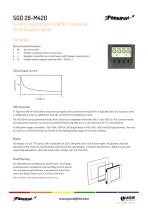
Current Loop Indicator PanelPilot Compatible Smart Graphics Display Hardware Screw Terminal Functions 1 2 3 4 Do not connect Positive connection from current loop Negative connection to current loop, and 0V power supply return Positive power supply connection (4V – 30V d.c.) Typical Supply Current USB connection A ‘Type A to Mini-B’ USB cable is required to program and customise the SGD 28-M. It typically takes 10 seconds to send a configuration, with an additional 5 seconds needed for the hardware to reset. The SGD 28-M can be powered directly from USB and is compatible with both USB 1.1 and...
Open the catalog to page 2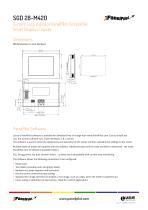
Current Loop Indicator PanelPilot Compatible Smart Graphics Display Dimensions All dimensions in mm (inches) DIMENSIONS: PanelPilot Software Lascar’s PanelPilot software is available for download free of charge from www.PanelPilot.com. Easy to install and use, the control software runs under Windows 7, 8.1 and 10. The software is used to setup the appearance and operation of the meter and then upload these settings to the meter. Multiple types of meter are supplied with the software. Additional types will be made available to download - see www. PanelPilot.com for details of available meters....
Open the catalog to page 3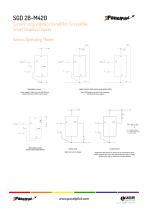
Current Loop Indicator PanelPilot Compatible Smart Graphics Display Various Operating Modes PSU 1 4 - 30V USING TWO SGD DISPLAYS IN SAME INSTALLATION I- Power supply to meter must be fully floating (isolated from the 4-20mA current loop) 0V Each SGD must be powered from a seperate, fully floating, power supply Vvoltage VS = Supply S = Supply voltage VL = LED Voltage drop VL = LED Voltage drop IL = LED current IL = LED current MEASURING 4-20mA USING A USB POWER SUPPLY DIGITAL HOLD ALARM OUTPUT DIGI1 will hold the display Applications that feature an alarm can be connected as above. ALM1 must not...
Open the catalog to page 4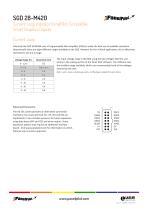
Current Loop Indicator PanelPilot Compatible Smart Graphics Display Current Loop Internally the SGD 28-M420 uses a Programmable Gain Amplifier (PGA) to make the best use of available resolution (theoretically there are eight different ranges available to the SGD. However for the 4-20mA application, this is effectively restricted to the 0-2.5 range. Voltage Range (V) The input voltage range is decided using the two voltages that the user enters in the scaling section of the Panel Pilot software. The software uses the smallest range available, which can accommodate both of the voltages entered...
Open the catalog to page 5All Lascar Electronics catalogs and technical brochures
 SGD 35-M420
5 Pages
 DPM 942-FPS
5 Pages
 EL-MOTE-ULT+
2 Pages
 EL-WiFi-ULT+
2 Pages
 EL-USB-ULT-LCD+
4 Pages
 EL-WiFi-TPX+
2 Pages
 panel-mount LED indicator
3 Pages
 loop-powered process indicator
2 Pages
 voltage data-logger
3 Pages



- DC power supply
- AC/DC power supply
- Temperature probe
- LCD screen
- Data logger
- Resistance temperature sensor
- Panel-mount screen
- Temperature datalogger
- Digital pyrometer
- Digital indicator
- Panel panel meter
- Industrial thermometer
- USB datalogger
- Waterproof temperature sensor
- Data-logger with screen
- Wireless datalogger
- Datalogger without display
- Variable-output power supply
- Rugged monitor