
- Catalogs
- Laird Connectivity
- Setting Up Basics Station on The Things Stack v3


Setting Up Basics Station on The Things Stack v3
Setting Up Basics Station on The Things Stack v3
Ezurio's RG1xx firmware update now uses Semtech Basics Station as a forwarder, eliminating TTN and MQTT options. This document provides guidance on configuring the Sentrius gateway with Basics Station for The Things Stack v3, applicable to both TTN Community and TTI Enterprise versions, using RG191 and RS191 devices, with notes for EU versions.
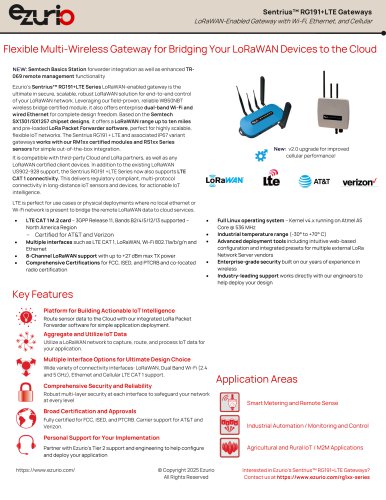
The Sentrius™ RG1xx Gateway provides secure, scalable LoRa solutions with dual-band Wi-Fi, BLE, and Ethernet, supporting a LoRa range up to 10 miles and compatibility with various LoRaWAN devices.
To connect the gateway, attach antennas, power it up, and connect via Ethernet. Use shorter antennas for Wi-Fi ports and a longer one for the LoRa port. Wi-Fi Quick Config allows setup without Ethernet by connecting to a specific access point.
Access the gateway's web interface using its Ethernet MAC address, accept the security certificate, and log in with default credentials.
The Ethernet port uses DHCP by default. For Wi-Fi setup, access the web interface, scan for networks, and connect using provided credentials.
Prerequisites include a user account on The Things Stack v3 and an internet-connected RG1xx gateway. Set up a gateway on The Things Stack by adding a gateway, configuring frequency plans based on region, and creating API keys for LNS.
Includes LNS and CUPS setup, with instructions for installing CLI in Linux and configuring CUPS.
Configure RS1xx and view data on The Things Stack.
Create an application by navigating to the Applications section on the main console page, clicking 'Add application', providing a descriptive Application ID, and clicking 'Create application'.
After creating an application, select it under the Applications tab, click '+ Add end device', and enter a descriptive End Device ID. Choose the device brand and model, ensuring the hardware, firmware, and profile match the Sentrius mobile app information. Select the appropriate frequency plan for your gateway's location.
For LNS setup, select 'Semtech Basics Station' under the Forwarder menu, update the LNS URL, and upload necessary root certificates. For CUPS setup, install the CLI, configure the CUPS to send the LNS API key, and set the CUPS server URL.
Use the Sentrius mobile app to connect to the RS1xx device, configure the DevEUI, AppEUI, and AppKey, and set the operating mode. Ensure the Channel Mask is set to sub-band 2.
To view data, select the application and end-device on The Things Stack console, and choose 'Live data'. Ensure the correct payload formatter is selected for data decryption.
For further assistance, contact Ezurio's support team or sales representatives. Note that all information is subject to change, and Ezurio's products are sold under standard terms and conditions.
Catalog excerpts
Setting Up Basics Station on The Things Stack v3 Sentrius RG1xx Application Note
Open the catalog to page 1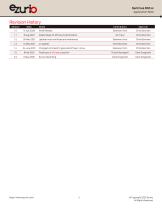
Sentrius RGlxx Application Note Revision History Version Date Notes Contributors Approver 1.0 14 July 2020 Initial Release 1.1 8 Aug 2020 Added steps for API Key Authentication 1.2 05 May 2021 Updated root certificate and references 1.4 04 June 2021 Changed command to generate API key in Linux 1.5 8 Feb 2022 Fixed typo in LNS setup section Seokwoo Yoon Chris Boorman Ian Tracy Chris Boorman Seokwoo Yoon Chris Boorman Chris Boorman Chris Boorman Seokwoo Yoon Chris Boorman Florian Baumgartl Dave Drogowski Dave Drogowski Dave Drogowski © Copyright 2025 Ezurio All Rights Reserved
Open the catalog to page 2
Sentrius RG1xx Application Note © Copyright 2025 Ezurio All Rights Reserved
Open the catalog to page 3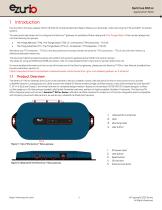
Sentrius RG1xx Application Note 1 Introduction Ezurio’s RG1xx firmware update v93.8.5.18 (GA5.0) introduced Semtech Basics Station as a forwarder, while removing the TTN and MQTT forwarder options. This document describes how to configure the SentriusTM gateway to use Basics Station along with The Things Stack v3 that can be categorized into the following two groups: • The Things Network (TTN), The Things Stack (TTS) v3 - Community (TTN Community – TTS v3) The Thing Industries (TTI), The Things Stack (TTS) v3 – Enterprise’ (‘TTI Enterprise - TTS V3’). We mainly use TTI Enterprise – TTS V3 in...
Open the catalog to page 4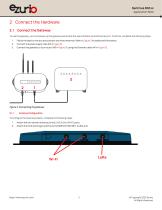
Sentrius RG1xx Application Note To use the gateway, you must power up the gateway and access the web interface via the Ethernet port. To do this, complete the following steps: 1. Follow the label on the box and connect the three antennas. Refer to Figure 3 for additional information. Connect the power supply (see #2 in Figure 3). Connect the gateway to your router (#3 in Figure 3) using the Ethernet cable (#1 in Figure 3). Figure 3: Connecting the gateway 2.1.1 Antenna Configuration To configure the antenna properly, complete the following steps: 1. Attach the two shorter antennas to the 2.4/5.5...
Open the catalog to page 5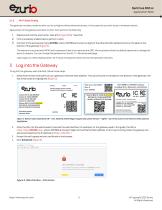
Sentrius RG1xx Application Note 2.1.2 Wi-Fi Quick Config The gateway includes a mode to allow you to configure without ethernet access, in the case that you wish to join a wireless network. Apply power to the gateway and allow to start, then perform the following: Depress and hold the user button (see #2 in Figure 3) for 7 seconds. From a wirelessly enabled device perform a scan. Connect to the access point rg1xx29378B, where 29378B are the last six digits of the ethernet MAC address found on the label on the bottom of the gateway (Figure 3). The network is secured with WPA2 with a password that...
Open the catalog to page 6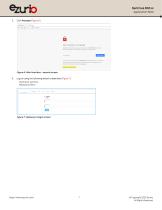
Sentrius RG1xx Application Note 5. Click Proceed (Figure 6). Figure 6: Web interface – second screen 6. Log on using the following default credentials (Figure 7): Username: sentrius Password: RG1xx Figure 7: Gateway UI login screen © Copyright 2025 Ezurio All Rights Reserved
Open the catalog to page 7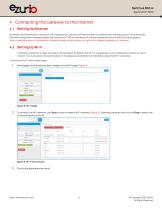
Sentrius RG1xx Application Note 4 Connecting the Gateway to the Internet 4.1 By default, the Ethernet port is set up for DHCP addressing. Connect the Ethernet cable to a network with internet access. If more advanced Ethernet configuration is needed, please see the SentriusTM RG1xx User Manual in the documentation tab of the RG1xx product page at; https://www.lairdconnect.com/wireless-modules/lorawan-solutions/sentrius-rg1xx-lora-enabled-gateway-wi-fi-ethernet 4.2 Setting Up Wi-Fi If Ethernet connection is made, this step is not necessary. By default, the Wi-Fi in the gateway is not configured...
Open the catalog to page 8
Sentrius RG1xx Application Note 4. Enter the information for the Wi-Fi network (Figure 10). Figure 10: Wi-Fi profile dialog Click Connect. 5 Configuration of Network Server 5.1 User account on The Things Stack (TTS) v3 RG1xx gateway connected via ethernet or Wi-FI (steps outlined above) to have internet access 5.2 Configuration on The Things Stack (TTS) 5.2.1 Set Up a Gateway on The Things Stack To set up a gateway on The Things Stack follow these steps: In the main console page, select Go to gateways. Figure 11: The Things Stack main console page © Copyright 2025 Ezurio All Rights Reserv
Open the catalog to page 9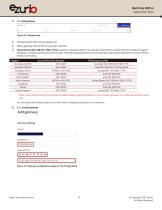
Sentrius RGlxxApplication Note 2. 3. Give descriptive name as the gateway-ID. 4. Obtain gatewayEU/from RGlxx’s UI under LoRa tab. 5. United States 902-928 Mhz, FSB 2 (TTN) is used for Frequency plan in this example. Ezurio offers a variety of RG1xx models to support operation in various countries around the world. The following table shows the recommended channel plan settings for the Ezurio RG1xx model you are using. Region Ezurio RG1xx Part Number TTN Frequency Plan Australia (AS923) 455-00057 Asia 923-925 MHz (TTN Australia) European Union RG186 or 450-0190 Europe 863 - 870 MHz (TTN) North...
Open the catalog to page 10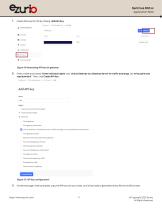
Sentrius RGlxxApplication Note 7. Create API keys for LNS by clicking +Add API Key. 8. Enter a name and choose 'Grant individual rights’ and 'Link as Gateway to a Gateway Server for traffic exchange, i.e. write uplink and read downlink’. Then, click Create API Key. Gateways > 2935a4-gateway-2 > API keys > Add Grant all current and future rights • Grant individual rights ■ Select all Delete gateway View gateway information Q Link as Gateway to a Gateway Server for traffic exchange, i.e. write uplink and read downlink View gateway location Retrieve secrets associated with a gateway View and edit...
Open the catalog to page 11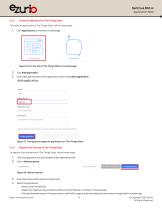
Sentrius RG1xx Application Note 5.2.2 Create an Application on The Things Stack To create an application on The Things Stack, follow these steps: Click Applications on the main console page Figure 16: On the top of The Things Stack's console page Give a descriptive name as the Application ID and click Create application. Figure 17: Configuration page for application on The Things Stack 5.2.3 Register End-Devices on The Things Stack To register your end device on The Things Stack, follow these steps: Click the application you just created under Applications tab. Enter descriptive name as the End...
Open the catalog to page 12
Sentrius RGlxxApplication Note 5. Select same frequency plan supported by the version of your gatewayyou are using. United States 902-928 Mhz, FSB 2 (TTN) is used for this example. You must use LoRa end-devices that match the country of operation of your gateway, and certified for the location they will be used in. Ezurio offers a wide variety of LoRaWAN sensors supporting a number of LoRa Alliance Regional Parameter regions alongside the local country radio regulatory requirements. 6. Click Register end device. 1. Select the end device Sentrius RSlxx Temp-RH Sensor MAC VI .11.7, PHY Vl.0.2 REV...
Open the catalog to page 13All Laird Connectivity catalogs and technical brochures
 BL54L15, BL54L10 Series
42 Pages
 Aurawave AW100 Series
14 Pages
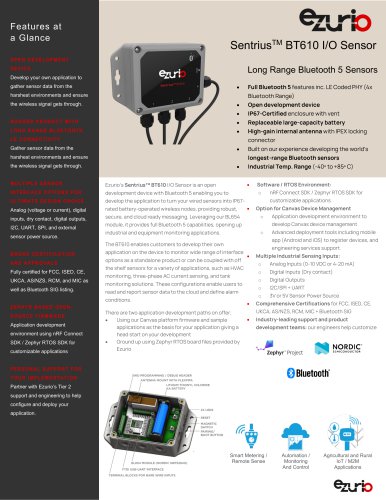 SentriusTM BT610 I/O Sensor
3 Pages
- Display module
- Temperature probe
- Touch screen display panel
- Waterproof temperature sensor
- HMI
- HMI with touch screen
- SoM
- Wireless gateway
- IoT gateway
- Ethernet HMI
- USB HMI
- Omnidirectional antenna
- Communication module
- RS-232 HMI
- Industrial HMI
- 7" display panel
- Compact gateway
- Numeric display
- WLAN antenna
- Industrial system-on-module