
- Catalogs
- Konica Minolta Sensing
- SpectraMagicNX


- Products
- Catalogs
- News & Trends
- Exhibitions
SpectraMagicNX

SpectraMagicNX
- Ease of Use: The software includes pre-defined and user-definable templates, step-by-step navigation help, and a tutorial on precise color communication.
- Language Support: Available in seven languages, facilitating global use.
- Color Difference Display: Utilizes the E00 (CIE DE2000) color-difference equation for accurate color assessments.
- Layout Customization: Users can design custom screen and print layouts, including graphs, data lists, and images.
- Navigation Function: Provides workflow control with customizable step-by-step instructions and a color measurement tutorial.
- Automatic Tolerance Setting: Calculates and sets minimum tolerance using various color-difference equations.
- Macro Function: Automates routine operations to save time and reduce errors.
- Search and CCS Function: Allows quick data extraction and closest color search from a database.
- System Requirements: Compatible with Windows XP, Vista, and 7, requiring a minimum of Pentium III 600 MHz CPU, 128 MB RAM, and 450 MB disk space.
- Compatible Instruments: Supports a range of Konica Minolta instruments including CM-3600A, CM-3610A, and others.
- Color Spaces and Indices: Supports multiple color spaces and indices, including L*a*b*, XYZ, and Munsell.
- Graph and Image Display: Offers spectral reflectance, color difference distribution, and image linking capabilities.
Catalog excerpts

Color Data Software CM-S100w Professional Edition Lite Edition Color quality control like never before: • Unprecedented ease of use • Pre-defined and user-definable templates • Step-by-step navigation help • Customized screens and reports including digital images • Includes “Precise Color Communication” tutorial • Available i
Open the catalog to page 1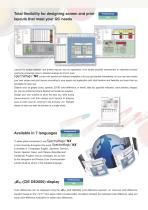
Total flexibility for designing screen and print layouts that meet your QC needs Professional Lite Layouts for screen displays and printed reports vary by application, from simple pass/fail assessment or statistical process control for production lines to detailed analysis for R & D work. comes with several pre-defined templates to let you get started immediately, but you can also create your own screen and print layouts according to your needs and application with total freedom and flexibility and save them as templates for later use. Objects such as graphs (color, spectral, 2D/3D color-difference,...
Open the catalog to page 2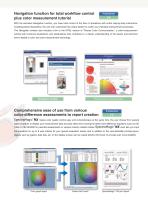
Navigation function for total workflow control plus color measurement tutorial Professional Lite With the exclusive Navigation function, you have total control of the flow of operations with online step-by-step instructions including picture illustrations. You can even customize this unique feature to match your individual measurement processes. The Navigation window also includes a link to the HTML version of “Precise Color Communication”, a color-measurement tutorial with numerous illustrations and explanations that contribute to a clearer understanding of the basics and technical terms related...
Open the catalog to page 3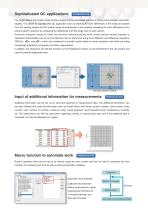
Professional only The target data of one master target (primary target) can be associated with two or more working targets (secondary targets). This allows for sophisticated QC application such as checking for color differences of the measured sample from the working targets and the master target simultaneously. It also enables managing the color differences of an entire product in sections by comparing the differences from the target color of each section. Automatic tolerance setting in which the minimum tolerance setting which would enclose several samples is calculated automatically and set...
Open the catalog to page 4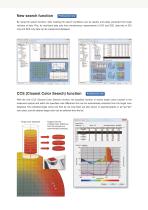
Professional only By using the search function, data meeting the search conditions can be quickly and easily extracted from large volumes of data. Plus, for dual-bank data sets from simultaneous measurement of SCI and SCE, data lists of SCI only and SCE only data can be created and displayed. CCS (Closest Color Search) function Professional only With the new CCS (Closest Color Search) function, the specified number of stored target colors closest to the measured sample and within the specified color-difference limit can be automatically extracted from the target color database. The extracted...
Open the catalog to page 5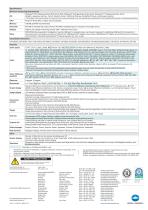
Specifications: Minimum Computing Requirements Windows® XP Professional 32-bit SP3, 64-bit SP2; Windows® Vista Business 32-bit, 64-bit; Windows® 7 Professional 32-bit, 64-bit (English, Japanese, German, French, Spanish, Italian, Traditional Chinese, Simplified Chinese, and Hangul versions) OS • The hardware of the computer system to be used must meet or exceed the greater of the recommended system requirements for the compatible OS being used or the following specifications. CPU Pentium® lll 600 MHz or higher (recommended) Memory Hard disk 450 MB of available disk space (At least 400 MB of available...
Open the catalog to page 6All Konica Minolta Sensing catalogs and technical brochures
 SpectraMagic NX2
2 Pages
 Spectrophotometer CM-25cG
3 Pages
 ProMetric® I
2 Pages
 basICColor Catch
4 Pages
 CHROMA METER CR-400/410
5 Pages
 CM-512m3A
3 Pages
 CM-700d / CM-600d
4 Pages
 CM-M6
CM-M64 Pages
 CM-25cG
5 Pages
 CM-26dG / CM-26d / CM-25d
6 Pages
 FD-7 and FD-5
6 Pages
 CA-410
8 Pages
 Automotive Industry Solutions
14 Pages
 AK series
4 Pages
 CM-3700A
4 Pages
 CRI Illuminance meter CL-70F
2 Pages
 Rhopoint IQ FLEX
2 Pages
 CR-10 PLUS
2 Pages
 Reference PV Cells
4 Pages
 Color Analyzer CA-2500
2 Pages
 Incident Color Meter CL-500A
4 Pages
 CL-200A
5 Pages
 Gloss-Meter Rhopoint iQ
4 Pages
 BC-10 Gloss Meters
2 Pages
 CM-2500d Spectrophotometers
3 Pages
 CM-3220d Spectrophotometers
2 Pages
 CM-3630 Spectrophotometers
6 Pages
 Reference PV Cells AK-200
2 Pages
 Color Readers CECF-9
2 Pages
 Color Readers CR-14
2 Pages
 Color Analyzers CA-310
2 Pages
 Light Cabinets
4 Pages


Archived catalogs
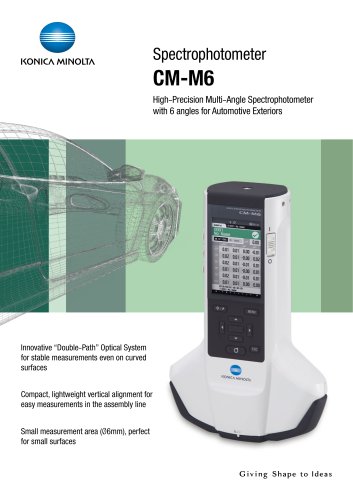 CM-M6 2020
4 Pages
 Spectrophotometer CM-M6
3 Pages
 spectroradiometer
6 Pages
 chroma-meter
5 Pages
 light meter
14 Pages
 glossmeter
2 Pages
 Digital Konsensus Pro
4 Pages
 Dry Film
2 Pages
 Regius Model 110
5 Pages
 magicolor 1600W
4 Pages
 PagePro 1380MF
4 Pages
 Bizhub 751
8 Pages
 Bizhub C650
8 Pages


- Digital imager
- Visible imager
- CMOS camera module
- Industrial camera module
- Monitoring analyzer
- Management software solution
- Analysis software solution
- Infrared imager
- Measuring machine
- Automatic analyser
- Windows software
- Image processing camera module
- Portable analyzer
- Measurement software
- GigE Vision camera
- Compact imager
- Inspection imager
- Rugged camera
- High-speed camera module
- Calibration analyzer