
- Catalogs
- KEBA Group AG
- KeTop T10

- Company
- Products
- Catalogs
- News & Trends
- Exhibitions
KeTop T10
1 /36Pages

KeTop T10
1 /36Pages
Catalog excerpts

KeTop Operation & Monitoring
Open the catalog to page 1
KeTop Operation and Monitoring Mobile and stationary visualization solutions KeTop stands for a unique choice from mobile to stationary operating devices for easy implementation of all possible visualization and operating tasks. Performance and size of the devices are scalable; depending on the model, membrane keyboards, touchscreens as well as multitouch monitors – on request with unique haptic elements – are available. Patented KEBA innovations create outstanding experiences of interaction. A user-friendly visualization software guarantees fast and unlimited project realization, no programming...
Open the catalog to page 2
Product features • Ideal for the intuitive teach-in of 6-axis robots • Can be used without robot programming knowledge • Time saving of approximately 20% during teach-in • Detects its orientation in space • Safe retraction from critical situations • Customizing of keyboard and display icons optional Using the inertial sensors of the 6D Inertial Measurement Unit (6D IMU), the KeTop T10 directMove detects its orientation and direction in three-dimensional space. The operator can therefore easily specify the desired movement or rotation of the robot’s TCP by indicating the KeTop T10 directMove in...
Open the catalog to page 4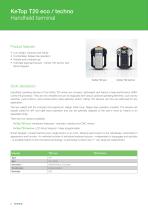
Product features • Low weight, compact and handy • Comfortable, fatigue free operation • Flexible and universal use • Unlimited keyboard layouts - KeTop T20 techno with Smart Keypad Short description Handheld operating devices of the KeTop T20 series are compact, lightweight and feature a high-performance ARM-Cortex A8 processor. They are very versatile and can be equipped with various optional operating elements, such as key switches, push buttons, hand wheel and/or (axis) selection switch. KeTop T20 devices can thus be optimized for any application. The low weight and the compact and ergonomic...
Open the catalog to page 6
Operating elements Membrane keyboard * internally or externally wired // up to two elements marked with * can be selected of which up to one may be externally wired ** perfect in combination with KeMotion
Open the catalog to page 7
Overview of the available options Middle option Emergency-stop button Gray stop button Left and right option Selector switch 2 levels Selector switch 4 levels Selector switch 16 levels Key switch 2 or 3 positions Push button, illuminated Available colors: green, red, white Customization of color and keyboard Hand wheel (optional: only KeTop T20 eco) Overview of the keyboards Stop KeTop T20 eco Robotics keyboard KeTop T20 eco Standard keyboard KeTop T20 eco CNC keyboard with hand wheel KeTop T20 techno LCD Smart Keypad freely programmable
Open the catalog to page 9
Product features • High-performance, proven universal device for performing all operating and visualization tasks • High-quality display for clear and well-arranged presentation, also suitable for complex processes • Many equipment options for individual adaptations Short description With the high-performance ARM Cortex A8 processor, the KeTop T55 forms a powerful embedded platform with low power consumption. Available as operating system is either Windows CE 6.0 or Linux. Data can be transferred via USB port. To increase the operational safety of the devices, the product design is based on a...
Open the catalog to page 10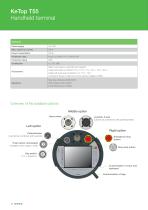
Hand wheel Joystick, 3-axis (cannot be combined with potentiometer) Potentiometer (cannot be combined with joystick) Right option Emergency-stop button Gray stop button Push button, illuminated Available colors: green, white Customization of color and keyboardCustomization of logo 12 < = 3K
Open the catalog to page 12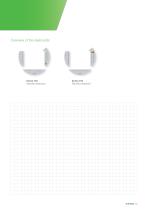
Overview of the keyboards KeTop T55 Standard keyboard KeTop T55 Robotics keyboard
Open the catalog to page 13
Product features • Maximum operating efficiency thanks to optional additional keyboard on rear of device • High-resolution, brilliant display • Scalable performance • Ergonomic design Short description The KeTop T70 mobile terminal features a high-resolution display and can be equipped with a selection of high-performance ARM processors. It is ideally suited for demanding visualization and operating applications. The robust housing is lightweight and ergonomic and enables long and fatigue-free operation. Unique features, such as the modular construction, which facilitates easy upgrades to newer...
Open the catalog to page 14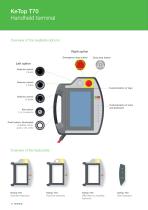
KeTop T70 Handheld terminal Overview of the available options Right option Emergency-stop button Gray stop button Left option Selector switch 2 levels Selector switch 4 levels Customization of logo Selector switch 16 levels Customization of color and keyboard Push button, illuminated Available colors: green, red, white KeTop T70 Standard keyboard KeTop T70 Robotics keyboard KeTop T70 IMM take-out handling keyboard KeTop T70 Rear keyboard
Open the catalog to page 16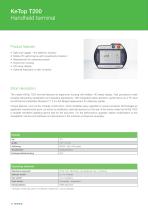
Product features • Safe and rugged - the tablet for industry • Mobile PC performance with investment protection • Replacement for stationary panels • Ergonomic housing • HD-ready display • Optional keyboard on rear of device Short description The mobile KeTop T200 terminal features an ergonomic housing with brilliant, HD-ready display. Fast processors make possible demanding visualization and operating applications. With integrated safety elements, performance on a PC level and Windows Embedded Standard 7®, it is a full-fledged replacement for stationary panels. Unique features, such as the modular...
Open the catalog to page 18
KeTop T200 Handheld terminal General Power supply Power consumption Protection class Protection rating UL, CE, SIBE (if enabling-switch safety electronics installed) Wall mount (various) Cable with screw connection 2,5 m / 5 m / 7 m / 10 m / 15 m / 20 m Cable with push-pull-connection 3 m / 5 m / 10 m / 15 m / 20 m Connection boxes for field and control cabinet installation (IP65) Touch stylus holder Machinery Directive 2006/42/EC EMC Directive 2014/30/EU RoHs Directive 2011/65/EU Overview of the available options Right option Left option Emergency-stop button Gray stop button Selector switch...
Open the catalog to page 20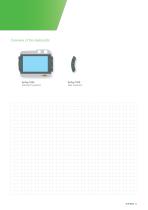
Overview of the keyboards KeTop T200 Standard keyboard KeTop T200 Rear keyboard
Open the catalog to page 21All KEBA Group AG catalogs and technical brochures
 PitchOne
2 Pages
 KeDrive DMS2 Synchronous Motors
36 Pages
 KeDrive for Motion
44 Pages
 KeSafe - Safety technology
24 Pages
 KeTop Operation & Monitoring
40 Pages
 KePlast System Brochure
11 Pages
 KeMotion FlexCore
2 Pages
 KeConnect I/O modules
44 Pages
 Smart HMI complete solutions
8 Pages
 KeControl FlexCore
24 Pages
 KeDrive D3-DR 361
2 Pages
 KeTop T150 wireless
2 Pages
 KePlast Hotrunner modul
2 Pages


Archived catalogs
 KeMes A100 Angle Meter
2 Pages
 KeControl C5
72 Pages
 SystemOne CM.
17 Pages
 KeControl C5 and KeConnect C5
72 Pages
 KeTop – Operating and monitoring
40 Pages
 Product catalog KeDrive
54 Pages
 KeDrive DMS2
28 Pages
 KeMotion
26 Pages


- Measuring device
- Automation software solution
- Embedded PC
- Analysis software solution
- Digital I/O
- Process software
- Real-time software
- IO module
- Computer-aided design software
- Control software
- Servo-motor
- Analog I/O
- Design software solution
- Compact PC
- Digital IO module
- 3D software solution
- Industrial software
- VGA PC
- Servo-amplifier
- Ethernet PC