
- Catalogs
- Kamoer Fluid Tech (Shanghai) Co.,LTD.
- UIP3 Intelligent Peristaltic Pump


- Company
- Products
- Catalogs
- News & Trends
- Exhibitions
UIP3 Intelligent Peristaltic Pump

UIP3 Intelligent Peristaltic Pump
- Warranty Conditions: Free service is available during the warranty period under normal use. Users must retain purchase invoices and the user manual for after-sales service.
- Warranty Coverage: Covers manufacturing defects for one year from purchase, including free repair or replacement of faulty parts, excluding shipping costs.
- Non-Warranty Coverage: Excludes damage from improper use, unauthorized repairs, accidents, and consumable parts.
- Safety: Follow regulations to avoid danger. Do not use if visibly damaged or in humid environments.
- Defects and Anomalies: Cease operation if damage is detected or if the product malfunctions.
- About: The UIP 3 series peristaltic pump uses stepping motor control for high precision, featuring a touch screen and various interfaces for sensors and remote control.
- Case-Opening: Check for shipping damage and verify all components against the packing list.
- Continuous Mode: The pump runs continuously until stopped manually, with adjustable flow rate during operation.
- Ration Mode: Suitable for filling tasks, the pump runs a set amount and stops automatically, operating in semi-automatic or fully automatic modes.
- System Settings: Includes tube type, Wi-Fi, language, and system calibration settings.
- Remote Control: Supports Wi-Fi, RS485, and CAN for remote operation.
- Chemical Compatibility: Ensure compatibility with chemicals used.
- Storage: Store the device properly to avoid damage.
Contact information for technical support is provided.
- Parameters: Detailed technical parameters of the pump.
- Packing List: List of components included with the product.
- Assignment Mode: The pump operates in cycles, with settings for tube type, flow rate, speed, temperature, and working volume. Users can set pause times and cycle numbers for automatic operation.
- Ration Mode Settings: Users can configure tube types, flow rates, liquid level detection, and cycle modes. The mode supports both fully automatic and semi-automatic operations.
- Level Detection: Liquid level detection can trigger alarms and stop the pump if a low level is detected.
- Copy Volume: This function helps determine the required volume for operations by copying a known volume.
- Tube Type Calibration: Calibration ensures pump accuracy by adjusting flow rates and speeds based on tube types.
- Wi-Fi Settings: The pump supports AP and router modes for Wi-Fi connectivity, allowing remote control via the Kamoer Pumps App.
- Language and Time Settings: Users can switch between Chinese and English and set the real-time clock.
- System Information and Self-Test: Displays firmware and model details and checks system functionality.
- Wi-Fi Remote Control: The pump can be controlled via the Kamoer Pumps App, supporting both direct and router connection modes.
- 485 and CAN Remote Control: The pump includes 485 and CAN remote control functions, with specific protocols for operation.
- App Download: The Kamoer Pumps App is available for iOS and Android, supporting devices with specific OS versions.
- App Modules: The app includes continuous mode, assignment mode, and system settings modules.
- Continuous Mode: In this mode, the pump runs continuously with adjustable flow rates and speeds.
- Liquid Level Detection: Similar to ration mode, continuous mode includes liquid level detection to prevent overflows or dry running.
- Ration Mode: This mode includes automatic and semi-automatic operations. In automatic mode, the pump cycles through work and pause intervals until a set number of cycles is completed. In semi-automatic mode, the pump runs once per trigger.
- Continuous Mode: Not detailed in the provided text but implied as an alternative to ration mode.
- Working Volume: Set the volume for each cycle.
- Flow Rate and Speed: Adjustable parameters that determine the operation speed.
- Pause Duration: Time interval between cycles in automatic mode.
- Cycle Number: Total number of cycles to be completed in automatic mode.
- Copy Function: Used to determine the required volume when unknown, by timing the filling process.
- Tube Type Calibration: Ensures accuracy by calibrating the pump based on tube type and flow rate.
- Restore Factory Settings: Option to reset the pump to its original settings.
- Chemical Compatibility: Standard silicone tubing is used, but specific solutions may require consultation with the manufacturer.
- Storage: Loosen adjustment knobs when not in use to prevent hose deformation. Keep pump rollers clean and dry.
- Appendix A: Lists technical parameters such as power input/output, weight, size, and operating conditions.
- Appendix B: Includes a packing list detailing the components provided with the pump.
Catalog excerpts

UIP 3 smart peristaltic pump User Manual Version:A/0 Kamoer fluid tech(Shanghai)Co., Ltd. www.kamoer.com
Open the catalog to page 1
Quality guarantee 1.Warranty conditions Free service is limited to the warranty period under normal use and maintenance of the user's manual is valid, all due to malfunction or damage not covered under warranty. Users please take care of purchase invoices, user manual, so you can receive timely and satisfactory after-sales service. 2.Warranty coverage Within One year from the date of purchase, if any resulting from the manufacturing process or component damage occurred, the free warranty service will be provided. The free repair service provided during the warranty period includes free repair,...
Open the catalog to page 3
Notice We have considered the safety of the user in the process of design of the instrument. Please read the manual carefully for installing and use of the instrument. Any improper operation may cause damage or danger. 1.Safety The product belongs to Active Products. The Operator should follow the regulation rules to avoid danger. If you find any visible damage, please do not switch on. Be sure not to use in humid environment, avoid damage by short circuit. Temperature changes or mechanical wear may cause the increases in the dispensed volume. You must stop any operation immediately if the...
Open the catalog to page 4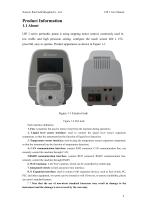
Kamoer fluid tech(Shanghai)Co., Ltd. Product Information 1.1 About UIP 3 series peristaltic pump is using stepping motor control, commonly used in low traffic and high precision setting, configure the touch screen 480 x 272, powerful, easy to operate. Product appearance as shown in Figure 1-1. Figure 1-1 Exterior look Figure 1-2 Port look Each interface definition: 1. Fan: A machine fan used to remove heat from the machine during operation; 2. Liquid level sensor interface: used to connect the liquid level sensor expansion component, so that the instrument has the function of liquid level detection;...
Open the catalog to page 5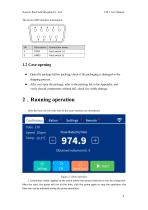
Kamoer fluid tech(Shanghai)Co., Ltd. The device DB9 interface information: Connection name Foot switch (-) Open the package before packing, check if the packaging is damaged in the shipping process. After you open the package, refer to the packing list in the Appendix, and verify that all components without fail, check for visible damage. 2.Running operation After the boot, the four title bars of the main interface are introduced: Figure 2-1 Boot interface 1. Continuous mode: applied to the scene where the pump continues to run for a long time. After the start, the pump will run all the time,...
Open the catalog to page 6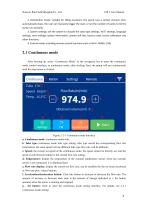
Kamoer fluid tech(Shanghai)Co., Ltd. 2. Distribution mode: suitable for filling occasions, the pump runs a certain amount, then automatically stops, the user can manually trigger the start, or set the number of cycles to let the pump run cyclically; 3. System settings: set the system to include the tube type settings, Wi-Fi settings, language settings, time settings, system information, system self-test, factory reset, screen calibration and other functions; 4. Control mode: including remote control functions such as Wi-Fi, RS485, CAN; 2.1 Continuous mode After booting up, select “Continuous...
Open the catalog to page 7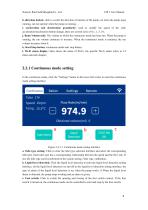
Kamoer fluid tech(Shanghai)Co., Ltd. h, direction button: click to switch the direction of rotation of the pump, set when the pump stops running, can not operate when the pump is running; i, acceleration and deceleration granularity: used to modify the speed of the click acceleration/deceleration button change, there are several sizes of 0.1, 1, 5, 10; j. Runn Volume (ml): The volume in which the continuous mode has been run. When the pump is running, the run volume continues to increase. When the continuous mode is restarted, the run volume increases from 0; k, Start/Stop button: continuous...
Open the catalog to page 8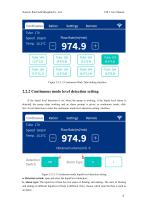
Kamoer fluid tech(Shanghai)Co., Ltd. Figure 2-2-1-2 Continuous Work Tube Setting Interface 2.2.2 Continuous mode level detection setting If the liquid level detection is on, when the pump is working, if the liquid level alarm is detected, the pump stops working and an alarm prompt is given; in continuous mode, click Set->Level Detection to enter the continuous mode level detection setting. interface: Figure 2-2-2-1 Continuous mode liquid level detection setting a. Detection switch: open and close the liquid level detection; b. Alarm type: The liquid level float has two states of floating and...
Open the catalog to page 9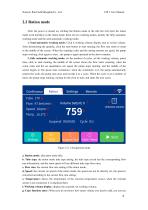
Kamoer fluid tech(Shanghai)Co., Ltd. 2.2 Ration mode After the power is turned on, clicking the Ration mode in the title bar will enter the ration mode work interface; in the ration mode, there are two working modes, namely the fully automatic working mode and the semi-automatic working mode; 1. Semi-automatic working mode: Click h working volume display area to set the volume. After determining the quantity, click the start button to start running, the flow rate starts to count in the middle of the screen. When the counting value and the setting amount are equal, the pump stops working, click...
Open the catalog to page 10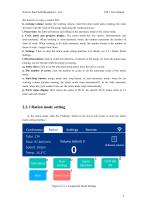
Kamoer fluid tech(Shanghai)Co., Ltd. this function to copy a volume first; h, working volume: display the working volume, when the ration mode starts working, the value decreases with the work of the pump, indicating the working process; i. Pause time: the interval between each filling in the automatic mode of the ration mode; j. Cycle mode and progress display: The ration mode has two modes: full-automatic and semi-automatic. When working in semi-automatic mode, the number represents the number of times of work. When working in the fully automatic mode, the number format is the number of times...
Open the catalog to page 11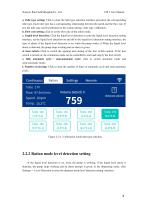
Kamoer fluid tech(Shanghai)Co., Ltd. a. Tube type setting: Click to enter the tube type selection interface and select the corresponding tube type. Each tube type has a corresponding relationship between the speed and the flow rate. If not, the tube type can be performed in the system setting->tube type. calibration; b, Flow rate setting: click to set the flow rate of the ration mode; c. Liquid level detection: Click the liquid level detection to enter the liquid level detection setting interface, set the liquid level detection on and off in the liquid level detection setting interface, the type...
Open the catalog to page 12All Kamoer Fluid Tech (Shanghai) Co.,LTD. catalogs and technical brochures
 KPK400 Peristaltic Pump
9 Pages
 UIP Smart Peristaltic Pump
8 Pages
 DIP Lab Peristaltic Pump
1 Page
 DIP1500 peristaltic pump system
16 Pages
 KMP80 Glue Dispenser
8 Pages
 KVP300 vacuum pump
1 Page
 KVP04 vacuum pump
1 Page
 HLVP8 vacuum pump
1 Page
 HLVP15 Vacuum Pump
6 Pages
 KVP8 mini vacuum pump
1 Page
 KVP15 Vacuum Pump
2 Pages
 EDZP02 Micro Air Pump
1 Page
 KEF Peristaltic Pump
1 Page
 Kamoer Pump Product Catalogue
124 Pages


