
- Catalogs
- Kamoer Fluid Tech (Shanghai) Co.,LTD.
- DIP1500 peristaltic pump system


- Company
- Products
- Catalogs
- News & Trends
- Exhibitions
DIP1500 peristaltic pump system

DIP1500 peristaltic pump system
- Warranty Conditions: Valid only if the product is installed, used, and maintained as per the manual. Man-made faults are not covered.
- Warranty Coverage: Free repair or replacement within one year for manufacturing defects. Shipping costs are not included.
- Non-Warranty Coverage: Includes appearance issues, improper use, unauthorized repairs, force majeure, and consumables.
Main Features
- Speed Range: 0.1-400 RPM with 0.1 RPM resolution.
- Flow Range: ≤1500 ml/min.
- Control Modes: Encoder, toggle switch, external analog signal, RS485, foot switch.
- Power Supply: External DC 24V, <50W.
- Working Conditions: Temperature -20℃ to 60℃, max current 2A.
Appearance Description
- Digital Display: Shows speed, flow, and time settings.
- Rotary Encoder: Adjusts speed and time.
- Direction Control Switch: Controls rotation direction.
- Power Socket: For external DC power.
- Combination Control Port: Includes 485 communication, start/stop control, and analog signal control.
Working Mode Settings
- Speed Mode: Fully automatic, semi-automatic, and manual settings available.
- Flow Mode: Similar settings as speed mode, with flow adjustments.
Menu Settings
- Mode Switching: Between speed and flow modes.
- Direction Adjustment: Adjusts rotation direction.
- Foot Switch Setting: Configures foot switch operation.
- Calibration: For flow calibration.
- Running Status: Option to save current running state.
- Analog Quantity Selection: Choose between 0-5V, 4-20mA, and 485 mode.
- Suction Back Function: Sets suction time and speed.
- Drive Enable: Configures drive enable settings.
- Maximum Speed Setting: Manufacturer setting, not recommended for user adjustment.
- Restore Factory Defaults: Option to reset settings.
External Control
- 485 Mode: Controlled via 485 communication.
- Analog Signal Control: Uses 0-5V or 4-20mA signals.
Pump Tube Flow Reference
Flow rates are based on specific conditions and may vary with temperature, material, and liquid viscosity.
Catalog excerpts
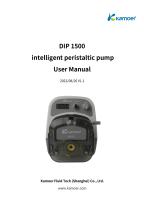
intelligent peristaltic pump User Manual 2022/08/26 V1.1 Kamoer Fluid Tech (Shanghai) Co., Ltd. www.kamoer.com
Open the catalog to page 1
Warranty service The warranty service is only valid for users who have correctly installed, used and maintained in accordance with the manual, and all man-made faults or damages are not covered by the warranty. 2. Warranty coverage Within one year from the date of purchase, if there is any damage caused by the manufacturing process or components, the company will provide free warranty service. The free maintenance service provided during the warranty period includes free repair, free replacement of faulty spare parts, and replacement of products that cannot be repaired with products of the same...
Open the catalog to page 2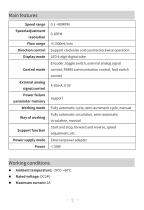
Main features Speed range Speed adjustment Flow range Direction control Support clockwise and counterclockwise operation Control mode control, RS485 communication control, foot switch Display mode External analog signal control Power failure parameter memory Working mode Support function Power supply mode Encoder, toggle switch, external analog signal 4-20mA, 0-5V support Fully automatic cycle, semi-automatic cycle, manual Fully automatic circulation, semi-automatic circulation, manual Start and stop, forward and reverse, speed adjustment, etc. External power adapter Maximum curre
Open the catalog to page 3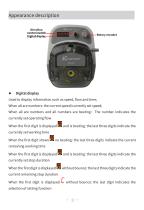
Appearance description Digital display Used to display information such as speed, flow and time; When all are numbers: the current speed/currently set speed; When all are numbers and all numbers are beating:The number indicates the currently set operating flow When the first digit is displayed currently set working time When the first digit shows remaining working time and is beating: the last three digits indicate the no beating: the last three digits indicate the current When the first digit is displayed and is beating: the last three digits indicate the When the first digit is displayed without...
Open the catalog to page 4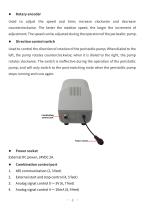
Rotary encoder Used to adjust the speed and time; increase clockwise and decrease counterclockwise. The faster the rotation speed, the larger the increment of adjustment; The speed can be adjusted during the operation of the peristaltic pump. Direction control switch Used to control the direction of rotation of the peristaltic pump; When dialed to the left, the pump rotates counterclockwise; when it is dialed to the right, the pump rotates clockwise. The switch is ineffective during the operation of the peristaltic pump, and will only switch to the post-switching state when the peristaltic...
Open the catalog to page 5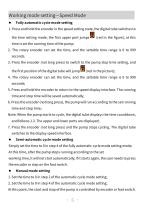
Working mode setting—Speed Mode Fully automatic cycle mode setting 1. Press and hold the encoder in the speed setting state, the digital tube switches to the time setting mode, the first upper port jumps time is set the running time of the pump; 2. The rotary encoder can set the time, and the settable time range is 0 to 999 seconds. 3. Press the encoder (not long press) to switch to the pump stop time setting, and the first position of the digital tube will jump 4. The rotary encoder can set the time, and the settable time range is 0 to 999 seconds; 5. Press and hold the encoder to return to...
Open the catalog to page 6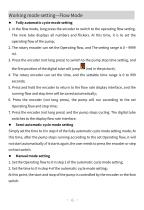
Working mode setting—Flow Mode Fully automatic cycle mode setting 1. In the flow mode, long press the encoder to switch to the operating flow setting. The nixie tube displays all numbers and flickers. At this time, it is to set the operating flow of the pump; 2. The rotary encoder can set the Operating flow, and The setting range is 0 ~ 9999 ml. 3. Press the encoder (not long press) to switch to the pump stop time setting, and the first position of the digital tube will jump 4. The rotary encoder can set the time, and the settable time range is 0 to 999 seconds; 5. Press and hold the encoder...
Open the catalog to page 7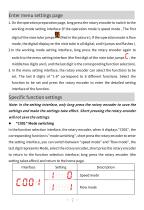
Enter menu settings page 1. On the operation preparation page, long press the rotary encoder to switch to the working mode setting interface (If the operation mode is speed mode , The first digit of the nixie tube jumps (Red in the picture ); If the operation mode is flow mode, the digital display on the nixie tube is all digital, and it jumps and flashes ). 2.In the working mode setting interface, long press the rotary encoder again to switch to the menu setting interface (the first digit of the nixie tube jumps middle two digits are 0, and the last digit is the corresponding function selection)....
Open the catalog to page 8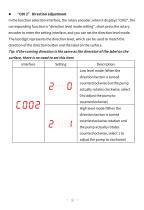
In the function selection interface, the rotary encoder, when it displays "C002", the corresponding function is "direction level mode setting", short press the rotary encoder to enter the setting interface, and you can set the direction level mode. The last digit represents the direction level, which can be used to match the direction of the direction button and the label on the surface. Tip: If the running direction is the same as the direction of the label on the surface, there is no need to set this item. Interface Low level mode (When the direction button is turned actually rotates clockwise,...
Open the catalog to page 9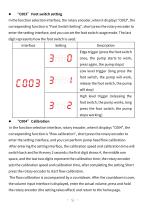
“C003” Foot switch setting In the function selection interface, the rotary encoder, when it displays "C003", the corresponding function is "Foot Switch Setting", short press the rotary encoder to enter the setting interface, and you can set the foot switch usage mode. The last digit represents how the foot switch is used. Interface Edge trigger (press the foot switch once, the pump starts to work, press again, the pump stops) Low level trigger (long press the foot switch, the pump will work, release the foot switch, the pump will stop) High level trigger (releasing the foot switch, the pump works,...
Open the catalog to page 10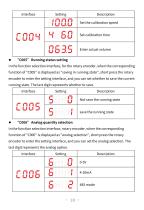
Set the calibration speed Set calibration time Enter actual volume “C005” Running status setting In the function selection interface, for the rotary encoder, when the corresponding function of "C005" is displayed as "saving in running state", short press the rotary encoder to enter the setting interface, and you can set whether to save the current running state. The last digit represents whether to save. Interface Not save the running state save the running state “C006” Analog quantity selection In the function selection interface, rotary encoder, when the corresponding function of "C006" is...
Open the catalog to page 11All Kamoer Fluid Tech (Shanghai) Co.,LTD. catalogs and technical brochures
 KPK400 Peristaltic Pump
9 Pages
 UIP Smart Peristaltic Pump
8 Pages
 DIP Lab Peristaltic Pump
1 Page
 KMP80 Glue Dispenser
8 Pages
 KVP300 vacuum pump
1 Page
 KVP04 vacuum pump
1 Page
 HLVP8 vacuum pump
1 Page
 HLVP15 Vacuum Pump
6 Pages
 KVP8 mini vacuum pump
1 Page
 KVP15 Vacuum Pump
2 Pages
 EDZP02 Micro Air Pump
1 Page
 KEF Peristaltic Pump
1 Page
 Kamoer Pump Product Catalogue
124 Pages


