


USR-N668

USR-N668
The USR-N668 device includes two 10/100Mbps Ethernet ports with Auto-MDI/MDIX support and eight serial ports for RS232/RS485/RS422. It supports Static IP or DHCP and various network protocols such as TCP Server, TCP Client, UDP Client, UDP Server, and HTTPD Client. It can function as a TCP client with up to 16 connections and includes features like keep-alive, Modbus TCP to Modbus RTU conversion, and remote monitoring.
Initial setup requires the device, power cord, serial cables, and a PC. Connect the USR-N668 to a PC using serial and Ethernet cables. The manual provides guidance on setting up the network environment, including firewall adjustments and static IP configuration.
The USR-N668 operates on AC 85~265V, consuming 1.6W. It supports multiple network protocols and allows user configuration via software, web pages, and AT commands.
Details include hardware dimensions, pin definitions, and LED indicators. Diagrams illustrate hardware connections and data flow for RS232, RS485, and RS422 configurations.
Functions include IP address configuration, DNS, VPN (PPTP and GRE), network diagnostics, and firmware upgrades. It supports TCP and UDP clients and servers, HTTPD Client, SSL Client, and V-COM. Serial port functions include framing mechanisms and RFC2217-like support.
Users can configure network protocol parameters, web settings, and AT commands. Default parameters for initial setup include IP address, subnet mask, and serial baud rate.
Specifications include a packing length of 1472 bytes, CE/RoHs certifications, and reliability grades EN61000-4-2, EN61000-4-4, and EN61000-4-5. The device has IP30 shell protection, dimensions of 482*185*45 MM, and operates in temperatures from 40 to 85℃ with humidity levels of 5%~95%.
Supports TCP Client, TCP Server, UDP Client, UDP Server, Httpd Client, and SSL Client modes. TCP Client mode ensures reliable data exchange, while TCP Server mode supports up to 16 clients. UDP modes offer simple communication options.
Configure the target port to 20108 using USR-TCP232-Test.exe software in UDP mode. Ensure the local IP matches the PC's IP for data reception and transmission.
Allows terminal devices to send request data to an HTTP server via the USR-N668 module. Configuration involves setting the target IP, domain name, and port through a web interface.
SSL encryption is intended for TCP links, targeting www.alipay.com on port 443, though not supported in the current firmware.
Facilitates communication between the N668 module and a virtual serial port for traditional PC software.
Includes a framing mechanism for efficient data transmission and RFC2217-like function for dynamic parameter changes.
Socket B offers simple TCP/UDP Client functions for data backup. Heartbeat Packet Function maintains connection status, and registration packages can be customized for server identification.
Parameters can be set via software or web page, ensuring all devices are on the same LAN. Key settings include IP address type, subnet mask, gateway, and serial port parameters.
Supports AT commands for configuration, with error codes indicating issues like invalid command format.
Company: Jinan USR IOT Technology Limited
Address: Floor 11, Building 1, No. 1166 Xinluo Street, Gaoxin District, Jinan, Shandong, 250101, China
Website: www.usriot.com
Support: h.usriot.com
Email: [email protected]
Telephone: 86-531-88826739 / 86-531-55507297
This document provides information about USR-N668 products without granting any intellectual property license. No warranty is provided for the sales and use of the products.
- V1.0.1 (2017-07-14): Establishment
- V1.0.2 (2017-07-20): Modified web page screenshots and statements
- V1.0.3: Removed hardware manual description
- V1.0.4V: Added number of accessories
Catalog excerpts

Technical Support: h.usriot.com Jinan USR IOT Technology Limited
Open the catalog to page 1
Technical Support: h.usriot.com
Open the catalog to page 2
Technical Support: h.usriot.com Jinan USR IOT Technology Limited
Open the catalog to page 3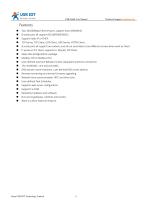
Technical Support: h.usriot.com Two 10/100Mbps Ethernet port, support Auto-MDI/MDIX. 8 serial ports all support RS232/RS485/RS422. Support Static IP or DHCP. TCP Server, TCP Client, UDP Client, UDP Server, HTTPD Client . 8 serial ports all support two sockets ,and all can send data to two different servers when work as Client. It works as TCP client, supports to 16(max) TCP Client. Keep-alive & Registration-package. Modbus TCP to Modbus RTU. User-defined overtime Reload (no data reload)and overtime connection. The modifiable , one and only MAC. DNS domain name resolution ,user-defined DNS server...
Open the catalog to page 4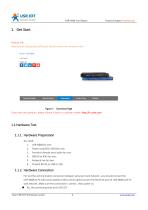
Technical Support: h.usriot.com 1. Get Start Product link: http://usriot.com/products/8-ports-serial-to-ethernet-converter.html Figure 1 Download Page If you have any question, please submit it back to customer center: http://h.usriot.com 1.1.Hardware Test 1.1.1. Hardware Preparation You need: 1. USR-N668 for one; 2. Power cord (85V~265V)for one; 3. Female to female serial cable for one; 4. DB9-M to RJ45 for one; 5. Network line for two; 6. PC(with RS232,or USB to 232) 1.1.2. Hardware Connection For test the communication conversion between serial port and network , you should connect the USR-N668...
Open the catalog to page 5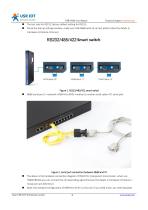
Technical Support: h.usriot.com The test only for RS232, factory default setting for RS232; Check the dial up settings window ,make sure USR-N668 work at correct pattern.(See the details in Hardware introduce->Dial up) Figure 1. RS232/485/422 smart switch N668 serial port 1->network->DB9-M to RJ45->mother to mother serial cable->PC serial port Figure 2. serial port connection between N668 and PC The above is the hardware connection diagram of RS232 for transparent transmission. when use RS485/RS422,you can connect the corresponding signal line.(see the details in Hardware introduce-> Serial port...
Open the catalog to page 6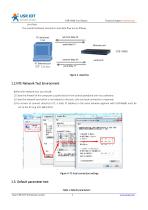
Technical Support: h.usriot.com purchase The overall hardware connection and data flow are as follows, Figure 3. data flow 1.2.NTE Network Test Environment Before the network test, you should: 1) Close the firewall of the computer (usually found in the control panel)and anti-virus software; 2) Close the network card which is not related to this test, only one local connection is reserved; 3) For servers to connect directly to PC, a static IP (address in the same network segment with USR-N668) must be set to the PC (e.g.192.168.0.201). Figure 4. PC local connection settings 1.3. Default parameter...
Open the catalog to page 7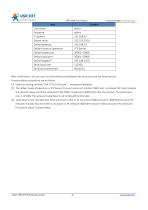
Technical Support: h.usriot.com User name Password IP address Subnet mask Default gateway Default mode of operation Default target port Default local port Default target IP Serial baud rate Serial port parameters After confirmation, You can carry out the bidirectional between the serial port and the Ethernet port. Communication procedures are as follows: 1) Open the testing software”USR-TCP232-Test.exe”,connected hardware; 2) The default mode of operation is TCP Server, first port serial port monitor 20001 port. So choose TCP client mode at the network setup end of the software,IP:192.168.0.7,target...
Open the catalog to page 8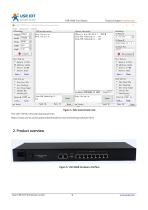
Technical Support: h.usriot.com Figure 5. data transmission test The USR-TCP232-Test.exe download links: https://www.usriot.com/support/downloads/usr-tcp-test-testing-software.html Figure 6. USR-N668 hardware interface Jinan USR IOT Technology Limited
Open the catalog to page 9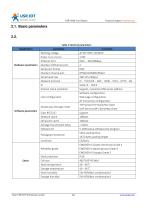
Technical Support: h.usriot.com 2.1. Basic parameters 2.2. Table 2 Electrical parameters Hardware parameters parameter Working voltage Power Consumption Ethernet Port Number of Ethernet port Serial port format Number of serial port Serial baud rate Network protocol IP Domain name resolution numerical AC 85~265V, 50/60Hz 1.6W RJ45、10/100Mbps 2 RJ45 8*RS232/RS485/RS422 300-115.2K(bps) IP、TCP/UDP、ARP、ICMP、IPV4、HTTP、SSL Static IP、DHCP Support, customize DNS server address Software configuration, Web page configuration, AT instruction configuration TCP Server/TCP Client/SSL Client UDP Server/UDP Client/Http...
Open the catalog to page 10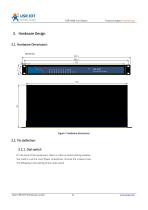
Technical Support: h.usriot.com 3. Hardware Design 3.1. Hardware Dimensions Figure 7 Hardware dimensions 3.2. Pin definition 3.2.1. Dial switch On the back of the equipment, there is a dial up switch setting window. You need to use the cross flower screwdriver, remove the screws to see. The following is the setting of the code switch. Jinan USR IOT Technology Limited
Open the catalog to page 11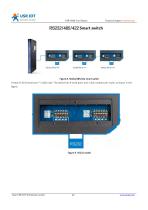
Technical Support: h.usriot.com Figure 8. RS232/485/422 smart switch A total of 16 (8 serial port * 2) dial code. The device has 8 serial ports and 2 dial numbers per route, as shown in the figure. Jinan USR IOT Technology Limited
Open the catalog to page 12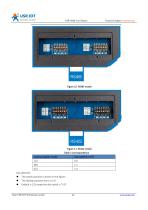
Technical Support: h.usriot.com Figure 11. RS422 model Table 3 Correspondence Pay attention: The switch position is shown in the figure. The dialing sequence form L to R. Default is 232 mode,the dial switch is “0 0”. Jinan USR IOT Technology Limited
Open the catalog to page 13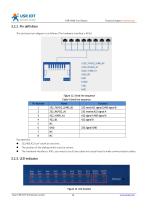
Technical Support: h.usriot.com 3.2.2. Pin definition The serial port pin diagram is as follows (The hardware interface is RJ45). Figure 12. Serial line sequence Table 4 Serial line sequence Pin Number Pay attention: 232,485,422 can’t work at one time; The position of the dialing switch must be correct. The hardware interface is RJ45, you need to use 8 core cable and crystal head to make communication cables. Figure 13. LED location Jinan USR IOT Technology Limited
Open the catalog to page 14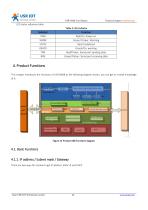
Technical Support: h.usriot.com LED status reference table. Table 5 LED indicator Indicator PWR WORK STATE READY TXN RXN Function Red/On: Power on Green/ Flicker: Working Red/ Undefined Green/On: working Red/Flicker: Serial port sending data Green/Flicker: Serial port receiving data 4. Product Functions This chapter introduces the functions of USR-N668 as the following diagram shown, you can get an overall knowledge of it. Figure 14 Product 668 Functions diagram 4.1. Basic Functions 4.1.1. IP address / Subnet mask / Gateway There are two ways for module to get IP address: Static IP and DHCP....
Open the catalog to page 15All Jinan USR IOT Technology Limited catalogs and technical brochures
 USR-MB706
2 Pages
 USR-G807
6 Pages
 USR-N520-H7-6
5 Pages
 USR-G786-G
2 Pages
 USR-LG206-P
15 Pages
 USR-M511
19 Pages
 USR-K6
107 Pages
 USR-K5
81 Pages
 USR-TCP232-306
23 Pages
 USR-DR302
70 Pages
 USR-DR301
70 Pages
 USR-DR404
86 Pages
 USR-GPRS232-734
15 Pages
 USR-W630
34 Pages
 USR-W610
4 Pages
 USR-WIFI232-B2
1 Page
 USR-WIFI232-A2
1 Page
 USR-GM3
2 Pages
 USR-SDR021
4 Pages
 USR-SDR041
3 Pages
 USR-SDR080
3 Pages
 USR-SDR160
3 Pages
 USR-K7
1 Page
 USR-CANET200
3 Pages
 USR-TCP232-S2
1 Page
 USR-TCP232-T2
1 Page
 USR-GPRS232-730
2 Pages
 GW-R4513
5 Pages
 USR-TCP232-304
1 Page
 USR-TCP232-302
1 Page
 USR-G806-A
6 Pages
 USR-G806-E/AU
6 Pages
 USR-TCP232-ED2
4 Pages
 USR-TCP232-E2
4 Pages
 USR-N540
5 Pages
 USR-N510
5 Pages
 USR-N520
5 Pages
 USR-N580
5 Pages
 USRIOT USR-G800V2 catalogs
7 Pages
 USR-GPRS232-7S3
2 Pages
 USR-SDR050-L
4 Pages


- Ethernet switch
- Industrial network switch
- DIN rail mounted network switch
- Waterproof network switch
- Communication gateway
- Unmanaged switch
- Redundant network switch
- PoE network switch
- Industrial gateway
- Fieldbus gateway
- Ethernet gateway
- Serial gateway
- Industrial communication router
- Ethernet communication router
- DIN rail converter
- IP40 network switch
- Fast network switch
- Communication router with VPN
- Ethernet converter
- 8 ports network switch