
- Catalogs
- Invertek Drives Ltd.
- E3 IP66 Outdoor User Guide


- Products
- Catalogs
- News & Trends
- Exhibitions
E3 IP66 Outdoor User Guide
1 /58Pages
E3 IP66 Outdoor User Guide
1 /58Pages
Catalog excerpts

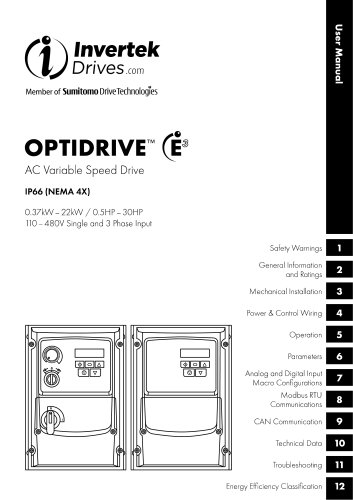
InyertekDrivGS .com User Manual Member of Sumitomo DriveTechnologies AC Variable Speed DriveIP66 (NEMA4X)0.37kW - 22 kW / 0.5HP - 30HP 110-480V Single and 3 Phase Input Safety Warnings General Information and Ratings Mechanical Installation Power & Control Wiring Operation Analog and Digital Input Macro Configurations CAN Communication Technical Data Troubleshooting Energy Efficiency Classification
Open the catalog to page 1
4.8. Using the REV/O/FWD Selector Switch (Versions With Local 7. Analog and Digital Input Macro Configurations.. 40 76. Macro Functions - Fieldbus Control Mode (P-12 = 3, 4, 77 Macro Functions - User PI Control Mode (P-12 = 5 or 6)... 44 9.2. Additional Information Relating to CAN or Modbus or This User Manual is intended to be used in conjunction with the Quick Start User Guide included with the product, and is intended to provide additional information for more advanced product applications and usage. The reader should be familiar with the contents of the Quick Start User Guide, and in particular,...
Open the catalog to page 2
It is the responsibility of the installer to ensure that the equipment or system into which the product is incorporated complies with all relevant legislation and codes of practice which apply in the country of use. All Invertek Drives products intended for use within the European Union carry the CE mark to indicate compliance with European Directives. A declaration of conformity is available from the website, www.invertekdrives.com For compliance with the European EMC Directive, the necessary guidance is provided within this document and it is the responsibility of the installer to ensure this...
Open the catalog to page 3
Please read the IMPORTANT SAFETY INFORMATION below, and all Warning and Caution information elsewhere. Safety Warnings A Danger: Indicates a risk of electric shock, which, /(/\ if not avoided, could result in damage to the / * \ equipment and possible injury or death. This variable speed drive product (Optidrive) is intended for professional incorporation into complete equipment or systems as part of a fixed installation. If installed incorrectly it may present a safety hazard. The Optidrive uses high voltages and currents, carries a high level of stored electrical energy, and is used to control...
Open the catalog to page 4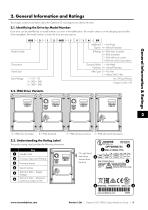
This chapter contains information about the Optidrive E3 including how to identify the drive. Each drive can be identified by its model number, as shown in the table below. The model number is on the shipping label and the drive nameplate. The model number includes the drive and any options. 2.2. IP66 Drive Variants Additional 1 = Not Fitted Option 4 = Internal Transistor IP Rating A = IP66 Non Switched B = IP66 Switched C = IP66 with local controls E = IP66 with switch-disconnector Dynamic Brake 1 = Not Fitted Transistor 4 = Internal Transistor Filter Type 0 = No Filter General Information &...
Open the catalog to page 5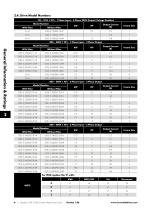
2.4. Drive Model Numbers 110 - 115V ± 10% - 1 Phase Input - 3 Phase 230V Output (Voltage Doubler) 6 | Optidrive ODE-3 IP66 Outdoor Rated User Guide | Version 1.26
Open the catalog to page 6
■ The Optidrive should be mounted in a vertical position only, on a flat, flame resistant, vibration free mounting using the integral mounting holes. ■ Do not mount flammable material close to the Optidrive. ■ Ensure that the minimum cooling air gaps, as detailed in section 3.4. Guidelines for mounting on page 8. ■ Ensure that the ambient temperature range does not exceed the permissible limits for the Optidrive given in section 10.1. Environmental on page 53. Refer to section 10.5. Additional Information for UL Compliance on page 55 for Additional Information for UL Compliance. Mounting Bolts...
Open the catalog to page 7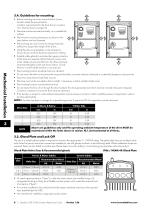
■ Before mounting the drive, ensure that the chosen location meets the environmental condition requirements for the drive shown in section 10.1. Environmental on page 53. ■ The drive must be mounted vertically, on a suitable flat surface. ■ The minimum mounting clearances as shown in the table below must be observed. ■ The mounting site and chosen mountings should be sufficient to support the weight of the drives. ■ Using the drive as a template, or the dimensions shown above, mark the locations required for drilling. ■ Suitable cable glands to maintain the ingress protection of the drive are...
Open the catalog to page 8
Mains switch-disconnector Lock Off On the switched models the mains switch-disconnector can be locked in the 'Off' position using a 20mm standard shackle padlock (not supplied). To access the connection terminals, the drive front cover needs to be removed as shown. Removing the screws on the front of the product allows access to the connection terminals, as shown below. The drive should be included within the scheduled maintenance program so that the installation maintains a suitable operating environment, this should include: ■ Ambient temperature is at or below that set out in section 10.1....
Open the catalog to page 9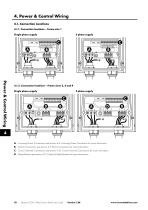
4.1.1. Connection locations - Frame size 1 Power & Control Wiring 4.1.2. Connection locations - Frame sizes 2, 3 and 4 A - Incoming Power Connections see section 4.4. Incoming Power Connection for more information B - Motor Connections see section 4.5. Motor Connection for more information C - Control Terminal Connections see section 4.10. Control Terminal Connections for more information D - Brake Resistor see section 4.13. Optional Brake Resistor for more information 10 | Optidrive ODE-3 IP66 Outdoor Rated User Guide | Version 1.26
Open the catalog to page 10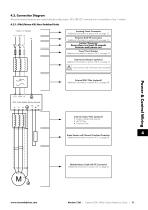
All power terminal locations are marked directly on the product. DC+/BR/DC- terminals are not available on Size 1 models. Incoming Power Connection Additional information in section 4.4. on page 13 Protective Earth PE Connection Additional information in section 4.3. on page 13 Isolator/ Disconnect Ensure there is at least 30 seconds between each power-on! Fuses/Circuit Breaker Additional information in section 4.4.2. on page 13 External Line Reactor (optional) Additional information in section 4.4.3. on page 14 It must not be used with frame size 4 models! External EMC Filter (optional) Additional...
Open the catalog to page 11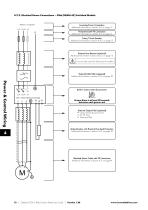
4.2.2. Electrical Power Connections - IP66 (NEMA 4X) Switched Models 12 | Optidrive ODE-3 IP66 Outdoor Rated User Guide | Version 1.26
Open the catalog to page 12All Invertek Drives Ltd. catalogs and technical brochures
 Fieldbus User Guide
62 Pages
 E3 IP66 Indoor User Guide
40 Pages
 E3 IP20 User Guide
40 Pages
 E3 IP66 Quick Start Guide
20 Pages
- Frequency inverter
- 3-phase frequency converter
- Compact frequency inverter
- Digital output frequency inverter
- IP20 frequency inverter
- Motor frequency converter
- Single-phase frequency inverter
- Vector control frequency inverter
- Industrial frequency inverter
- Variable-speed drive AC
- Fieldbus frequency inverter
- Integration frequency inverter
- Induction frequency converter
- Pump frequency inverter
- Wall-mounted frequency inverter
- Fan frequency converter
- Variable-frequency frequency inverter
- Vector-controlled frequency inverter
- Digital display frequency inverter
- Modbus frequency inverter