video corpo

Manual IMON-G100

Manual IMON-G100
1 / 140 PagesView full catalog

Manual IMON-G100

Product catalog summary
Preface: The manual is crucial for the safe and efficient use of the IMON-G100 1.2 Fault Monitor, emphasizing the importance of proper use and adherence to documentation to avoid voiding liability.
Safety: It outlines intended use, technical limits, operator responsibilities, personnel qualifications, and safety instructions for electrical installation, with a focus on environmental protection and proper transport and storage.
Open Source Software: Information on open-source software usage, liability regulations, and a list of used software is provided.
Scope of Delivery: Details the components included with the product.
Technical Data: Lists physical and technological features, including voltage range, power consumption, supported frequencies, and operating temperature range.
Display and Control Elements: Describes the function of various LEDs and control elements on the device.
Connections: Information on connections, including pin assignments for serial interfaces.
Function Overview: Summarizes the main functions, including monitoring, routing, VPN setup, and message dispatch.
Assembly and Commissioning: Provides instructions for assembling and commissioning the device, including safety precautions.
Operating Principle: Details on operating the web interface and accessing it via HTTPS protocol.
Functions: Covers monitoring, basic settings, GSM/GPRS configuration, VPN setup, and system configuration.
Maintenance, Repair, and Troubleshooting: Guidelines for maintaining, troubleshooting, and repairing the device.
Waste Disposal: Information on proper disposal methods and compliance with WEEE regulations.
Declaration of Conformity and FCC Statement: Includes compliance and regulatory information.
Export Restriction and Licenses: Details on export restrictions and licensing, including GNU licenses.
International Safety Instructions: Safety precautions for international use, especially in sensitive areas.
Glossary, Tables, and Diagrams: Provides a glossary of terms and lists of tables and diagrams included in the manual.
General Information: Outlines delivery and purchasing conditions, emphasizing user feedback for improvement.
Warning and Note Markings: Uses specific symbols to indicate risk levels and important notes.
Manual Formatting and Symbols: Specific formatting and symbols guide users through instructions.
Safety Instructions: Comprehensive guidelines for safe product operation, specifying intended and prohibited uses.
Transport and Storage Instructions: Instructions for protecting the product during transport and storage.
Product Markings: Various markings, including CE and UL, are explained.
Environmental Protection: Guidelines for disposing of the product and packaging according to environmental regulations.
Electrical Installation Safety: Electrical connections must be made by authorized personnel.
Open Source Software Usage: Information on open-source software licenses and usage.
Scope of Delivery: Lists included components and advises checking for missing or damaged parts.
Technical Specifications: Detailed specifications, including voltage, power consumption, and supported frequencies.
Technological Features: Includes Ethernet and RS232 interfaces, SIM card reader, and SMS dispatch capabilities.
Display and Control Elements: Describes LEDs and control elements on the front panel.
Connections: Details connections for Siemens LOGO!, Ethernet, and serial interfaces.
Function Overview: Describes monitoring capabilities, routing, VPN setup, and message dispatch.
Sandbox and Debugging Tools: Describes a configurable sandbox and debugging tools for network analysis.
MCIP Protocol: Allows querying and setting objects via TCP/IP.
Assembly Instructions: Detailed instructions for mounting and connecting the device.
Commissioning: Steps for inserting a SIM card, connecting antennas, and configuring the device.
Operating Principle: Operated via a web-based interface with guidance on secure access.
Functions: Covers monitoring capabilities and basic settings configuration.
Virtual Network Configuration: Instructions for configuring virtual network addresses and security settings.
Static Route Configuration: Defines routes for data packet forwarding.
Host Name Configuration: Specifies host and domain names and creates a host table.
MAC Filter Configuration: Enables MAC filtering for network security.
Access Protection via Radius Server: Protects access using a Radius server.
CLI Access Configuration: Configures CLI access with authentication options.
GSM/GPRS Configuration: Configures mobile network login and network selection.
Dial-In Configuration: Configures the device as a dial-in server for remote access.
Automatic Callback: Configures automatic callback for predefined numbers.
Routing Configuration: Defines routes and NAT settings for data packet forwarding.
Port Forwarding Configuration: Configures port forwarding rules for directing WAN packets.
Exposed Host Definition: Configures an exposed host for diagnostic purposes.
VPN Configuration: Supports OpenVPN, PPTP, IPsec, and GRE connections for secure data transmission.
OpenVPN Server Setup: Configures OpenVPN server settings and authentication methods.
Authentication and Security: Describes authentication methods for OpenVPN.
Advanced Configuration Options: Additional settings for VPN performance and security.
OpenVPN Configuration: Steps for setting up an OpenVPN connection.
OpenVPN Client Setup: Configures the device as an OpenVPN client.
PPTP General: Describes PPTP configuration and security recommendations.
PPTP Server Setup: Configures the device to support PPTP clients.
PPTP Client Setup: Configures PPTP client settings.
Overview: Instructions for configuring network protocols and settings.
PPTP Configuration: Details on entering credentials and encryption levels.
IPsec Setup: Configures secure VPN connections with IPsec.
GRE Tunnel Configuration: Configures GRE tunnels for data transmission.
Serial Ethernet Gateway: Enables communication with serial devices via the network.
IMON-G100 1.2 Functions Overview: Describes connection management and serial Ethernet gateway configuration.
Modem Emulator: Emulates a modem using AT commands.
Message Dispatch Configuration: Configures email, SMS, and SNMP trap dispatch based on events.
SMS Command Receipt: Configures SMS command receipt with optional password protection.
SMS Command Configuration: Details syntax and supported commands for SMS control.
Configuration via Web Interface: Enables SMS receipt and acknowledgment options.
Email Dispatch Configuration: Configures email dispatch based on events.
SMS Dispatch Configuration: Configures SMS dispatch with character limits.
SNMP Trap Dispatch Configuration: Configures SNMP trap dispatch settings.
Server Services: Describes DNS forwarding, dynamic DNS updates, DHCP server setup, and router advertiser configuration.
IMON-G100 1.2 Technical Document Summary: Summarizes key configurations and functions of the device.
1. Proxy Server Configuration: Configures proxy server settings for HTTP and HTTPS protocols.
2. URL Filter Configuration: Restricts access to specific URLs from the internal network.
3. IPT Configuration: Configures the device as an IPT slave for data transfer.
4. SNMP Agent Configuration: Configures SNMP agent settings for parameter reading.
5. MCIP Configuration: Configures MCIP for exchanging short telegrams.
6. System Configuration: Displays system data and configures time settings.
7. Reset and Update: Describes reset and update procedures for the device.
Firmware Update Procedure: Steps for updating the firmware, emphasizing stable connection and power supply.
Configuration File Upload: Describes uploading configuration files to replace current settings.
Configuration File Download: Describes downloading configuration and log files.
Sandbox Functionality: Describes programmable sandbox for running additional programs.
Debugging Tools: Describes tools for network troubleshooting.
Maintenance and Troubleshooting: Provides maintenance-free guidelines and troubleshooting resources.
Waste Disposal: Guidelines for disposing of legacy systems in compliance with regulations.
Declaration of Conformity: Compliance with EU directives and electromagnetic exposure standards.
FCC Compliance and Antenna Usage: Specifies antenna usage guidelines and FCC compliance.
Export Restrictions: Outlines export restrictions for chipsets and encryption technology.
Licenses: Details software licenses, including GNU GPL, and terms for distribution and modification.
License Overview: Outlines licensing terms for a software library.
Key Sections: Describes distribution requirements, combined libraries, license acceptance, and legal restrictions.
Other Licenses: Information about licenses related to OpenVPN, LZO, and OpenSSL.
License and Acknowledgements: Licensing terms for cryptographic software and Windows-specific code.
Disclaimer: Software is provided "as is" without warranties.
International Safety Instructions: Safety precautions for using cellular terminals in sensitive areas.
Glossary: Definitions of key terms related to telecommunications and networking.
Tables and Diagrams: Includes tables and diagrams detailing features and configurations.
See more

Catalog excerpts

Manual IMON-G100-3

Copyright © July 2016 INSYS MICROELECTRONICS GmbH Any duplication of this manual is prohibited. All rights on this documentation and the devices are with INSYS MICROELECTRONICS GmbH Regensburg. Trademarks The use of a trademark not shown below is not an indication that it is freely available for use. MNP is a registered trademark of Microcom Inc. IBM PC, AT, XT are registered trademarks of International Business Machine Corporation. INSYS®, VCom®, e-Mobility LSG® and e-Mobility PLC® are registered trademarks of INSYS MICROELECTRONICS GmbH. Windows™ is a registered trademark of Microsoft Corporation. Linux...

 Open the catalog to page 3

Manual IMON-G100-7

This manual allows for the safe and efficient use of the product. The manual is part of the product and must always be stored accessible for installation, commissioning and operating personnel. Defects Liability Terms A usage not according to the intended purpose, an ignorance of this documentation, the use of insufficiently qualified personnel as well as unauthorised modifications exclude the liability of the manufacturer for damages resulting from this. The liability of the manufacturer ceases to exist. The regulations of our Delivery and Purchasing Conditions are effective. These can be found...

 Open the catalog to page 7
Manual IMON-G100-8

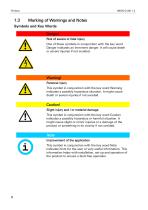
Marking of Warnings and Notes Symbols and Key Words Danger! Risk of severe or fatal injury One of these symbols in conjunction with the key word Danger indicates an imminent danger. It will cause death or severe injuries if not avoided. Warning! Personal injury This symbol in conjunction with the key word Warning indicates a possibly hazardous situation. It might cause death or severe injuries if not avoided. Caution! Slight injury and / or material damage This symbol in conjunction with the key word Caution indicates a possibly hazardous or harmful situation. It might cause slight or minor injuries...

 Open the catalog to page 8
Manual IMON-G100-9

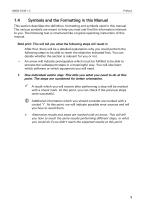
1.4 Symbols and the Formatting in this Manual This section describes the definition, formatting and symbols used in this manual. The various symbols are meant to help you read and find the information relevant to you. The following text is structured like a typical operating instruction of this manual. Bold print: This will tell you what the following steps will result in After that, there will be a detailed explanation why you could perform the following steps to be able to reach the objective indicated first. You can decide whether the section is relevant for you or not. ■■■* An arrow will...

 Open the catalog to page 9
Manual IMON-G100-10

2 Safety The Safety section provides an overview about the safety instructions, which must be observed for the operation of the product. The product is constructed according to the currently valid state-of-the-art technology and reliable in operation. It has been checked and left the factory in flawless condition concerning safety. In order to maintain this condition during the service life, the instructions of the valid publications and certificates must be observed and followed. It is necessary to adhere to the general safety instructions must when operating the product. The descriptions of...

 Open the catalog to page 10

Manual IMON-G100-11

2.2 Permissible Technical Limits The product is only intended for the use within the permissible technical limits specified in the data sheets. The following permissible limits must be observed: • The ambient temperature limits must not be fallen below or exceeded. • The supply voltage range must not be fallen below or exceeded. • The maximum humidity must not be exceeded and condensate formation must be prevented. • The maximum switching voltage and the maximum switching current load must not be exceeded. • The maximum input voltage and the maximum input current must not be exceeded. 2.3 Responsibilities...

 Open the catalog to page 11
Manual IMON-G100-12

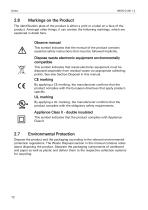
2.6 Markings on the Product The identification plate of the product is either a print or a label on a face of the product. Amongst other things, it can contain the following markings, which are explained in detail here. Observe manual This symbol indicates that the manual of the product contains essential safety instructions that must be followed implicitly. Dispose waste electronic equipment environmentally compatible This symbol indicates that waste electronic equipment must be disposed separately from residual waste via appropriate collecting points. See also Section Disposal in this manual. CE...

 Open the catalog to page 12
Manual IMON-G100-13

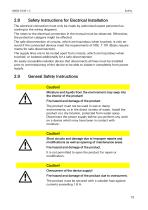
2.8 Safety Instructions for Electrical Installation The electrical connection must only be made by authorised expert personnel according to the wiring diagrams. The notes to the electrical connection in the manual must be observed. Otherwise, the protection category might be affected. The safe disconnection of circuits, which are hazardous when touched, is only ensured if the connected devices meet the requirements of VDE T.101 (Basic requirements for safe disconnection). The supply lines are to be routed apart from circuits, which are hazardous when touched, or isolated additionally for a safe...

 Open the catalog to page 13
Manual IMON-G100-14

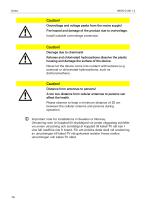
Caution! Overvoltage and voltage peaks from the mains supply! Fire hazard and damage of the product due to overvoltage. Install suitable overvoltage protection. Caution! Damage due to chemicals! Ketones and chlorinated hydrocarbons dissolve the plastic housing and damage the surface of the device. Never let the device come into contact with ketones (e.g. acetone) or chlorinated hydrocarbons, such as dichloromethane. Caution! Distance from antennas to persons! A too low distance from cellular antennas to persons can affect the health. Please observe to keep a minimum distance of 20 cm between...

 Open the catalog to page 14
Manual IMON-G100-15

Using Open Source Software Using Open Source Software General Information Our product IMON-G100 1.2 contains, amongst others, so-called open-source software that is provided by third parties and has been published for free public use. The open-source software is subject to special open-source software licenses and the copyright of third parties. Basically, each customer can use the open-source software freely in compliance with the licensing terms of the respective producers. The rights of the customer to use the open-source software beyond the purpose of our product are regulated in detail by...

 Open the catalog to page 15
*Prices are pre-tax. They exclude delivery charges and customs duties and do not include additional charges for installation or activation options. Prices are indicative only and may vary by country, with changes to the cost of raw materials and exchange rates.