


- Company
- Products
- Catalogs
- News & Trends
- Exhibitions
DIC Replay 2D Digital Image Correlation Software
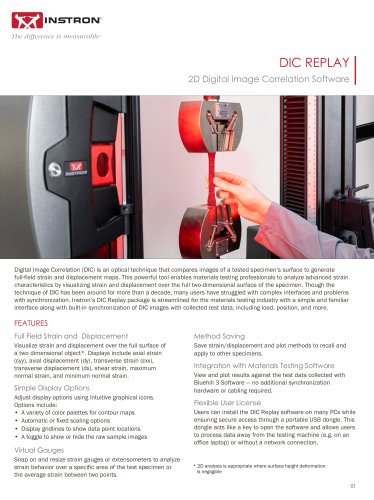
DIC Replay 2D Digital Image Correlation Software
Digital Image Correlation (DIC) is an optical technique used to generate full-field strain and displacement maps by comparing images of a specimen's surface. Instron's DIC Replay package offers a streamlined interface for the materials testing industry, integrating synchronization of DIC images with test data such as load and position.
- Method Saving: Save and apply strain/displacement methods to other specimens.
- Integration: Synchronize with Bluehill 3 Software without additional hardware.
- User License: Install on multiple PCs with secure access via a USB dongle.
- Full Field Visualization: Display strain and displacement over a 2D surface, including various strain types.
- Display Options: Intuitive graphical icons for adjusting display settings.
- Virtual Gauges: Analyze strain behavior over specific areas with virtual gauges.
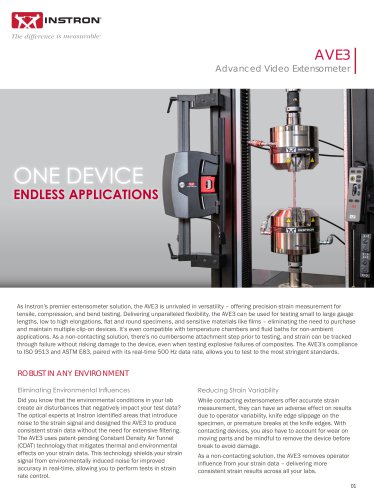
The DIC Replay Software is a self-contained 2D DIC package that works in post-processing mode, using images and calibration data from Instron's Advanced Video Extensometer (AVE). It features a user-friendly interface with only three screens for sorting, analyzing, and plotting results.
- Visualizing material behavior and checking specimen alignment.
- Ensuring compliance with standards by identifying localized strain.
- Analyzing strain and displacement on flat surfaces where traditional extensometers are impractical.
- Detecting cracks and observing tension and compression strain behavior.
- Field of View (FOV): Ranges from 100 mm to 840 mm.
- Lens Focal Length: Varies from 6 mm to 35 mm.
- Virtual Extensometer Accuracy: ±1 to ±7 µm depending on FOV.
- Virtual Strain Gage Accuracy: ±140 to ±1160 µε depending on FOV.
- Compatible with Instron AVE2, AVE3, and Bluehill Universal Software.
- Minimum PC specifications include Intel i3 @ 3.0GHz, 16GB RAM, Windows 10 or 11 (64 bit).
- Image collection rate is user-defined up to 50 Hz.
- Speckle Only: Post-test analysis using DIC Replay Software.
- Real-time Strain: Traditional tests capturing average strain in real-time.
- Mixed Mode: Real-time average strain capture with post-test DIC processing.
Catalog excerpts
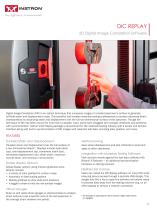
Digital Image Correlation (DIC) is an optical technique that compares images of a tested specimen s surface to generate full-field strain and displacement maps. This powerful tool enables materials testing professionals to analyze advanced strain characteristics by visualizing strain and displacement over the full two-dimensional surface of the specimen. Though the technique of DIC has been around for more than a decade, many users have struggled with complex interfaces and problems with synchronization. Instron's DIC Replay package is streamlined for the materials testing industry with a simple and familiar interface along with built-in synchronization of DIC images with collected test data, including load, position, and more. FEATURES Full Field Strain and Displacement Visualize strain and displacement over the full surface of a two dimensional object*. Displays include axial strain (eyy), axial displacement (dy), transverse strain (exx), transverse displacement (dx), shear strain, maximum normal strain, and minimum normal strain. Simple Display Options Adjust display options using intuitive graphical icons. Options include: • A variety of color palettes for contour maps • Automatic or fixed scaling options • Display gridlines to show data point locations • A toggle to show or hide the raw sample images Virtual Gauges Snap on and resize strain gauges or extensometers to analyze strain behavior over a specific area of the test specimen or the average strain between two points. Method Saving Save strain/displacement and plot methods to recall and apply to other specimens. Integration with Materials Testing Software View and plot results against the test data collected with Bluehill 3 Software — no additional synchronization hardware or cabling required. Flexible User License Users can install the DIC Replay software on many PCs while ensuring secure access through a portable USB dongle. This dongle acts like a key to open the software and allows users to process data away from the testing machine (e.g. on an office laptop) or without a network connection. * 2D analysis is appropriate where surface height deformation is negligible
Open the catalog to page 1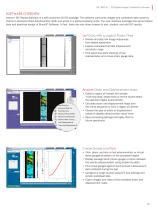
DIC REPLAY | 2D Digital Image Correlation Software Instron® DIC Replay Software is a self-contained 2D DIC package. The software consumes images and calibration data saved by Instron's Advanced Video Extensometer (AVE) and works in a post-processing mode. The user interface leverages the same tabbed style and graphical design of Bluehill® Software. In fact, there are only three screens to sort, analyze, and plot DIC results. v\xial Strain £yy Transverse Strain £xx N Shear Strain £xy Maximum Normal Strain Minimum Normal Strain Poisson's Ratio -£xx/£yy Axial Displacement dy Transverse Displacement...
Open the catalog to page 2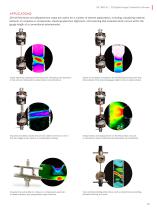
DIC REPLAY | 2D Digital Image Correlation Software APPLICATIONS 2D full-field strain and displacement maps are useful for a number of diverse applications, including: visualizing material behavior on coupons or components, checking specimen alignment, and ensuring that localized strain occurs within the gauge length of a conventional extensometer. Check specimen preparation techniques by comparing one specimen to the next and looking for localized strain concentrations. Check for standards compliance by identifying localized strain that falls outside of the standard gauge length or clip-on extensometer....
Open the catalog to page 3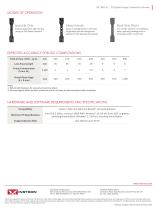
DIC REPLAY | 2D Digital Image Correlation Software D Turn off DIC mode to run traditional D tests (capturing average axial or transverse strain in real time) 1. Refer to AVE literature for accuracy of real-time strain. 2. Accuracy figures reflect ambient conditions and do not apply to tests conducted within chambers. Minimum PC Specifications Image Collection Rate Instron® AVE2 and AVE3 and Bluehill® Universal Software Intel i3 @ 3.0GHz, minimum 16GB RAM, Windows® 10 (64 bit) Build 1607 or greater, excluding Home Edition. Windows® 11 (64 bit), excluding Home Edition. IN RON Worldwide Headquarters...
Open the catalog to page 4All Instron catalogs and technical brochures
 CEAST 9000 Series
20 Pages
 MFi Series Melt Flow Testers
16 Pages
 Automated Testing Systems
20 Pages
 Composites Testing Solutions
20 Pages
 DX MODELS
3 Pages
 2580 Series Load Cells
3 Pages
 HDX Models
2 Pages
 DAMPER TEST SYSTEMS BI-7080
2 Pages
 HIGH STRAIN RATE VHS SYSTEM
4 Pages
 Automated XY Testing System
3 Pages
 CEAST 9400 Series
20 Pages
 COMPRESSION PLATENS
2 Pages
 LOW CYCLE FATIGUE
11 Pages
 ElectroPuls™
10 Pages
 Pneumatic Side-Action Grips
4 Pages
 HDT AND VICAT TESTING SYSTEMS
16 Pages
 AlignPRO™ Alignment System
2 Pages
 CEAST Melt Flow Series
20 Pages
 CEAST SmartRheo Series
16 Pages





Archived catalogs
 CEAST HDT Vicat Series
9 Pages
- Valve
- Control valve
- Kiln
- Actuator
- Instron load cell
- Chamber kiln
- Test cabinet
- Linear actuator
- Automation software solution
- Management software solution
- Positioning table
- Electric valve
- Analysis software solution
- Test stand
- Process software
- Instron tension/compression load cell
- Temperature test chamber
- Real-time software
- Instron Windows software