
- Catalogs
- Industrial Scientific
- iAssign® Technology (Specifications)


- Company
- Products
- Catalogs
- News & Trends
- Exhibitions
iAssign® Technology (Specifications)

iAssign® Technology (Specifications)
The document provides a detailed specification sheet for iAssign Beacons and Tags, which enhance the functionality of Ventis Pro Series Multi-Gas Monitors by recording location and user data in real-time. This technology helps in identifying who was exposed to gas hazards and where, thus improving safety and compliance.
Key Features
- Real-Time Location Tracking: iAssign Beacons broadcast site identifiers and permission levels, allowing automatic location recording.
- Data Logging: Enables the addition of worker and location names to data logs, ensuring compliance and accurate record-keeping.
- Proximity Alerts: Alerts workers when entering restricted areas, reducing the need for additional devices or signage.
- Easy Installation: Beacons can be configured for coverage areas from 1 to 30 meters and are safe for indoor or outdoor use.
iAssign Tags and Beacons
- Tags: Allow workers to assign their names to gas monitors with a simple tap.
- Beacons: Automatically assign location names to monitors based on proximity.
Specifications
- Beacon Specifications: Part Number 18109491, run time of four years, IP65 ingress protection, temperature range from -40°C to 50°C, humidity range 0% to 100% RH, dimensions 125 x 85 x 43 mm, weight 250 g, Bluetooth and NFC technology.
- Tag Specifications: Available in various types (Standard, Waterproof, All Weather, Keychain) with different thicknesses and adhesive options.
Certifications
- ATEX, c UL us, IECEx, and wireless certifications including FCC Part 15 and IC.
Installation and Usage
- Download the iAssign App from the Google Play store.
- Program Tags and Beacons with names, location ranges, and access levels.
- Distribute tags and install beacons across the facility.
- Begin tracking gas detector user and location information.
Contact Information
Contact details for Americas, Asia Pacific, and EMEA regions are provided for further assistance.
Catalog excerpts

Gas detectors record basic information about gas hazards, but they don't help you understand who was exposed and where. iAssign® Beacons continuously broadcast a programmable site identifier and permission level, which enables Ventis® Pro Series Multi-Gas Monitors to automatically record locations in real time. iAssign Beacons allow you to send out real-time, site-specific reminders to your team, set access permission reminders, and automatically track data logged events, making it easier to analyze your data and prevent hazards in the future. Spend less time investigating problems by knowing who and where • Locate problem sites across your facility • Add worker and location names to your data logs • Stay compliant with clear and accurate record keeping • Collect consistent site recordings when technology like GPS is not available Keep workers out of restricted areas • Alert workers when entering restricted areas with simple-to-program proximity alarms • Reduce the need for separate devices, extra signage, or physical barriers to manage worker clearances Install and maintain iAssign Beacons with ease • Configure the coverage areas of your beacons from 1 to 30 m • Install intrinsically safe beacons in indoor or outdoor locations iAssign Tags - Allow workers to assign their names to their gas monitors with a simple tap. iAssign Beacons - Automatically assign location names to Ventis Pro Series Multi-Gas Monitors based on proximity, helping safety managers see where hazards occurred and who was involved. LOGGED INFORMATION WITHOUT iASSIGN Using tags and beacons, anyone reviewing the data can easily date time s/n gas type avg. reading duration see who had the instrument and where the measurements 3/23 2:09 pm 100458 H2S High Alarm 28 ppm 3 min, 27 sec were taken, making the information more actionable. LOGGED INFORMATION WITH iASSIGN INDUSTRIAL SCIENTIFIC
Open the catalog to page 1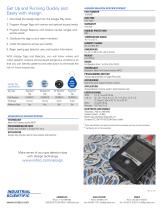
Get Up and Running Quickly and Easily with iAssign 1. Download the iAssign App from the Google Play store 2. Program iAssign Tags with names and optional access levels 3. Program iAssign Beacons with location names, ranges, and access levels 4. Distribute the tags to your team members 5. Install the beacons across your facility 6. Begin seeing gas detector user and location information With iAssign Tags and Beacons, you will know where and when specific workers encountered dangerous conditions so that you can identify patterns and take action to eliminate the risk of future exposures. Tag Type...
Open the catalog to page 2All Industrial Scientific catalogs and technical brochures
 Ventis Pro5 - Spec sheet
2 Pages
 Radius™ BZ1
8 Pages
 Radius BZ1 - Spec sheet
2 Pages
 Ventis® Pro5 - Brochure
8 Pages
 Ventis® MX4 - Spec sheet
4 Pages
 Tango™ TX1 - Spec sheet
1 Page
 General brochure
30 Pages
 T40 II Rattler - Brochure
8 Pages
 Tango® TX2 - Spec sheet
1 Page
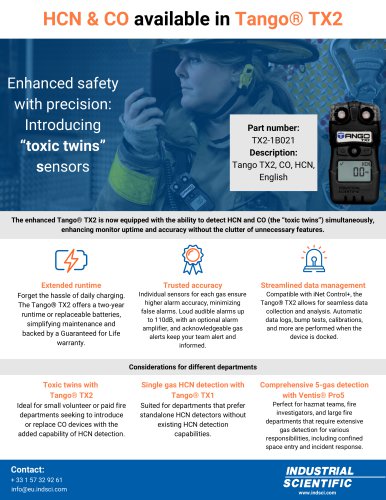 Flyer - Tango TX2 HCN CO
1 Page
 T-Dock - Spec sheet
1 Page
 T40II & T-Dock - Brochure
12 Pages
 SAFER One™
2 Pages
 Rental
1 Page
 iNet - Solutions overview
2 Pages
 DSX (Specifications)
1 Page
 MX6 iBrid®
4 Pages
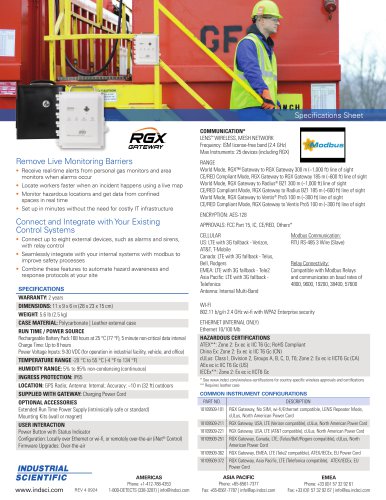



- Automation software solution
- Management software solution
- Analysis software solution
- Real-time software
- Cloud-based software
- Monitoring software solution
- Industrial software
- Communication gateway
- Visualization software solution
- Gas sensor
- Automated software
- Industrial detector
- Monitoring detector
- Wireless gateway
- Industrial Scientific portable detector
- Infrared detector
- Wireless module
- Modeling software
- Industrial Scientific detector with alarm