
- Catalogs
- Inbolt SAS
- GuideNOW

GuideNOW
GuideNOW
- GuideNOW: A real-time robot guidance solution using 3D vision, comprising a 3D camera, Inbrain AI for workpiece localization, and GuideNOW Studio for training. It enhances automation flexibility and reduces costs by adapting to various environments.
- Components: Includes Intel Realsense d435 camera, HP ProDesk 405 G8 controller, USB and ethernet cables, software licenses, mounts for different robots, and a calibration board.
- Communication: The camera connects to the controller via USB, and the robot connects via ethernet.
- Features: Utilizes active depth stereo technology, supports model-based part detection, and offers a web application for scene definition and performance testing.
- Benefits: Simplifies automation, enhances flexibility, and improves efficiency by reducing cycle time and enabling automation of moving lines.
- Use Cases: Applicable in fixed stations and moving lines for processes like assembly, finishing operations, and handling.
- Robot Compatibility: Supports Universal Robots, with future compatibility for ABB and FANUC. Communication via RTDE protocol.
- Hardware Setup: Optimal camera positioning is crucial for accuracy. The camera should be fixed securely to avoid recalibration.
- GuideNOW Studio: A web application for project setup, CAD model visualization, and algorithm training.
- Inbrain Performance: Offers high accuracy and low latency in dynamic environments. Optimal camera distance is 30 cm.
- Detailed Performance: Includes acquisition, detection, and refresh times, with specific metrics for static and dynamic precision.
- Warnings: Current limitations include lack of integration for robot physical limits, collision detection, and singularity detection. Camera recalibration is not possible during active processes.
Catalog excerpts

0 inbolt \ GuideNOW Technical Specifications June 2023
Open the catalog to page 1
II. Features, benefits and uses cases 5 B. Basic runtime communication diagram 8 D. GuideNOW Studio - Web application 8 B. Inbrain detailed performance 9 2. Catch up time (for moving parts only) 10 3. Dynamic precision (for moving parts only) 11 GuideNOW Specsheet - 06/2023 All information contained in this document is confidential and is the propriety of inbolt. Any distribution, use or communication is not authorized without prior agreement.
Open the catalog to page 2
GuideNOW Specsheet - 06/2023 All information contained in this document is confidential and is the propriety of inbolt. Any distribution, use or communication is not authorized without prior agreement.
Open the catalog to page 3
A. GuideNOW GuideNOW is a real-time robot guidance solution based on 3D vision. It comprises a 3D camera mounted on the robot, Inbrain, our real-time workpiece localization AI: Inbrain, and GuideNOW Studio, a web-app for Inbrain training. Inbrain is the most efficient 3D matching vision technology currently available. Its AI-powered system can quickly process large amounts of 3D data and determine the position and orientation of a workpiece. The technology adapts the robot's trajectory in real-time and our proprietary software is 100 times faster than leading algorithms, and can work with any...
Open the catalog to page 4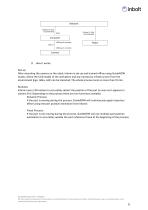
D. How it works Set-up After mounting the camera on the robot, Inbrain is set-up and trained offline using GuideNOW studio, where the CAD model of the workpiece and any necessary infrastructure from the environment (jigs, table, cell) can be imported. The whole process lasts no more than 15 min. Runtime: Inbrain uses a 3D camera to accurately detect the position of the part as soon as it appears in camera FoV. Depending on the process there are two functions available. Dynamic Process: If the part is moving during the process, GuideNOW will continuously apply trajectory offset using the part...
Open the catalog to page 5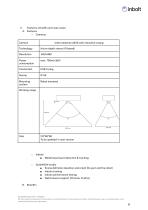
II. Features, benefits and uses cases A. Features ○ Cameras Camera Intel realsense d435 with industrial casing Active depth stereo (IR based) Power consumption Mounting system Robot mounted Working range 110*60*60 To be updated in next version Inbrain ■ Model based part detection & tracking GuideNOW studio ■ Scene definition (position and orient the part and the robot) ■ Inbrain training ■ Inbrain performance testing ■ Web browser support (Chrome, Firefox) GuideNOW Specsheet - 06/2023 All information contained in this document is confidential and is the propriety of inbolt. Any distribution,...
Open the catalog to page 6
The Inbolt real-time guidance system provides many benefits to the end user. ○ Reduces automation complexity: the vision system is easy to program by the end-user, and does not require additional lighting systems. Also, thanks to trajectory realignment there is no need anymore for correcting the trajectories inline after OLP. ○ Improves flexibility: no jigs, custom tooling are needed anymore. Therefore it is now possible to work on many different products on a same line and to rapidly recondition cells to launch new references. For customers with a large diversity of parts, automation is now...
Open the catalog to page 7
B. Basic runtime communication diagram Note: regarding UR, the communication between the GuideNOW Controller and UR will be through an URcap. GuideNOW Camera Point clouds GuideNOW Controller Part position coordinates (6 DoF) Robot Controller GuideNOW Specsheet - 06/2023 All information contained in this document is confidential and is the propriety of inbolt. Any distribution, use or communication is not authorized without prior agreement.
Open the catalog to page 8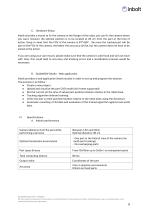
C. Hardware Setup Inbolt provides a mount to fix the camera to the flange of the robot, you can fix the camera where you want, however the optimal position is to be located at 20 cm from the part at the time of action. Keep in mind that the FOV of the camera is 87°x58°, the more the tracked part will be part of the FOV of the camera, the better the accuracy will be, but the camera does not have to be aimed at the action. If you are using your own mount, please make sure that the camera is well fixed and will not move with time, this could lead to accuracy and tracking errors and a recalibration...
Open the catalog to page 9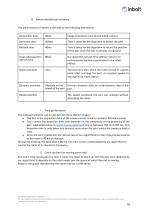
B. Inbrain detailed performance The performance of Inbrain is defined by the following information: 1. Time performance The time performance can be divided into three distinct stages: • The first is the acquisition time of the camera which remains constant: 40 milliseconds. • Then comes the detection time, this depends on the complexity of the geometry of the part (explained below in performance detection) and is between 150 and 250 ms. This detection time is only taken into account once when the part enters the camera's field of view. • Once the part is detected, the refresh rate of our algorithms...
Open the catalog to page 10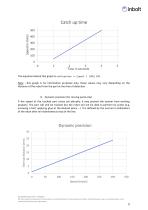
The equation behind this graph is ݑаݑΰݑpݑТĎ ݑ°ݑ ݰݑpݑְݑڰݑ = (Ұݑ0ݑݰݑҰݑҰݑ + 100)/ 150. Note : this graph is for information purposes only, these values may vary depending on the distance of the robot from the part at the time of detection 3. Dynamic precision (for moving parts only) If the speed of the tracked part varies too abruptly, it may prevent the system from working properly. The part will still be tracked but the robot will not be able to perform its action (e.g. screwing a bolt, applying glue at the desired place ...). It is defined by the overrun in millimeters of the robot after an instantaneous...
Open the catalog to page 11
Note : Once the speed variation is finished, the robot catches up with the part and the process can continue without any problem. While the part is continuously moving, accuracy is 1mm. If the line stops with a deceleration lower than 100 mm/s2, the overrun distance can be considered null. 4. Detection performance The detection performance depends on the geometry of the part, as well as on the quality of the CAD model. ● The geometry: the geometry of the part should have as few symmetries as possible. Moreover, the part must have a minimum dimension of 30 cm. The more the part has geometric features,...
Open the catalog to page 12