

- Company
- Products
- Catalogs
- News & Trends
- Exhibitions
WIJI App
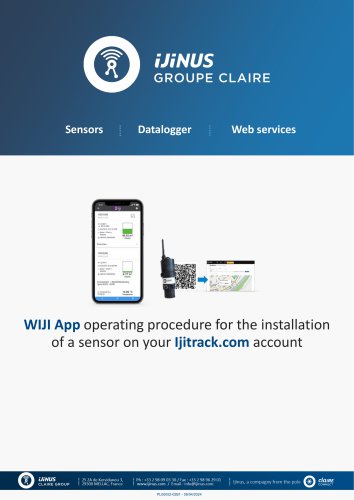
WIJI App
This document outlines the operating procedure for installing a sensor using the WIJI App on your Ijitrack.com account. It covers the integration of sensors, data visualization, and real-time alarm notifications.
Quick Integration in Ijitrack
To quickly configure your sensor, scan the QR code on the product label. You can edit the group it belongs to and use your mobile GPS to place it on the map.
Data Visualization
The app allows you to add sensors to your Ijitrack account and displays the latest data sent by the sensors, configured alarms, and pictures taken during installation.
Real-Time Alarm Notifications
Notifications appear in real-time, even if the app is closed. Alerts are managed similarly to the web monitoring platform Ijitrack.
Pre-requisites
Ensure that the Ijinus sensors have connected to IJITRACK at least once using the button in Avelour.
Installation Procedure
- Download the WijiApp: Available on Android or iOS stores. Download freely from the App Store or Google Play, or scan the QR code.
- Account Connection: After ordering Ijitrack.com access, you will receive an email with registration and login details. Use these to log in to the Wiji application.
- Sensor or Logger Selection: Choose 'Configure Device' from the main screen. Use your phone's camera to scan the QR code on the sensor or logger label. Permission may be required to use the camera.
- Sensor Configuration and Installation Site: The app confirms sensor recognition and data sent to the Ijitrack.com server.
- Configuration Upload: Confirm that your configuration can be sent to the server. Use the blue button to complete the upload. Data can be viewed in detail by parameter in table or graph view. Indicate the sensor's name and group or sub-group. A photo of the installation site is recommended for future reference.
Catalog excerpts
iJiNUSGROUPE CLAIRE Sensors Datalogger Web services WIJI App operating procedure for the installation of a sensor on your Ijitrack.com account 25 ZA de Kervidanou 3, 29300 MELLAC, France Ijinus, a compagny from the pole claiRE CONNECT
Open the catalog to page 1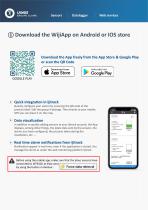
® Download the WijiApp on Android or IOS store Download the App freely from the App Store & Google Play or scan the QR Code GOOGLE PLAY > Quick integration in Ijitrack Quickly configure your sensor by scanning the QR code of the product label. Edit the group it belongs. Then thanks to your mobile GPS you can place it on the map. In addition to quickly adding sensors to your Ijitrack account, the App displays, among other things, the latest data sent by the sensors, the alarms you have configured, the pictures taken during the installation, etc. ... > Real time alarm notifications from Ijitrack...
Open the catalog to page 2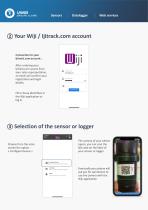
② Your Wiji / Ijitrack.com account Connection to your Ijitrack.com account : After ordering your Ijitrack.com access from your sales representative, an email will confirm your registration and login details. Fill in these identifiers in the Wiji application to log in ③ Selection of the sensor or logger Choose from the main screen the option : « Configure Device » The camera of your phone opens, you can scan the QR code on the label of your sensor or logger Eventually your phone will ask you for permission to use the camera with the Wiji applicat
Open the catalog to page 3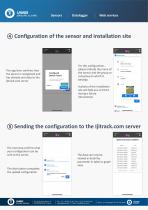
GROUPE CLAIRE 0 Configuration of the sensor and installation site The app then confirms that the sensor is recognised and has already sent data to the Ijitrack.com server Configured Device Found The device you looking for is already configured. For this configuration, please indicate the name of the sensor and the group or sub-group to which it belongs. Water Level sensor The name of the measure point Serial Number A photo of the installation site will help you to find it during a future intervention. Water level sensor LNU06V3 The next step confirms that your configuration can be sent to the...
Open the catalog to page 4All IJINUS catalogs and technical brochures
 Environmental applications
28 Pages
 CSCV4 - LSCV4
39 Pages
Archived catalogs

- Flowmeter
- Volume flow monitor
- Liquid flow monitor
- IJINUS data-logger
- Analysis software solution
- Level limit switch
- Windows software
- Liquid level detector
- Temperature datalogger
- Liquid level sensor
- Monitoring software solution
- Pressure probe
- Measurement software
- Interface software
- USB datalogger
- Tilt sensor
- Visualization software solution
- Analog level sensor
- IJINUS wireless data-logger
 鄂公网安备42018502009509号 -