


KW2D SERIES

KW2D SERIES
Catalog excerpts

ø22 SMART RFID READER KW2D SERIES Smart RFID Reader Manage user authority for machines and equipment Control and track access to production sites
Open the catalog to page 1
ø22 KW2D Series Compact and smart design ideal for factory automation environments Mounts on ø22mm panel cut-out * Actual size F ront unit: 43.6 × 43.6mm Panel front height: 9.0mm B ack unit: 40.0 × 40.0mm Depth: 48.5mm Can be used for IC cards, such as employee IDs (*1). *1 Mifare, FeliCa, etc. IP65/67-rated to protect from washdowns and oil spills. Designed to work on metal surfaces often used at factory automation sites. Equipped with an LED easily visible from the side and an auxiliary buzzer, the RFID reader enables visible and audible feedback on operation status. * an be controlled from...
Open the catalog to page 2
Panel Mount RFID Reader Holder feature available for mounting RFID tags * 5 types are available (sold separately). An Ethernet port enhances connection compatibility with host devices • upported protocol: Modbus TCP (server) S * EtherNet/IP and CC-LINK IE FB will be supported soon. With a verification function inside, the verified result can be communicated to the host device as data. V erification result (Success/Error) A uthority level, etc. * If the verification function is not used, a communication error will occur if the result is not sent back to the RFID main unit.
Open the catalog to page 3
Application Examples Manage user authority for machines and devices BEFORE Anyone can operate the machines. Inadvertent operation and setting changes are prevented, reducing equipment malfunctions and failures. Mount the RFID reader on the operation panel of a machine and register the workers in the RFID reader. ID cards can then be used to authenticate each worker. Track entry/exit at work areas BEFORE Do not know if workers are left inside. By recording entry/exit logs, workers can be prevented from being trapped or left behind in a work area. Worker's names are linked to ID cards such as employee...
Open the catalog to page 4
Manage inspection history BEFORE Inspection reports were written by hand. After inspection work, employee ID cards are read and data is recorded. Inspection details are recorded as electronic data and linked to worker data. The time and work details are recorded on a touch panel or PLC to ensure reliable traceability. By connecting with devices such as touch panels and PLCs, the RFID reader can be used for wide variety of applications.
Open the catalog to page 5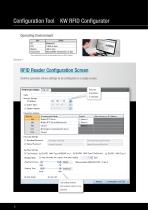
Operating Environment Item * The configuration tool can be downloaded from the IDEC website. RFID Reader Configuration Screen Intuitive operation allows settings to be configured on a single screen. RFID Reader Sett rigs Name: Network Settings IP Address J Subnet Mask: HI Default Gateway: Connection Settings Only the IP address is required. Password Settings Download Password: □| Upload Password: Download Password Upload Password Download Password(Confirm) Upload Password(Confirm) Tag Read Settings IC Tag Standard: y ISO/IEC 14443 Type A(MIFARE etc) Reading Mode: [ Keep ON state for a certain...
Open the catalog to page 6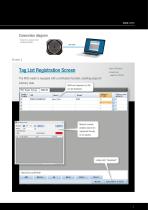
Connection diagram * onnect to a computer when C configuring settings. LAN cable Tag List Registration Screen • Up to 500 items • Import and export as CSV file The RFID reader is equipped with a verification function, enabling output of arbitrary data. ASCII and Japanese (S-JIS) can be displayed. Monitor function enables data to be registered directly to the tag list. Lastly, click "Download"
Open the catalog to page 7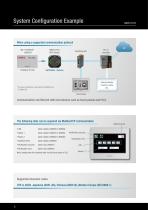
System Configuration Example When using a supported communication protocol UID: 123456789 0ABCDEF KW2D series RFID Reader Verification - Success External device - Inverter, motor, etc. * he same configuration is also used for EtherNet/IP and T CC-LINK IE FB. Touch panel Communication via Ethernet with host devices such as touch panels and PLCs The following data can be acquired via ModbusTCP communication • UID • Authority level • Verification success • Verification error Next, simply enter the required data via the touch panel or PLC. Verification success Verification error UID Name 1, 2 Supported...
Open the catalog to page 8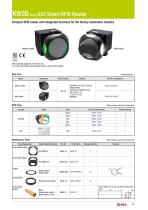
Note: Approvals apply only to the main unit. • For more information about certified products, see the IDEC website. Main Unit When ordering, specify the Ordering No.
Open the catalog to page 9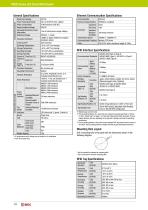
KW2D Series 022 Smart RFID Reader General Specifications Ethernet Communication Specifications Electrical Specifications *1 IP performance and IK ratings are not subject to UL certification. *2 Front of the panel only. RFID Interface Specifications Communication Standards *1 Multiple tags cannot be read. *2 The tag reading distance is a value that was measured using the tags listed in “Names of LSIs in Tested Tags” (on page 2-3 of the User's Manual) that IDEC has tested. The tag reading distance will vary depending on the tag that is actually used and the operating environment. *3 The tag reading...
Open the catalog to page 10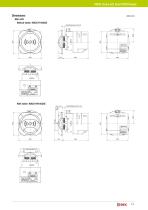
KW2D Series ø22 Smart RFID Reader Main Unit Without holder: KW2D-R100Q4E
Open the catalog to page 11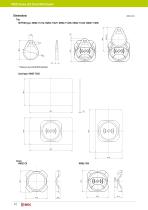
KW2D Series ø22 Smart RFID Reader *1 Minimum size with KEYFOB attached.
Open the catalog to page 12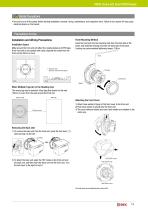
KW2D Series ø22 Smart RFID Reader Safety Precautions • Be sure to turn off the power before starting installation, removal, wiring, maintenance, and inspection work. Failure to turn power off may cause electrical shocks or fire hazard. Precautions for Use Installation and Wiring Precautions Panel Mounting Method Installation Space Metal around the front unit will affect the reading distance of RFID tags. If the front unit is surrounded with metal, separate the metal from the front unit by 20mm or more. Insert the front unit into the mounting hole from the front side of the panel, and install...
Open the catalog to page 13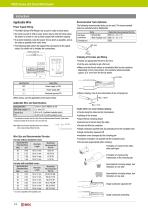
Applicable Wire Power Supply Wiring • The KW2D Series RFID Reader has a push-in style terminal block. • An inrush current of 25A or lower (when input is 24V DC) flows when the power is turned on. Use a power supply with sufficient capacity. • To prevent induction, keep the power line as short as possible, and as far away as possible from motor lines. • The following table shows the signals that correspond to the signal codes. Be careful not to mistake the connections. Recommended Tools (Optional) The following recommended tools can be used. The recommended tools are manufactured by Weidmuller....
Open the catalog to page 14All IDEC catalogs and technical brochures
 MACHINE TOOLS Industry Solutions
28 Pages
 ROBOTICS Industry Solutions
27 Pages
 Relay Selection Guide
16 Pages
 PUSH-IN PRODUCTS
12 Pages
 PRODUCT GUIDE
44 Pages
 HR6S
HR6S32 Pages
 LED-Leuchten: LF2B
6 Pages
 LED Illumination Units
28 Pages
 LED-Leuchten: LF1B-N
4 Pages
 Katalog FL1E
16 Pages
 RS485-Kommunikationsmodul
2 Pages
 Automation Organizer
2 Pages
 Web-Server-Modul
4 Pages
 MicroSmart DC12V
4 Pages
 FT1A SmartAXIS
36 Pages
 RTE/GT3/GE1A/GT5P/GT5Y
68 Pages
 Universalrelais RR/RY/RH/RU
59 Pages
 RJ.S Relays und Sockets
12 Pages
 RV8H-Baureihe
6 Pages
 E-Stop Switches
16 Pages
 XA series
7 Pages
 High Performance
4 Pages
 HG1X
HG1X3 Pages
 FL1E
FL1E4 Pages
 product brochure
6 Pages
 All Product Brochure
6 Pages
 Complete Contactors Catalog
60 Pages
 Complete Terminal Blocks Catalog
22 Pages
 Complete Timer Catalog
68 Pages
 Complete Relay & Socket Catalog
68 Pages
 Complete Display Lights Catalog
44 Pages
 Complete Safety Overview
6 Pages
 Complete Power Supply Catalog
22 Pages
 Complete O/I Catalog
22 Pages
 Complete PLC Catalog
68 Pages



- DC power supply
- AC/DC power supply
- Rectangular housing
- Ethernet switch
- Electric gearmotor
- LED lighting
- Industrial network switch
- Plastic housing
- Single-pole switch
- Windows software
- Cloud-based software
- Push-button switch
- Power supply for industrial applications
- Switched-mode power supply
- Waterproof network switch
- Unmanaged switch
- Photoelectric sensor
- Compact power supply
- Indoor enclosure