


Complete Automation Software Catalog

Complete Automation Software Catalog
This document provides an overview of various automation software tools offered by IDEC, specifically designed for programming and monitoring tasks related to IDEC PLCs and operator interfaces. The tools include WindLDR, WindLGC, WindSRV, WindMSG, and WindO/I-NV2, each serving distinct purposes in automation and sensing applications.
WindLDR is a ladder logic programming tool for IDEC PLCs, featuring online editing, simulation mode, and free lifetime upgrades. It supports analog macro instructions and PID loop configurations, making it suitable for diverse control solutions.
WindLGC is designed for IDEC SmartRelay programming, offering Function Block and Ladder programming options. It focuses on simplicity and professional documentation, with free upgrades available.
WindSRV is an OPC server that facilitates remote data acquisition and monitoring. It supports various connection types, including RS232C, RS485, and Ethernet, and offers tag creation and management for seamless data integration.
WindMSG is a configuration tool for HG1X character displays, featuring an intuitive interface and built-in drivers for easy communication with IDEC and other major PLCs. It is suitable for small applications.
This software provides a configuration tool for OI Touchscreens, featuring drag-and-drop functionality and a library of over 5,000 images for graphical interface creation. It includes security and script functions for enhanced project management.
The document mentions online resources available on the IDEC website, including product information, software demos, part configuration tools, and downloadable manuals.
The document provides a detailed description of the WindO/I-NV2 software, highlighting its features, functionalities, and benefits, emphasizing ease of use and flexibility.
- Debug Function: Allows online monitoring or data changes with the touchscreen.
- Pass-Thru Function: Enables downloading of PLC programs from a PC through the touchscreen for IDEC PLCs.
- Free Lifetime Upgrade: Offers cost and time savings with free upgrades after a one-time purchase.
- Intuitive Programming: Features drag-and-drop functionality, a comprehensive help menu, and a library of over 5,000 images.
- Flexible Screen Display: Supports up to 3,000 base screens and pop-up menus with customizable properties.
- Project Management: Facilitates easy duplication and modification of screens and project settings, with import/export capabilities.
- Extensive Image Library: Includes over 5,000 symbols and supports various image file formats.
- Compatibility: Supports standard WindowsTM fonts and multilingual capabilities.
- Operating Conditions Programming: Simplifies setup with step-by-step wizards.
- Recipe and Alarm Management: Manages parameters, alarm logging, and trend graph creation.
- Script Function: Allows complex process creation with C programming knowledge.
- Security Function: Provides multiple user security levels for project editing and screen/object display.
WindO/I-NV2 is a versatile and user-friendly automation software that enhances the programming and management of IDEC OI Touchscreens, offering significant benefits in terms of functionality, flexibility, and cost-effectiveness.
Catalog excerpts

PLCsOperator InterfacesAutomation SoftwarePower SuppliesSensorsCommunication & Networking Unique ladder logic programming tool designed to program all IDEC PLCs Part Number > Part NumberDescription FC9Y-LP2CDWWindLDR PLC programming software Single Platform for all IDEC PLCs User-friendly Interfaces > WindLDR is an excellent, long-term investment for your control solutions. It programs every IDEC PLC including the OpenNet Controller, MicroSmart and the fastest micro-controller on the market, MicroSmart Pentra. Its adaptable to whatever hardware you need today and down the road. Icon-based toolbars...
Open the catalog to page 2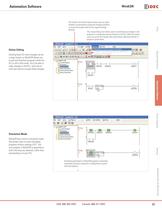
The Confi rm and Cancel options allow users to select whether to permanently accept the changes (Confi rm) or revert the program back to the original settings (Cancel).This unique Debug tool allows users to download any changes in the program to a temporary memory location in the PLC. With this option, users can verify the changes they make before selecting whether to accept or cancel them. PLCsOperator InterfacesAutomation SoftwarePower SuppliesSensorsCommunication & Networking Online Editing > Shutting down for minor changes can be a major hassle, so WindLDR allows you to edit and download...
Open the catalog to page 3
PLCsOperator InterfacesAutomation SoftwarePower SuppliesSensorsCommunication & Networking Analog Macro Setting up analog controls with WindLDR software just got a lot easier. The analog macro instruction allows users to point and select mod- ules, signal and data type in a matter of seconds. And, all of these confi gurations convert into just one ladder line instruction. Simple-to-use PID Confi guring PID loops with WindLDR software is a snap using the built-in PID dialog box. The PID dialog allows users to quickly select and fi ne tune the desired controls without needing to remember each and...
Open the catalog to page 4
Comment Download Settings > PLCsOperator InterfacesAutomation SoftwarePower SuppliesSensorsCommunication & Networking The comment download settings allow users to choose whether to download Tag names, rung comments, custom monitor dialog boxes and fi le names into the MicroSmart Pentra. The biggest advantage of utilizing these settings is that once a program is retrieved from the PLC, all these important parameters will be available. Users can create, save and download the custom monitor dialog into the MicroSmart Pentra controller. Custom Monitor Dialog Box > Compile and enter a list of parameters...
Open the catalog to page 5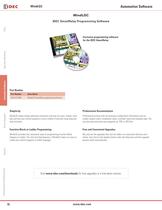
PLCsOperator InterfacesAutomation SoftwarePower SuppliesSensorsCommunication & Networking Exclusive programming software for the IDEC SmartRelay Part Number > Part NumberDescription FL9Y-LP1CDWWindLGC SmartRelay programming software Simplicity Professional Documentation > WindLGC makes things extremely convenient and easy for users. Create, simu-late and test your control programs in just a matter of seconds using drag and drop funcitons. Professional printout with all necessary confi guration information such as creator, project name, installation name, customer name and company logo. You can...
Open the catalog to page 6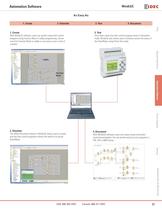
1. Create2. Simulate3. Test4. Document1. Create > PLCsOperator InterfacesAutomation SoftwarePower SuppliesSensorsCommunication & Networking 3. Test > With WindLGC software, users can quickly create their control programs using Function Block or Ladder programming. Conver- sion from Function Block to Ladder or vice versa is just a click of a button. Once Users verify that their control program works in Simulation mode, WindLGC also allows users to directly monitor the status of the SmartRelay using Online Test mode. LadderFunction Block 2. Simulate 4. Document > The offl ine Simulation feature...
Open the catalog to page 7
PLCsOperator InterfacesAutomation SoftwarePower SuppliesSensorsCommunication & Networking Powerful OPC server for IDEC programmable logic controllers Part Number > Part NumberDescription WINDSRV-1WindSRV OPC server single-node WINDSRV-4WindSRV OPC server 4-node WINDSRV-8WindSRV OPC server 8-node WINDSRV-12WindSRV OPC server 12-node WINDSRV-UWindSRV OPC server unlimited-node A node is a PLC on a network. What is WindSRV Features > WindSRV is an OPC server which provides direct connectivity between an IDEC PLC and a wide variety of software clients including: Microsoft Excel, Wonder- Ware, Think...
Open the catalog to page 8
Step 1: Defi ne channel object Step 4: Select Quick Client > PLCsOperator InterfacesAutomation SoftwarePower SuppliesSensorsCommunication & Networking Each protocol or driver used in the WindSRV server is referred to as a channel. Channels are specifi c communication drivers such as RS232C, RS485, Ethernet or Modem. All WindSRV projects can consist of many channels. You can easily check and control your PLC with QUICK CLIENT software. It allows you to test your PLC connection, toggle I/O, read/write data values and test ASCII strings in real time. Step 2: Defi ne device object Step 5: Completed...
Open the catalog to page 9
PLCsOperator InterfacesAutomation SoftwarePower SuppliesSensorsCommunication & Networking Windows based confi guration tool forIDEC HG1X character displays Part Number > Part NumberDescription WINDMSGWindMSG programming software for HG1X series Easy Programming Simple Confi gurable objects: > WindMSG programming software for all character displays helps you create your projects fast and easy. On-line help and tips are available to help you to learn the software quickly. Most functions found in WindMSG are common to most Windows applications, therefore, confi guring and developing screen projects...
Open the catalog to page 10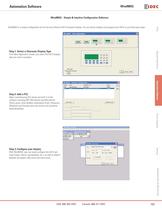
WindMSG - Simple & Intuitive Confi guration Software > WindMSG is a simple confi guration tool for the cost effective HG1X character display. You can easily confi gure and program your HG1X in just three easy steps. PLCsOperator InterfacesAutomation SoftwarePower SuppliesSensorsCommunication & Networking Step 1: Select a Character Display Type > From New Application screen, just select the HG1X display type you want to program. Step 2: Add a PLC > Major manufacturing PLC drivers are built-in to the software including IDEC MicroSmart and MicroSmart Pentra series, Allen Bradley, Automation Direct,...
Open the catalog to page 11All IDEC catalogs and technical brochures
 MACHINE TOOLS Industry Solutions
28 Pages
 ROBOTICS Industry Solutions
27 Pages
 Relay Selection Guide
16 Pages
 PUSH-IN PRODUCTS
12 Pages
 PRODUCT GUIDE
44 Pages
 HR6S
HR6S32 Pages
 KW2D SERIES
16 Pages
 LED-Leuchten: LF2B
6 Pages
 LED Illumination Units
28 Pages
 LED-Leuchten: LF1B-N
4 Pages
 Katalog FL1E
16 Pages
 RS485-Kommunikationsmodul
2 Pages
 Automation Organizer
2 Pages
 Web-Server-Modul
4 Pages
 MicroSmart DC12V
4 Pages
 FT1A SmartAXIS
36 Pages
 RTE/GT3/GE1A/GT5P/GT5Y
68 Pages
 Universalrelais RR/RY/RH/RU
59 Pages
 RJ.S Relays und Sockets
12 Pages
 RV8H-Baureihe
6 Pages
 E-Stop Switches
16 Pages
 XA series
7 Pages
 High Performance
4 Pages
 HG1X
HG1X3 Pages
 FL1E
FL1E4 Pages
 product brochure
6 Pages
 All Product Brochure
6 Pages
 Complete Contactors Catalog
60 Pages
 Complete Terminal Blocks Catalog
22 Pages
 Complete Timer Catalog
68 Pages
 Complete Relay & Socket Catalog
68 Pages
 Complete Display Lights Catalog
44 Pages
 Complete Safety Overview
6 Pages
 Complete Power Supply Catalog
22 Pages
 Complete O/I Catalog
22 Pages
 Complete PLC Catalog
68 Pages


- Power supply unit
- DC power supply
- AC/DC power supply
- Rectangular housing
- Ethernet switch
- Electric gearmotor
- LED lighting
- Industrial network switch
- Plastic housing
- Single-pole switch
- Windows software
- Cloud-based software
- Push-button switch
- Power supply for industrial applications
- Switched-mode power supply
- Waterproof network switch
- Unmanaged switch
- Photoelectric sensor
- Compact power supply
- Indoor enclosure