
- Catalogs
- Honeywell Video Systems
- Data and Installation Main Control Card


Data and Installation Main Control Card
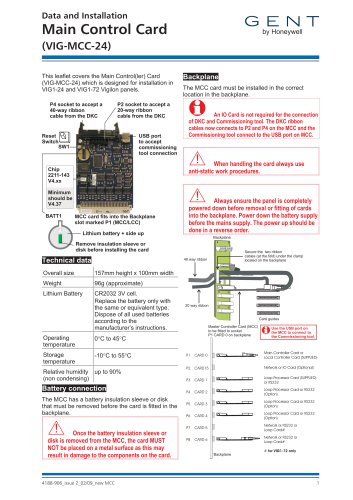
Data and Installation Main Control Card
- Dimensions: 157mm height x 100mm width
- Weight: Approximately 96g
- Battery: Lithium CR2032 3V cell; replace only with the same or equivalent type
- Operating Temperature: 0°C to 45°C
- Storage Temperature: -10°C to 55°C
- Relative Humidity: Up to 90% (non-condensing)
- Remove the battery insulation sleeve or disk before installation.
- Avoid placing the card on metal surfaces to prevent damage.
- Install the MCC card in the correct backplane location.
- Connect DKC ribbon cables to P2 and P4 on the MCC.
- Connect the commissioning tool to the USB port on the MCC.
- Use anti-static procedures when handling the card.
- Ensure the panel is powered down before card removal or installation; power down the battery before the mains supply and reverse the order for powering up.
- Dispose of packaging, product, and batteries at a suitable recycling center in accordance with local legislation.
- Do not dispose of with household waste or burn.
Catalog excerpts

Main Control Card (VIG-MCC-24) This leaflet covers the Main Control(ler) Card (VIG-MCC-24) which is designed for installation in VIG1-24 and VIG1-72 Vigilon panels. P4 socket to accept a 40-way ribbon cable from the DKC P2 socket to accept a 20-way ribbon cable from the DKC USB port to accept commissioning tool connection The MCC card must be installed in the correct location in the backplane. An IO Card is not required for the connection of DKC and Commissioning tool. The DKC ribbon cables now connects to P2 and P4 on the MCC and the Commissioning tool connect to the USB port on MCC. When handling the card always use anti-static work procedures. MCC card fits into the Backplane slot marked P1 (MCC/LCC) Lithium battery + side up Always ensure the panel is completely powered down before removal or fitting of cards into the backplane. Power down the battery supply before the mains supply. The power up should be done in a reverse order. Backplane Remove insulation sleeve or disk before installing the card Technical data Secure the two ribbon cables (at the fold) under the clamp located on the backplane Overall size Lithium Battery CR2032 3V cell. Replace the battery only with the same or equivalent type. Dispose of all used batteries according to the manufacturer’s instructions. Operating temperature Storage temperature Relative humidity up to 90% (non condensing) Battery connection The MCC has a battery insulation sleeve or disk that must be removed before the card is fitted in the backplane. Once the battery insulation sleeve or disk is removed from the MCC, the card MUST NOT be placed on a metal surface as this may result in damage to the components on the card. Card guides Master Controller Card (MCC) to be fitted to socket P1 CARD 0 on backplane Use the USB port on the MCC to connect to the Commissioning tool. Main Controller Card or Local Controller Card (SUPPLIED) Network or IO Card (Optional) Loop Processor Card (SUPPLIED) or RS232 Loop Processor Card or RS232 (Option) Loop Processor Card or RS232 (Option) Loop Processor Card or RS232 (Option) Network or RS232 or Loop Card# Network or RS232 or Loop Card# Backplane
Open the catalog to page 1
At the end of their useful life, the packaging, product and batteries should be disposed of via a suitable recycling centre and in accordance with national or local legislation. WEEE Directive: At the end of their useful life, the packaging, product and batteries should be disposed of via a suitable recycling centre. Do not dispose of with your normal household waste. Do not burn. Gent by Honeywell reserves the right to revise this publication from time to time and make changes to the content hereof without obligation to notify any person of such revisions of changes.
Open the catalog to page 2All Honeywell Video Systems catalogs and technical brochures
 Network Node (VIG-NODE-24)
16 Pages
 Copper Network Card (EN)
2 Pages
 S4 Mains Powered Interface
28 Pages
Archived catalogs
 Honeywell Systems 2011-2012 Catalog
188 Pages
 Mobile
16 Pages
 Digital Video Recorders
40 Pages
 Intelligent Analytics Solutions
12 Pages
 Cameras and Domes
64 Pages
 Systems and System Accessories
14 Pages
 Analog components
22 Pages

- Digital imager
- Visible imager
- CMOS camera module
- Industrial camera module
- Automation software solution
- Management software solution
- Infrared imager
- Full-color camera system
- Monitoring camera system
- Real-time software
- Windows software
- Cloud-based software
- Control software
- Detection camera system
- Monochrome camera module
- Monitoring software solution
- Image processing camera module
- Communication gateway
- Waterproof camera module
- HD camera module