
- Catalogs
- Honeywell Video Systems
- Copper Network Card (EN)


Copper Network Card (EN)
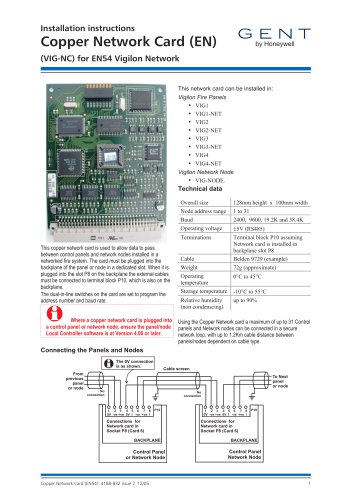
Copper Network Card (EN)
- Size: 128mm x 100mm
- Node address range: 1 to 31
- Baud rates: 2400, 9600, 19.2K, 38.4K
- Operating voltage: 5V (RS485)
- Weight: 72g
- Operating temperature: 0°C to 45°C
- Storage temperature: -10°C to 55°C
- Relative humidity: up to 90% (non-condensing)
Catalog excerpts

Installation instructions (VIG-NC) for EN54 Vigilon Network Where a copper network card is plugged into a control panel or network node, ensure the panel/node Local Controller software is at Version 4.00 or later. This copper network card is used to allow data to pass between control panels and network nodes installed in a networked fire system. The card must be plugged into the backplane of the panel or node in a dedicated slot. When it is plugged into the slot P8 on the backplane the external cables must be connected to terminal block P10, which is also on the backplane. The dual-in-line switches on the card are set to program the address number and baud rate. This network card can be installed in: Vigilon Fire Panels • VIG4-NET Vigilon Network Node Using the Copper Network card a maximum of up to 31 Control panels and Network nodes can be connected in a secure network loop, with up to 1.2Km cable distance between panels/nodes dependent on cable type. Copper Network Card (EN54) 4188-832 issue 2_12/05 1
Open the catalog to page 1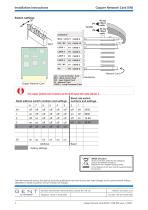
Installation instructions Copper Network Card (EN) Copper Network Card LCC - Local Controller Card MCC - Main Control Card IOC - Input Output Card LOOp n - Loop processor Card ribbon To DKC Network Card Backplane The copper network card is factory set for 38.4K baud with node address 4. Baud rate switch Node address switch numbers and settings numbers and settings WEEE Directive: At the end of their useful life, the packaging, product and batteries should be disposed of via a suitable recycling centre. Do not dispose of with your normal household waste. Do not burn. Gent by Honeywell reserves...
Open the catalog to page 2All Honeywell Video Systems catalogs and technical brochures
 Network Node (VIG-NODE-24)
16 Pages
 S4 Mains Powered Interface
28 Pages

Archived catalogs
 Honeywell Systems 2011-2012 Catalog
188 Pages
 Mobile
16 Pages
 Digital Video Recorders
40 Pages
 Intelligent Analytics Solutions
12 Pages
 Cameras and Domes
64 Pages
 Systems and System Accessories
14 Pages
 Analog components
22 Pages

- Digital imager
- Visible imager
- CMOS camera module
- Industrial camera module
- Automation software solution
- Management software solution
- Infrared imager
- Full-color camera system
- Monitoring camera system
- Real-time software
- Windows software
- Cloud-based software
- Control software
- Detection camera system
- Monitoring software solution
- Monochrome camera module
- Image processing camera module
- Communication gateway
- Waterproof camera module
- HD camera module