


- Company
- Products
- Catalogs
- News & Trends
- Exhibitions
Wirless Monitoring System

Wirless Monitoring System
HK308 is a versatile host designed for data transmission, monitoring, management, and control operations. It is easy to install and supports multiple interfaces for analog and digital inputs, RS485 communication, relay control, and analog output. Configuration is straightforward via a wired USB connection within a local area network.
Technical Specifications
Power Supply Parameters
- Supply voltage: DC12-24V
- Current: 0.5A (MAX) @DC12V
- External power supply: Current limit <1A, voltage equal to equipment supply voltage
Signal
- Wireless signal access: 2G, WIFI, 4G
- Analog input: 8 channels 0-20mA, 8 channels 0-5V
- Analog output: 2 channels, 0-20mA or 0-10V
- Acquisition accuracy: 0.2%
- Output accuracy: 0.3%
- Switch value input: 8-channel active input, DI0 supports up to 6MHz, DI1 above 100MHz
- Relay output: 4-channel, AC220V/5A DC30V/5A
Hardware Performance
- Flame retardant plastic shell, customizable color
- USB TYPE-C for settings and upgrades
- Power, alarm, and network indicators
- Push-type buttons
- RS485 communication interfaces
- 1.3 inch OLED display
- 100M RJ45 interface
- Drawer type SIM card holder
- Weight: 600g
- SMA antenna socket
- Normal operation: 200mA
- Standard plug-in terminal interface
- Ship type power switch
- Dimensions: 205*128*32MM
- Operating environment: -20℃ to 60℃, 0% to 95% RH
- Storage environment: -30℃ to 65℃, 30% to 80% RH
Software Performance
- Connects via GPRS, 4G, WIFI, LAN
- Supports RS485 DTU, wireless/wired platform connection
- Screen for parameter settings and operation information
- 1-year data storage capacity (10 seconds/time)
- USB settings and data export (CSV format)
- Supports MQTT & MODBUS RTU protocols
- Network port supports modbus tcp server, tcp client, mqtt, and modbus rtu
- Northbound RS485 uses modbus rtu for data reading and control
- Southbound RS485 supports transparent transmission
- Device search and configuration in LAN
- Real-time clock calibration
Illustration
- Top view
- Front view
- Left: Network port [Northbound RS485]
- Right: Wireless port [Southbound RS485]
Catalog excerpts
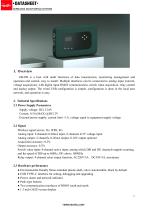
1. Overview HK308 is a host with multi functions of data transmission, monitoring management and operation and control, easy to install. Multiple interfaces can be connected to analog input (current, voltage acquisition), with digital input RS485 communication, switch value acquisition, relay control and analog output. The wired USB configuration is simple, configuration is done in the local area network, and operation is easy. 2. Technical Specifications 2.1 Power Supply Parameters Supply voltage: DC12-24V Current: 0.5A (MAX) @DC12V External power supply: current limit <1A, voltage equal to equipment supply voltage 2.2 Signal Wireless signal access: 2G, WIFI, 4G Analog input: 8 channels 0-20mA input, 8 channels 0-5V voltage input Analog output: 2 channels, 0-20mA output, 0-10V output optional Acquisition accuracy: 0.2% Output accuracy: 0.3% Switch value input: 8-channel active input, among which DI0 and DI1 channels support counting, and the speed of DI0 up to 6MHz, DI1 above 100MHz Relay output: 4-channel relay output function, AC220V/5A DC30V/5A, maximum 2.3 Hardware performance ● Environmental-friendly flame retardant plastic shell, color customizable, black by default ● USB TYPE-C interface for setting, debugging and upgrading ● Power, alarm and network indicator ● Push-type buttons ● Two communication interfaces of RS485 south and north ● 1.3 inch OLED screen
Open the catalog to page 1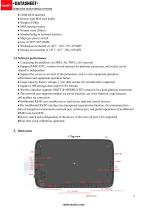
● 100M RJ45 interface ● Drawer type SIM card holder ● Weight of 600g ● SMA antenna socket ● Normal work 200mA ● Standard plug-in terminal interface ● Ship type power switch ● Size of 205*128*32MM ● Working environment of -20℃ ~60℃ 0%~95%RH ● Storage environment of -30℃~65℃ 30%~80%RH 2.4 Software performance ● Connecting the platform via GPRS, 4G, WIFI, LAN network ● Support RS485 DTU, wireless/wired optional for platform connection, and socket can be shared or independent ● Support the screen to set most of the parameters, and to view equipment operation information and equipment operation failure...
Open the catalog to page 2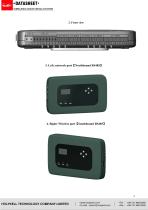
3. Left: network port【Northbound RS485】 4. Right: Wireless port【Southbound RS485
Open the catalog to page 3All Holykell catalogs and technical brochures
 HPT604-B
6 Pages
 HPT604-E11
6 Pages
 HPT604-LT
6 Pages
 HPT604-BL
6 Pages
 HPT604-BH
6 Pages
 ATEX & IECEx HPT604-A
8 Pages
 HPT200-EX2
8 Pages
 HPT200-EX1
8 Pages
 HPT604-BL
6 Pages
 Holykell Catalog
35 Pages
 HRF600-S 2025
4 Pages
 HRF 600 2025
4 Pages
 HPT701 2025
6 Pages
 TS401 temperature switch
4 Pages
 PS302 pressure switch
4 Pages
 Holykell flow meter
2 Pages
 Holykell wireless sensor
2 Pages
 Holykell pressure sensor
2 Pages
 Holykell level sensor
2 Pages
 Holykell flowmeter catalog
15 Pages
 HK301
HK3015 Pages
 WIRELESS MONITORING SYSTEM
9 Pages
 H305V
H305V3 Pages
 HTS 300 Series
5 Pages
 4001
40015 Pages
 UF2000-F
6 Pages
 UF2000B
6 Pages
 HTWF
HTWF5 Pages
 FLOWMETER (HSF series)
3 Pages
 FLOWMETER
9 Pages
 HPT604H
3 Pages
 HPT604-FW
5 Pages
 HPT612
6 Pages
 HPT603
6 Pages
 HPT611
6 Pages
 HPT608
6 Pages
 HPT607
6 Pages
 HPT606
6 Pages
 UE3008
4 Pages
 HPT605
6 Pages
 UE3005
6 Pages
 UE3003
5 Pages
 UE3002
4 Pages
 UE3001
5 Pages
 HPT613
6 Pages
 HPT604-BM
6 Pages
 HR80G
HR80G8 Pages
 HPT675S
5 Pages
 UE3006
4 Pages
 UE2000/US8000/US9000
5 Pages
 HPT604
6 Pages
 HLM
HLM4 Pages
 HPT708
6 Pages
 Sensor Cells Holykell CYX20
4 Pages
 HPT601/602
6 Pages
 HPT200-G
6 Pages
 HPT702
8 Pages
 HPT703
6 Pages
 HPT200-HT
6 Pages
 HPT200-EX
6 Pages
 Sensor Cells Holykell CYX19
4 Pages
 HPT907C
6 Pages
 HPT200
6 Pages
 HPT300-S
6 Pages
 HPT300-C
6 Pages
 HPT906
6 Pages
 HPT700
6 Pages
 HK7 Series
14 Pages
 HPT604-A Datasheet
6 Pages
 Flow meter
9 Pages
 HPT621
6 Pages


Archived catalogs






- Flowmeter
- Temperature probe
- Volume flow monitor
- Liquid flow monitor
- Data logger
- Resistance temperature sensor
- Pressure transmitter
- Analog pressure transmitter
- Waterproof flow meter
- Gas flow monitor
- Level probe
- Temperature datalogger
- Stainless steel flow monitor
- Liquid level sensor
- Pressure switch
- Industrial flow monitor
- Pressure probe
- Waterproof pressure transmitter
- Precision flow meter