
- Catalogs
- Hitachi-Johnson Controls Air Conditioning Inc.
- air365 & airCloud Tap Brochure

air365 & airCloud Tap Brochure
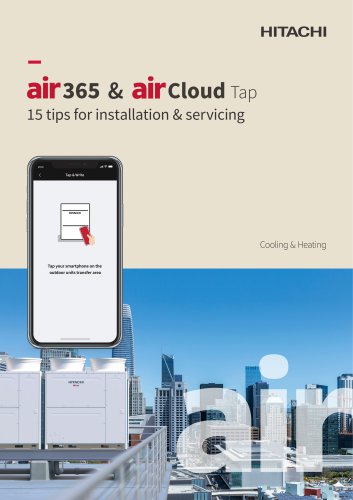
air365 & airCloud Tap Brochure
Catalog excerpts
air365 & aircioud Tap 15 tips for installation & servicing Cooling & Heating outdoor units transfer area
Open the catalog to page 1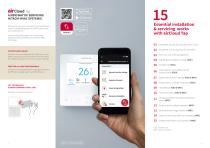
A NEW WAY OF SERVICING HITACHI HVAC SYSTEMS! Discover how you can commission and troubleshoot Hitachi Variable Refrigerant Flow (VRF) systems with your mobile phone! Access settings and program air conditioning equipment by Near Field Communication (NFC) technology. CONTACTLESS & QUICK Replaces manual configurations through your smart phone, simply tap your smart phone over the Hitachi Air Conditioner equipment to access system settings. FREE FOR ALL HVAC PROFESSIONALS The app can be downloaded through apple app store for iPhones or google play for android devices. ALREADY COMMON IN DAILY LIFE!...
Open the catalog to page 2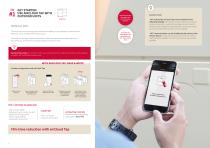
GET STARTED: USE AIRCLOUD TAP WITH OUTDOOR UNITS No need to remove the outdoor unit covers to access switches! MANUAL WAY To access the commissioning and maintenance settings, it was necessary to remove each VRF units’ cover and reach the electric board. To modify the settings, buttons and switches had to be manipulated cautiously due to their small size, sometimes requiring tooling to move the switch. air365 Max and air365 Max Pro are embedded with NFC chip, ready for a tap. Good-to-know: - NFC method by airCloud Tap is not available for the following settings: Termination resistor setting,...
Open the catalog to page 3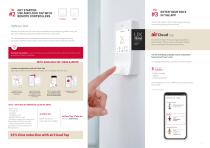
GET STARTED: USE AIRCLOUD TAP WITH REMOTE CONTROLLERS ENTER YOUR ROLE IN THE APP Hitachi VRF systems offer a wide range of settings and troubleshooting functionalities. MANUAL WAY Remote controllers are not only used to operate the air conditioning indoor units, but they also enable servicing and maintenance of the indoor units. For the installation & service features, professionals can use the physical remote controller’s interface, with buttons and screens to browse and modify the features. You have the choice: if you don’t wish to use airCloud Tap NFC, traditional method is still available...
Open the catalog to page 4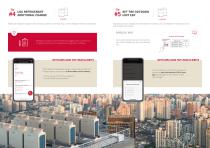
SETTHE OUTDOOR #5 UNIT ESP LOG REFRIGERANT ADDITIONAL CHARGE air365 Max air365 Max Additional refrigerant charge is often necessary, either at commissioning or when refrigerant levels are insufficient. High static pressure changes must be made when outdoor units are installed in mechanical rooms and ducted to the outside. MANUAL WAY Must use the service manual to interpret the dip switch’s positioning and are manually set. Outdoor unit ESP setting WITH AIRCLOUD TAP: READ & WRITE WITH AIRCLOUD TAP: READ & WRITE Ref. Cycle No. Setting Refrigerant amount (Installation) kg unit on Refrigerant Charge...
Open the catalog to page 5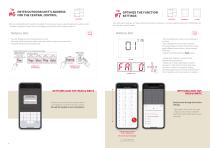
ENTER OUTDOOR UNIT’S ADDRESS FOR THE CENTRAL CONTROL When a centralized control system is installed, it is necessary to give a specific address to outdoor unit’s. - Enables recognition of each unit and configures the central control system correctly. Over 190 option settings can help customize the system operation, to enhance performance and comfort tailored for your site’s specific needs. MANUAL WAY To enter Refrigerant cycle No & Outdoor unit No Manually select board’s dip switch and rotary switch using service manual to interpret the dip switches positioning. DSW6 (PCB1)| Outdoor Unit No....
Open the catalog to page 6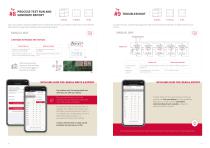
PROCESS TEST RUN AND GENERATE REPORT air365 Max Once your system is properly installed and commissioned, the test run procedure enables you to verify that the VRF system’s cooling and/or heating cycle is operating properly. In case of an error, airCloud Tap displays the data of the equipment’s operation to determine the cause of error. MANUAL WAY 2 METHODS TO PROCESS THE TEST RUN Start the test run Read test run data Outdoor Unit: Manually Set dip switches for test mode. (1) Using the outdoor unit segment display (2) Wired remote controller: Go to the “test run” screen and begin test run (3)...
Open the catalog to page 7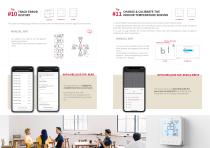
TRACK ERROR HISTORY air365 Max The outdoor unit keeps log of the latest 15 errors, while the wired remote controller logs the latest 30 errors. CHANGE & CALIBRATE THE INDOOR TEMPERATURE SENSOR Set Value (Flashing) Setting Item (Flashing) You can use the controller menu to modify those features, by navigating in the service menu. For temperature calibration, use function selection – code corresponding to certain numbers of +/- degrees. Thermistor Selection WITH AIRCLOUD TAP: READ The app enables you to display the complete list of errors in one touch. Combining the error code, description, and...
Open the catalog to page 8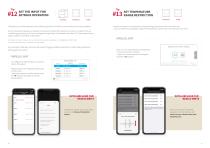
Linking the air conditioning with other building’s equipment is ideal to synchronize your facility’s operation. Up to three external signals can be easily connected to Hitachi VRF systems(l), as input or output for the air conditioning operation, and can be managed through Hitachi Centralized Controllers (2). Those external input/ output makes a cost-effective alternative (1) through connector accessory, max number of external signals vary between 2 or 3 depending on VRF models (2) only with selected Hitachi centralized controller models. For example, hotel key card can be used to trigger setback...
Open the catalog to page 9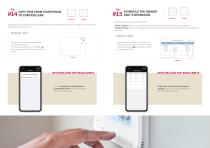
Setting the current date and time of the wired remote controller is necessary in order to program the on/off timer and weekly schedule function. Scheduling combines two types of benefits: 1. Better Comfort: Allows pre-cool/pre-warming of the premises every day prior to opening hours. 2. Energy Savings: Allows scheduling of automatic AC Shutdown or setpoint changes after the closing hour of your facility. Must follow the setup manual to access “current time settings” Increment date and time by 1 with ▼ or A For example: press 8+30 times to reach 8h 30min. You can use the controller’s schedule....
Open the catalog to page 10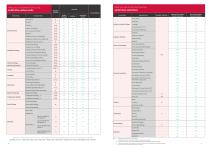
Key *1. Only English and numbers can be registered. *2. If multiple indoor units are connected, individual settings are not possible. *3. Selection of the indoor unit on the Check Menu screen on the Wired Remote Controller is required. *4. Selection of the indoor uniton the result of check PCB of the units on the Wired Remote Controller is required. *5. May not work with some Samsung Galaxy phone models
Open the catalog to page 11All Hitachi-Johnson Controls Air Conditioning Inc. catalogs and technical brochures
Archived catalogs
 Summit Wall Mounted RAK-PEB
2 Pages
 Utopia ES
2 Pages
 FS(V)N(Y)2E
2 Pages
 KPI series
2 Pages
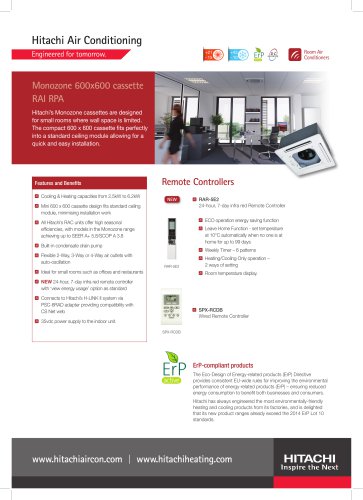 Monozone 600 x 600 Cassette
2 Pages
 Ducted In the Ceiling
2 Pages
 S-Series Wall Mounted
2 Pages
 Shirokuma Wall Mounted Units
2 Pages
 Yutaki
2 Pages
 IVX Comfort Outdoor Units
2 Pages
 IVX Premium Outdoor Units
2 Pages
 ES Outdoor Units
2 Pages
 KPI Active
2 Pages
 RCUE-WG2 Water Cooled
2 Pages
 KPI-Energy
2 Pages
 Cooling Only
2 Pages
 Air Cooled Heat Pump
2 Pages
 Air Cooled Cooling Only
2 Pages
 Room Air Conditioners
17 Pages
 FSNM
FSNM2 Pages
 FSXN
FSXN2 Pages
 FSXNH
FSXNH2 Pages
 RCME-AH
2 Pages
 Hermetic compressors
5 Pages
 HITACHI SCREW COMPRESSORS
3 Pages
 dehumidifiers
24 Pages
 Centrifugal Chiller
12 Pages
 For Heat Pump Application
12 Pages
 INDUSTRIAL DEHUMIDIFICATION
24 Pages
 For Refrigeration Application
28 Pages
 For Data Center Application
2 Pages
 Yutaki Heat Pumps
2 Pages
 Room Air Conditioners
29 Pages
 Utopia Split Systems
24 Pages
 Heat pumps
7 Pages
 AquaFREE System
2 Pages


- Communication gateway
- Wireless remote control
- Industrial remote control
- Remote control with buttons
- Wireless gateway
- IoT gateway
- On/off remote control
- Compact remote control
- Compact gateway
- Air duct
- Flexible air duct
- WiFi gateway
- Floor-standing air conditioner
- CANbus gateway
- 8-button remote control
- 6-button remote control
- Outdoor air conditioner
- Control remote control
- Inverter heat pump
- Wall-mounted air conditioner