


Hikvision Webcams

Hikvision Webcams
Hikvision has introduced a new line of webcams designed to meet the needs of remote meetings, distance learning, and live streaming. These webcams offer high-definition video, noise reduction, and easy USB plug-and-play functionality, ensuring studio-quality imaging and clear sound.
Specifications
The webcams feature up to 4K resolution, wide-angle lenses, PTZ (pan-tilt-zoom) capabilities, and auto-focus. They are equipped with intelligent noise reduction and HD sound pick-up to minimize background noise.
Application Scenarios
- Remote Conferences: Suitable for small to large meetings and corporate events, offering wide-angle views and remote control for camera adjustments.
- Online Education: Provides flexibility with multiple mounting options and driver-free USB connectivity, ideal for studying from home and teaching.
- Live Streaming: Designed for e-commerce, lifestyle sharing, and gaming, with features like adjustable supplemental lighting and auto-focus.
Product Families
- Value Series: Includes models like DS-U02, DS-U12, and DS-U18, offering 1080p to 4K resolution with built-in microphones.
- Pro Series: Models such as DS-UC2 and DS-UC8 provide auto-focus and wide-angle views with metal anodized surfaces.
- Ultra Series: The DS-U102 model features motorized lenses, 120 dB WDR, and supports remote control.
- Live Series: Includes DS-UL8 and DS-UL2, offering sharp auto-focus and supplemental lighting.
Installation and Compatibility
Installation is straightforward, involving mounting the webcam, connecting via USB, and setting the video input source. The webcams are compatible with various operating systems and software, including Windows, MacOS, Linux, Android, and popular video conferencing platforms.
Service and Support
Hikvision provides after-sales service through local service points in 15 regions and 100 authorized maintenance partners worldwide. The webcams come with a 2-year warranty.
Contact Information
Hikvision offers global contact points for sales and technical support across multiple countries, ensuring comprehensive customer service.
Catalog excerpts
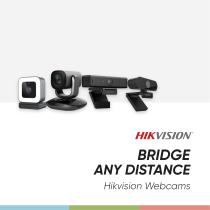
Hikvision Webcams
Open the catalog to page 1
Hikvision Webcams Today, remote meetings, distance learning, and working from home have become normal for people around the world. And to do this, computer users need good webcams. That’s why Hikvision – global leader in video technology – designed its own Webcam Series with world-class audio and video, creating top-notch products. Hikvision’s brand new line of Webcams contains a wide variety of options to guarantee the perfect fit for any user in any scenario. Equipped with high edge definition, noise reduction, and USB plug & play, you can get it all – studio-quality imaging, crystal clear sound,...
Open the catalog to page 2
Remote Conference Focus on the Moment Whether the light is low or bright, whether you need to see the whole or just a part, Hikvision Webcams will help you to focus on the right thing in the right moment. Application Scenarios Hikvision Webcams guarantee great streaming with excellent options in a variety of applications. Meetings of all kinds will be enhanced, across any distance. Small to Medium-sized Meetings Large Conferences Corporate Events
Open the catalog to page 3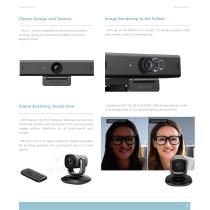
Remote Conference Classic Design and Texture Image Rendering to the Fullest · The UC-Series integrates an advanced anodized housing, giving your professional setting a classic, elegant touch. · With up-to-4K definition on board, UC-Series presents clear and smooth video for conferencing Frame Anything, Hands Free · Equipped with 120 dB True WDR, U102-Series delivers evenly-lit images even in strong backlighting environment · U102-Series, the PTZ cameras, features vertical and horizontal rotation with 5x optical zoom, ensuring wide angles without distortion for all participants and boards · Remote...
Open the catalog to page 4
Online Education Learning Beyond the Bounds Now there are no limits on learning or education. Travel ten thousand more miles and read ten thousand more books – all online. Hikvision Webcams help you learn more, going far beyond yesterday’s limitations. Application Scenarios Hikvision Webcams provide all kinds of options for digital learning and sharing. Keep streaming, keep learning, anytime and anywhere. Studying from Home Teaching & Sharing
Open the catalog to page 5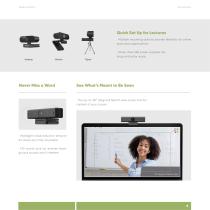
Online Education Quick Set Up for Lectures · Multiple mounting options provide flexibility for online education applications · Driver-free USB power supplies are plug-and-play ready Desktop Never Miss a Word See What’s Meant to Be Seen · The up-to-95° diagonal field of view covers the full context of your course · Intelligent noise reduction empowers study any time, anywhere · HD sound pick-up ensures background sounds won’t interfere
Open the catalog to page 6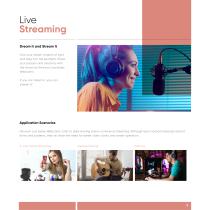
Live Streaming Dream It and Stream It Give your dream a beam of light and step into the spotlight. Share your passion and creativity with the world via Hikvision Live Series Webcams. If you can dream it, you can stream it! Application Scenarios Hikvision Live Series Webcams cater to daily sharing and e-commerce streaming. Although each scenario features distinct forms and patterns, they all share the need for better video clarity and easier operation. E-Commerce Streaming Lifestyle Sharing
Open the catalog to page 7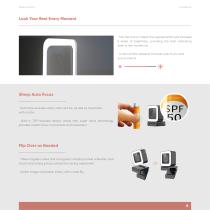
Live Streaming Look Your Best Every Moment · Tap the icon to adjust the supplemental light between 5 levels of brightness, providing the best ambiance, even in dim conditions · A natural filter presents the best side of you and your products Sharp Auto Focus · Auto focus ensures clarity near and far, as well as movement with no blur · Built-in TOF-assisted sensor, along with super focus technology, provides instant focus on products and movement Flip Over as Needed · Three magnetic sides and a magnetic shutter promise a flexible, solid mount and strong privacy protection during adjustment · Switch...
Open the catalog to page 8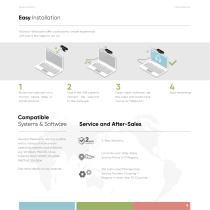
Hikvision Webcams Easy Installation Hikvision Webcams offer a pleasantly simple experience with just a few steps to set up: Mount the webcam on a monitor, tripod, table, or similar location. Compatible Systems & Software Hikvision Webcams are compatible with a variety of mainstream operating systems and software, e.g. Windows, MacOS, Linux, Android, VooV, ZOOM, DingTalk, WeChat, YouTube See more details on our website. Plug in the USB cable to connect the webcam to the computer. Open video software; set the video and audio input source as “Webcam.” Start streaming! Local Hikvision After-Sales...
Open the catalog to page 9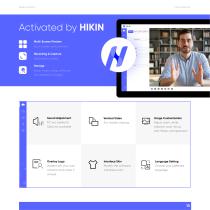
Hikvision Webcams Multi-Screen Preview Four-screen split preview Recording & Capture Seize every scene Storage Save video using software (no onboard storage) Sound Adjustment Vertical Video Image Customization PC mic (default) Options available Adjust zoom, white balance, auto-focus, anti-flicker, and resolution Overlay Logo Interface Skin Language Setting Watermark your own content and make it unique Modify the software interface color Choose your preferred language
Open the catalog to page 10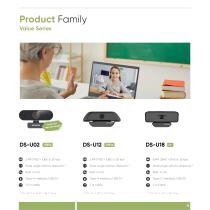
Product Family Value Series Small and n desig exquisite Wide angle without distortion * Wide angle without distortion * Wide angle without distortion *
Open the catalog to page 11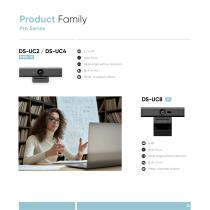
Product Family Pro Series 2 / 4 MP Auto focus Wide angle without distortion Built-in mic Metal, anodized surface 8 MP Auto focus Wide angle without distortion Built-in mic Metal, anodized surface
Open the catalog to page 12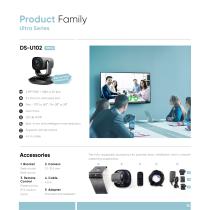
Product Family Ultra Series DS-U102 Video High-end ce Kit Conferen 2 MP (1920 × 1080 @ 30 fps) 3.1-15.5 mm motorized lens Pan: -170° to 160°, Tilt:-28° to 28° Auto focus 120 dB WDR Built-in mic with intelligent noise reduction Supports remote control 4.5 m cable Desk mount Wall mount The fully-equipped accessory kits promise easy installation and a smooth streaming experience. 3. Remote Control Preset points PTZ control Zoom International adapters
Open the catalog to page 13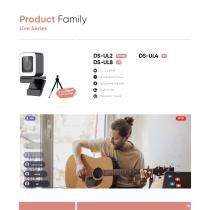
Product Family Live Series 2 / 4 / 8 MP Sharp Auto Focus Supplemental light Built-in mic Magnetic mount
Open the catalog to page 14
Headquarters No.555 Qianmo Road, Binjiang District, Hangzhou 310051, China T +86-571-8807-5998 Business: [email protected] Technical Support: [email protected] Hikvision Australia T +61-2-8599-4233 [email protected] Hikvision Brazil T +55-11-3318-0050 [email protected] Hikvision Canada T +1-866-200-6690 [email protected] Hikvision Colombia [email protected] Hikvision Czech T +420 29 6182640 [email protected] Hikvision Europe T +31-23-5542770 [email protected] Hikvision France T +33 1-85-330-450 [email protected] Hikvision Germany...
Open the catalog to page 15All Hikvision catalogs and technical brochures
 DS-2TD2528T-10/Q(C)
7 Pages
 DS-2DE7A432IW-AEB(T5)
8 Pages
 DS-E04HGHI-B
4 Pages
 DS-2CD1043G2-LIUF/SL
5 Pages
 DS-2CD1143G2-I
6 Pages
 DS-2CD2H23G2-IZS
6 Pages
 AX PRO Solution
5 Pages
 Hikvision Tripod Turnstile
2 Pages
 EMERGENCY ALARM SERIES
4 Pages
 CASINO SOLUTION
6 Pages
 SMART CLASSROOMS
6 Pages
 LOGISTICS PARK SOLUTION
12 Pages
 RETAIL SOLUTION
18 Pages
 SAFE CITY SOLUTION
19 Pages
 HOSPITAL SOLUTION
6 Pages
 SMART PORT & MARITIME SOLUTION
16 Pages
 THE SOLUTION FOR CAMPUS SECURITY
12 Pages
 ColorVu Varifocal Cameras
2 Pages
 Hikvision AcuSense Products
8 Pages
 D3T Ultra-low-light Series
2 Pages
 HIKVISION UNDERWATER CAMERA
2 Pages
 Fingerprint Terminal
2 Pages
 AX Wireless System
2 Pages
 VIDEO WALL CONTROLLER
2 Pages
 ColorVu Network Cameras
2 Pages
 WI-FI VIDEO DOORBELL
2 Pages
 DS-KAS261
2 Pages
 ColorVu
2 Pages
 AcuSense DVR
2 Pages
 PIR CAMERAS
2 Pages
 ColorVu Lite series camera
2 Pages
 Radar
Radar2 Pages
 Auto NVR Easy Operation
2 Pages
 AX SERIES Hybrid Alarm Kit
2 Pages
 IP VIDEO INTERCOM KIT
2 Pages
 Powerful PoE Switch
2 Pages
 Hilook Product Family Tree
2 Pages
 Hikvision LED Displays
40 Pages
 Blazer Express
6 Pages
 HikCentral Professional
23 Pages
 Hikvision Access Control
12 Pages
 Explosion Proof Product
8 Pages
 Intrusion Series
28 Pages
 AXHUB
AXHUB2 Pages
 AXPRO Solution
3 Pages
 WIRED SECURITY CONTROL PANEL
8 Pages
 TURBO HD 5.0 SOLUTION
8 Pages
 HIKVISION Monitors
6 Pages
 HIKVISION NVR
16 Pages
 TURBO HD 4.0 SOLUTION
24 Pages
 HikCentral Professional
24 Pages
 TURBO HD 3.0
24 Pages
 DS-K1T607 Series
2 Pages
 ACCESS AT A GLANCE
2 Pages
 DVR
DVR2 Pages
 Flexible product combination
2 Pages
 HIKVISION 4K SYSTEM
6 Pages
 ELLIPSE DETECTOR RANGE
5 Pages
 H.265+ Encoding Technology
12 Pages
 AX PRO SERIES
27 Pages
 Monitors-In-Command-Center
14 Pages
 Enjoy the Ease of IP
8 Pages
 PRODUCT CATALOG 2021 H1
26 Pages
 Hikvision Commercial Displays
44 Pages
 Turbo HD X
6 Pages


Archived catalogs
 HIKVISION cHANNEL PRODUCTS
3 Pages
 DF SERIES PTZ CAMERAS
11 Pages


- Display module
- Hikvision digital camera
- Visible imager
- LCD display panel
- LCD screen
- Ethernet switch
- Hikvision CMOS camera
- Hikvision industrial camera
- Management software solution
- HDMI monitor
- Hikvision infrared camera
- Full-color camera system
- Panel-mount screen
- Hikvision monitoring camera
- Real-time software
- Single-pole switch
- Color display panel
- Push-button switch
- Managed switch
- Hikvision detection camera