


Auto NVR Easy Operation

Auto NVR Easy Operation
Available models include the non-PoE 71Q Series V3.4.104. The NVR and cameras must be on the same network, and the cameras should be inactive before connection. Ensure the number of connected cameras does not exceed the NVR's capacity.
To get a live view, follow these steps: 1) Ensure the NVR and cameras are on the same network. 2) Connect inactive cameras. 3) Do not exceed the NVR's camera capacity.
Download the Hik-Connect app (version V3.7.8 or above) from the App Store or Google Play. Use the app to scan the NVR QR code for access without registration or login. Ensure the NVR and phone are on the same LAN when unbinding.
To unbind the NVR, click the "Unbind Device" button, enter the NVR password and verification code, and scan the NVR QR code with the Hik-Connect app.
Headquarters: No.555 Qianmo Road, Binjiang District, Hangzhou 310051, China. Phone: +86-571-8807-5998. Email: [email protected].
Catalog excerpts
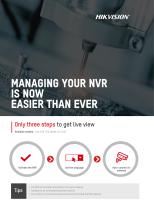
MANAGING YOUR NVR IS NOW EASIER THAN EVER Only three steps to get live view Available models: non-PoE 71Q Series V3.4.104 • The NVR and cameras should be in the same network • Cameras to be connected should be inactive • The number of connected cameras should not exceed the NVR capacity
Open the catalog to page 1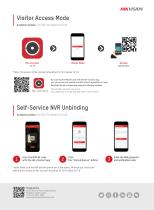
Visitor Access Mode Available models: non PoE 71Q Series V3.4.104 Visitor Mode *Note: The version of Hik-Connect should be V3.7.8 or above V3.7.8 By scanning the NVR QR code with the Hik-Connect app, you can access and operate the NVR without registration or login. Download the Hik-Connect app using the following methods Scan the QR code with your phone Go to App Store or Google Play and search “Hik-Connect” Self-Service NVR Unbinding Available models: non PoE 71Q Series V3.4.104 Scan the NVR QR code with the Hik-Connect app Click the “Unbind Device” button *Note: Make sure the NVR and the phone...
Open the catalog to page 2All Hikvision catalogs and technical brochures
 DS-2TD2528T-10/Q(C)
7 Pages
 DS-2DE7A432IW-AEB(T5)
8 Pages
 DS-E04HGHI-B
4 Pages
 DS-2CD1043G2-LIUF/SL
5 Pages
 DS-2CD1143G2-I
6 Pages
 DS-2CD2H23G2-IZS
6 Pages
 AX PRO Solution
5 Pages
 Hikvision Tripod Turnstile
2 Pages
 EMERGENCY ALARM SERIES
4 Pages
 CASINO SOLUTION
6 Pages
 SMART CLASSROOMS
6 Pages
 LOGISTICS PARK SOLUTION
12 Pages
 RETAIL SOLUTION
18 Pages
 SAFE CITY SOLUTION
19 Pages
 HOSPITAL SOLUTION
6 Pages
 SMART PORT & MARITIME SOLUTION
16 Pages
 THE SOLUTION FOR CAMPUS SECURITY
12 Pages
 ColorVu Varifocal Cameras
2 Pages
 Hikvision AcuSense Products
8 Pages
 D3T Ultra-low-light Series
2 Pages
 HIKVISION UNDERWATER CAMERA
2 Pages
 Fingerprint Terminal
2 Pages
 AX Wireless System
2 Pages
 VIDEO WALL CONTROLLER
2 Pages
 ColorVu Network Cameras
2 Pages
 WI-FI VIDEO DOORBELL
2 Pages
 DS-KAS261
2 Pages
 ColorVu
2 Pages
 AcuSense DVR
2 Pages
 PIR CAMERAS
2 Pages
 ColorVu Lite series camera
2 Pages
 Radar
Radar2 Pages
 AX SERIES Hybrid Alarm Kit
2 Pages
 IP VIDEO INTERCOM KIT
2 Pages
 Powerful PoE Switch
2 Pages
 Hilook Product Family Tree
2 Pages
 Hikvision LED Displays
40 Pages
 Blazer Express
6 Pages
 HikCentral Professional
23 Pages
 Hikvision Access Control
12 Pages
 Explosion Proof Product
8 Pages
 Intrusion Series
28 Pages
 AXHUB
AXHUB2 Pages
 AXPRO Solution
3 Pages
 WIRED SECURITY CONTROL PANEL
8 Pages
 TURBO HD 5.0 SOLUTION
8 Pages
 HIKVISION Monitors
6 Pages
 HIKVISION NVR
16 Pages
 TURBO HD 4.0 SOLUTION
24 Pages
 HikCentral Professional
24 Pages
 TURBO HD 3.0
24 Pages
 DS-K1T607 Series
2 Pages
 ACCESS AT A GLANCE
2 Pages
 DVR
DVR2 Pages
 Flexible product combination
2 Pages
 HIKVISION 4K SYSTEM
6 Pages
 Hikvision Webcams
16 Pages
 ELLIPSE DETECTOR RANGE
5 Pages
 H.265+ Encoding Technology
12 Pages
 AX PRO SERIES
27 Pages
 Monitors-In-Command-Center
14 Pages
 Enjoy the Ease of IP
8 Pages
 PRODUCT CATALOG 2021 H1
26 Pages
 Hikvision Commercial Displays
44 Pages
 Turbo HD X
6 Pages


Archived catalogs
 HIKVISION cHANNEL PRODUCTS
3 Pages
 DF SERIES PTZ CAMERAS
11 Pages


- Display module
- Hikvision digital camera
- Visible imager
- LCD display panel
- LCD screen
- Ethernet switch
- Hikvision CMOS camera
- Hikvision industrial camera
- Management software solution
- HDMI monitor
- Hikvision infrared camera
- Full-color camera system
- Panel-mount screen
- Hikvision monitoring camera
- Real-time software
- Single-pole switch
- Color display panel
- Push-button switch
- Managed switch
- Hikvision detection camera