
- Catalogs
- Guangzhou Dragon Diamond Technology Co., Ltd.
- Portable Fiber marking machine Introduction


Portable Fiber marking machine Introduction

Portable Fiber marking machine Introduction
The document provides an overview of a portable fiber marking machine, detailing its components, operation procedures, and specifications.
The machine consists of several key parts including the front and back of the electric control box, the working platform, and control switches.
- Startup Sequence: Turn on the power supply, then sequentially activate the laser switch, galvo scanner, and red light. Finally, open the scan lens cover.
- Shutdown Sequence: Close the scan lens cover, then sequentially turn off the laser switch, galvo scanner, and red light before turning off the power.
The working range is determined by the F-theta Scan Lens size, for example, 110mm x 110mm. To achieve the correct focal length, adjust the height based on material thickness and the basic focal length (e.g., for a 2mm thick material with a 320mm focal length, adjust to 322mm).
Adjust the height between the lens and material using a handwheel to ensure the correct focal length.
This component helps fix the material's processing position to allow for repeated processing and reduced errors.
Includes USB cable for computer connection, power cable, and foot switch. Ensure the machine casing is grounded.
Regular maintenance and checks are necessary, including measuring material thickness and ensuring materials are regular objects.
Catalog excerpts

便携式光纤打标机介绍 Portable Fiber marking mac
Open the catalog to page 1
机器外观 Machine appea
Open the catalog to page 2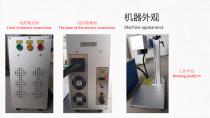
电控箱正面 Front of electric control box 电控箱背面 The back of the electric control box 机器外观 Machine appearan
Open the catalog to page 3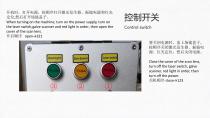
开机时,打开电源,按顺序打开激光发生器、振镜电源和红光 定位,然后打开场镜盖子。 When turning on the machine, turn on the power supply, turn on the laser switch,galve scanner and red light in order, then open the cover of the scan lens. 开启顺序 open→321 控制开关 Control switch
Open the catalog to page 4
工作区域 Work area 工作范围与机器的场镜尺寸相关。例如: 110mm*110mm The working range is related to the F-theta Scan Lens size o
Open the catalog to page 5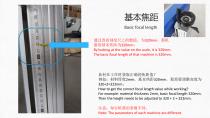
基本焦距 Basic focal length 通过查看刻度尺上的数值,为320mm。那机 器的基本焦距为320mm。 By looking at the value on the scale, it is 320mm. The basic focal length of that machine is 320mm. 如何在工作时获取正确的焦距值? 例如:材料厚度2mm,基本焦距320mm。那需要调整高度为 320+2=322mm。 How to get the correct focal length value while working? For example: material thickness 2mm, basic focal length 32
Open the catalog to page 6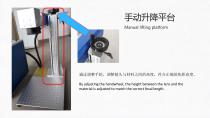
手动升降平台 Manual lifting platform 通过调整手轮,调整镜头与材料之间的高度,符合正确的焦距高度。 By adjusting the handwheel, the height between the
Open the catalog to page 7
辅助固定块 Auxiliary fixed block 辅助固定材料的加工位置,重复加 工,降低误差。 Auxiliary fix the processing position
Open the catalog to page 8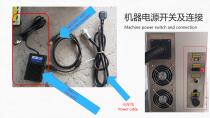
机器电源开关及连接 Machine power switch and connection
Open the catalog to page 9
日常注意事项 Daily considerations Measuring material thickness Note the focal length
Open the catalog to page 10All Guangzhou Dragon Diamond Technology Co., Ltd. catalogs and technical brochures
 Axis of rotation
13 Pages
 CO2 Laser Machine
8 Pages
 LZ-1390
10 Pages


- VirtualExpo Group
- Our Partners
- Recruitment
- Testimonials