
- Catalogs
- France Etuves
- C3000 Controller


C3000 Controller

C3000 Controller
This document provides a detailed description of the C3000 controller used in ovens. The controller allows precise temperature control in both programmed and manual modes. Users are advised to read the manual thoroughly before using the oven.
C3000 Controller Overview
The C3000 controller features a digital display, various indicators, and keys for operation. Key components include:
- Digital display for temperature and parameter information.
- Indicators for heating, connectivity, set point overheat, and more.
- Keys for incrementing, decrementing, and programming settings.
Before Starting
Ensure the oven is connected to the correct electrical network and, if necessary, connect the RS232 cable to a computer.
Manual Mode
In manual mode, users set the temperature set point. Upon starting the oven, the controller initializes, displaying the current temperature and set point status. Users can adjust the set point using increment and decrement keys.
Program Mode
Program mode allows for automatic temperature cycles consisting of three steps: wait time, ramp, and timer. The loop option enables repeated cycles.
- Setting Program Parameters: Users can adjust wait time, ramp rate, and timer duration using the program key and increment/decrement keys.
- Program Execution: Initiate by pressing increment and decrement keys simultaneously. The display shows current status and remaining times for each step.
- Program Stop: Stop the program by pressing the program and decrement keys simultaneously.
Catalog excerpts
FRANCE ETUVES
Open the catalog to page 1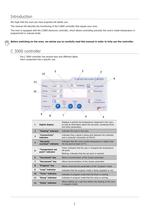
We hope that the oven you have acquired will satisfy you. This manual will describe the functioning of the C3000 controller that equips your oven. The oven is equipped with the C3000 electronic controller, which allows controlling precisely the oven's inside temperature in programmed or manual mode. Before switching on the oven, we advise you to carefully read this manual in order to fully use the controller. The C 3000 controller has several keys and different lights. Each component has a specific use. Displays in priority the temperature measured in the oven, Digital display as well as information...
Open the catalog to page 4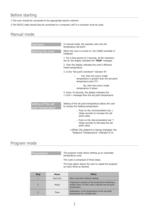
Before starting l-The oven should be connected to the appropriate electric network. 2-The RS232 cable should also be connected to a computer (off) if a computer must be used. Manual mode In manual mode, the operator sets only the When the oven is turned on, the C3000 controller is 1. For a time period of 2 seconds, all the indicators are lit; the display indicates the "RUN" message. 2. Then the display indicates the oven's effective inside temperature. 3. Is the "Set point overshoot" indicator lit? Yes, then the oven's inside temperature is greater than the set point No, then the oven's inside...
Open the catalog to page 5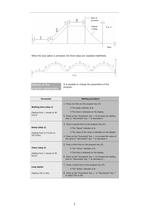
When the loop option is activated, the three steps are repeated indefinitely. program parameters It is possible to change the parameters of the
Open the catalog to page 6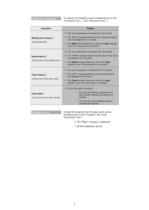
Program execution To execute the program, press simultaneously on the Program stop To stop the program and the beep sound, press "Decrement" keyV. ■=> The "Stop" message is displayed.
Open the catalog to page 7
NICE ETUVES E-mail : [email protected]
Open the catalog to page 9All France Etuves catalogs and technical brochures
 XFL RANGE
4 Pages
 XFM RANGE
4 Pages
 XBR RANGE
2 Pages
 XL RANGE
4 Pages
 XAS
XAS2 Pages
 XXL Range
4 Pages
 XM
XM4 Pages
 XPP
XPP2 Pages
 Etuves XSV
2 Pages
 Four XKL
2 Pages
 Range XU universal oven
4 Pages
 WEST W6400 Controller
82 Pages
 WEST 6100+ Controller
157 Pages
 WEST 4400 Controller
38 Pages
 Large Industrial Ovens XXL
2 Pages
 Industrial Ovens XL
2 Pages
 Vacuum ovens XF
2 Pages
 High temperature ovens XHT
2 Pages
 Laboratory Furnaces XKL
2 Pages
 Universal Ovens XU
2 Pages


Archived catalogs
 Laboratory furnace
2 Pages
 High temperature oven
2 Pages
 Cooled incubator
2 Pages
 Fan circulated incubator
2 Pages
 Incubator
2 Pages
 Industrial oven
2 Pages
 Vacuum oven
2 Pages
 Glassware drying oven
2 Pages
 Laboratory oven
2 Pages