
- Catalogs
- Focus LCDs
- C81A-BW-LW65

C81A-BW-LW65
C81A-BW-LW65
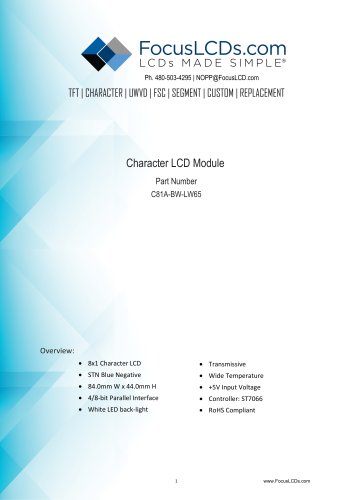
The document outlines the technical specifications and handling instructions for the C81A-BW-LW65 Character LCD Module. This module features an 8x1 character display with a blue negative STN type, a transmissive LCD panel, a built-in driver IC, and a white LED backlight. It supports a 4/8-bit parallel interface and operates at a +5V input voltage. It is RoHS compliant and suitable for wide temperature ranges.
- Character Format: 5x7 Dots with Cursor
- Display Format: 8 Characters x 1 Line
- Controller: ST7066
- Viewing Direction: 6 o'clock
- Backlight Type: LED Edge External Power
- Temperature Range: Operating -20°C to 70°C, Storage -30°C to 80°C
- Module Size: 84.0mm L x 44.0mm W x 13.5mm H
- Viewing Area: 61mm L x 15.8mm W
- Character Size: 4.2mm L x 7.71mm W
- Power Voltage: 0 to 7.0 V
- Input Voltage: VSS to VDD
- Supply Voltage for LCD: 4.5 V
- Supply Current: 0.8 to 1.0 mA
The document provides detailed instructions for operating the LCD, including function set instructions, address set instructions, and data transfer instructions. It also includes timing characteristics for write and read cycles.
- Avoid mechanical shock and strong pressure on the display area.
- Handle the polarizer with care to prevent scratches.
- Follow static electricity precautions to prevent damage to the module.
- Observe soldering precautions to ensure proper connections.
- Ensure proper grounding and no leakage when using soldering irons.
- Maintain soldering temperature at 280°C ± 10°C.
- Limit soldering time to 3-4 seconds.
- Use eutectic solder with resin flux filling.
- Protect the LCD surface from flux spattering if flux is used, and remove any flux residue.
- Adjust the viewing angle by varying the LCD driving voltage Vo.
- Avoid DC voltage to prevent electro-chemical reactions; use a symmetric pulse waveform with no DC component.
- Keep driving voltage within the specified range to avoid shortening display life.
- Response time increases as temperature decreases.
- Display color may change at temperatures above the operational range.
- Maintain temperature and humidity within specified limits to prevent polarization degradation, polarizer peel-off, or bubble formation.
- For long-term storage above 40°C, keep relative humidity below 60%.
Catalog excerpts
TFT | CHARACTER | UWVD | FSC | SEGMENT | CUSTOM | REPLACEMENT Character LCD Module Part Number C81A-BW-LW65 • Wide Temperature • RoHS Compliant
Open the catalog to page 1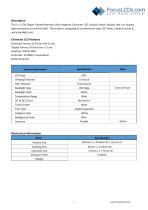
This is a STN (Super-Twisted Nematic) Blue Negative Character LCD (Liquid Crystal Display) that can display eight characters on one line (8x1). This model is composed of a transmissive type LCD Panel, a built-in driver IC and a backlight unit. Character Format: 5x7 Dots with Cursor Display Format: 8 Characters x 1 Line Interface: 4/8-bit MPU Controller: ST7066 (or equivalent) RoHS Compliant
Open the catalog to page 2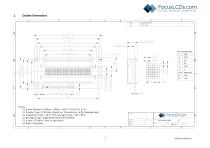
1) . D river Method: 1/8duty, 1/4bias, VDD: 5.0V VLCD: 4.5V 2) . D i splay Type: STN Blue, Negative, T ransmissive, 6:00 Viewing Angle 3) . Operating Temp: -20°C~70°C Storage Temp: -30°C~80°C 4) . Backlight Type: Edge W hite Vled:5.0V/150mA _3_ FocusLCDs.com LCDs MADE SIMPLE® FocusLCDs.com LCDs MADE SIMPLE®
Open the catalog to page 3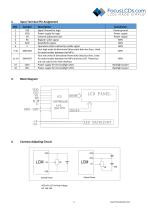
2. Input Terminal Pin Assignment 4. Contrast Adjusting Circuit
Open the catalog to page 4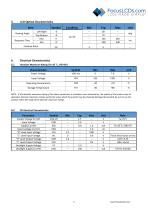
5. LCD Optical Characteristics 6. Electrical Characteristics 6.1 Absolute Maximum Rating (Ta=25 °C, VSS=0V)
Open the catalog to page 5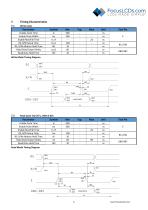
7. Timing Characteristics Parameter Write Mode Timing Diagram Read Mode Timing Diagram
Open the catalog to page 6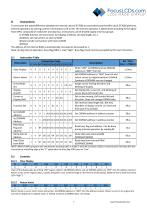
8. Instructions To overcome the speed difference between the internal clock of ST7066 (or equivalent) and the MPU clock, ST7066 performs internal operations by storing control in formations to IR or DR. The internal operation is determined according to the signal from MPU, composed of read/write and data bus. Instructions can be divided largely into four groups: 1) ST7066 function set instructions (set display methods, set data length, etc.) 2) Address set instructions to internal RAM 3) Data transfer instructions with internal RAM The address of the internal RAM is automatically increased or...
Open the catalog to page 7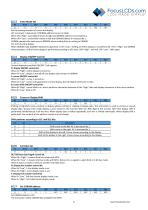
Set the moving direction of cursor and display. I/D: increment / decrement of DDRAM address (cursor or blink) When I/D="high", cursor/blink moves to right and DDRAM address is increased by 1. When I/D="Low", cursor/blink moves to left and DDRAM address is increased by 1. CGRAM operates the same way as DDRAM, when reading from or writing to CGRAM. SH: shift of entire display When DDRAM read (CGRAM read/write) operation or SH="Low", shifting of entire display is not performed. If SH ="High" and DDRAM write operation, shift of entire display is performed according to I/D value. (I/D="high". shift...
Open the catalog to page 8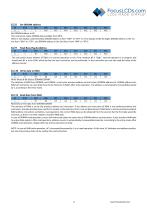
This instruction makes DDRAM data available from MPU. When 1-line display mode (N=LOW), DDRAM address is form "00H" to "4FH".In 2-line display mode (N=High), DDRAM address in the 1st line form "00H" to "27H", and DDRAM address in the 2nd line is from "40H" to "67H". Read binary 8-bit data from DDRAM/CGRAM. The selection of RAM is set by the previous address set instruction. If the address set instruction of RAM is not performed before this instruction, the data that has been read first is invalid, as the direction of AC is not yet determined. If RAM data is read several times without RAM address...
Open the catalog to page 9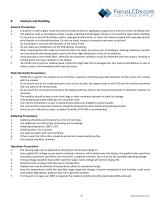
9. Cautions and Handling General Precautions: 1. LCD panel is made of glass. Avoid excessive mechanical shock or applying strong pressure onto the surface of display area. 2. The polarizer used on the display surface is easily scratched and damaged. Extreme care should be taken when handling. To clean dust or dirt off the display surface, wipe gently with cotton, or other soft material soaked with isoproply alcohol, ethyl alcohol or trichlorotriflorothan. Do not use water, ketone or aromatics and never scrub hard. 3. Do not tamper in any way with the tabs on the metal frame. 4. Do not make any...
Open the catalog to page 10All Focus LCDs catalogs and technical brochures
 KAB-M20SD-01
10 Pages
 E28RA-I-CW600-C
20 Pages
 E24RB-FW360-N
19 Pages
 C204A-BW-LW65
10 Pages
 E20RB-XW260-N
13 Pages
 G12864A1-FTW-LW63
13 Pages
 E17RG11216LW6M300-R
20 Pages
 C82A-BW-XW65
10 Pages
 C402A-FTW-LW63
10 Pages
 E43GB-I-MW405-C
17 Pages
 C204CXBSGSW6WT33XAA
15 Pages
 G12864A-FTW-LW63
13 Pages
 E24RG12432LWIM800-C
20 Pages
 C402A-FTW-LW65
10 Pages
 G12864B-BW-DW63
12 Pages
 E43GB-I-MW800-CB
15 Pages
 E28RA-I-CW480-N
17 Pages
 C202C-YTY-LW63
10 Pages
 G255128A-FTW-DW63
7 Pages
- LCD display panel
- TFT display module
- Medical equipment display
- Outdoor display panel
- Control panel display panel
- Instrumentation display panel
- Compact display panel
- Digital signage display panel
- Portable display
- Sunlight-readable display panel
- 2" display
- Sensor display
- 3.5" display
- 2.4" display
- Transflective display
- Display with cover glass
- Battery-powered display