
- Catalogs
- FIBRO GmbH
- INSTRUCTIONS FOR USE WPM REPEATER 2480.00.91.43


- Company
- Products
- Catalogs
- News & Trends
- Exhibitions
INSTRUCTIONS FOR USE WPM REPEATER 2480.00.91.43

INSTRUCTIONS FOR USE WPM REPEATER 2480.00.91.43
- Intended Use: The WPM Repeater is designed to extend the WPM system for tool monitoring in areas lacking press control.
- System Requirements: It requires access to a WPM cloud application via port 8883 and can be integrated using WLAN or LAN.
- Author's Rights: The document and product are copyright protected, and reproduction requires approval from FIBRO GMBH.
Commissioning
- Create the WPM repeater in the cloud application using the MAC address as the password.
- Import and edit the configuration file on a USB stick for network settings.
- Connect the repeater to the network via cable or WLAN.
- Edit the wireless configuration on the USB stick.
- Power on the device and insert the USB stick. A green LED ring indicates successful installation.
- An orange LED ring indicates a successful connection with the WPM cloud.
Firmware Update
- Import the firmware update file onto the USB stick and insert it into the repeater. The update process begins when the LED ring turns blue.
- Ensure the power supply is not disconnected during the update to avoid damage.
Troubleshooting
- Errors are indicated by LED ring colors, and a LOG file is created for analysis.
- Common issues include invalid configurations or connection problems with the WPM cloud.
Appendix
- Section for personal notes.
Catalog excerpts

Document: Instructions for use Document number: 2.7554.00.0522.0100000 Language: In the German language, this document is the original version in the EU language of the manufacturer and is labelled with the German national flag. In the language of a country of use, this document is a translation of the original version and labelled with the national flag of the country of use. This document is referred to as "instructions" in the following text. Number of pages in this manual including the title page: 12 These instructions are valid for the product 2480.00.91.43 WPM Repeater This document was...
Open the catalog to page 2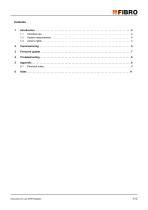
Intended use . . . . . . . . . . . . . . . . . . . . . . . . . . . . . . . . . . . . . . . . . . . . . . . . . . . . . . . . . . . . . . . . 4 System requirements . . . . . . . . . . . . . . . . . . . . . . . . . . . . . . . . . . . . . . . . . . . . . . . . . . . . . . . . . . 4 Autor's rights . . . . . . . . . . . . . . . . . . . . . . . . . . . . . . . . . . . . . . . . . . . . . . . . . . . . . . . . . . . . . . . . 4
Open the catalog to page 3
Intended use The WPM repeaters are used to extend the WPM system for areas where no press control is required, but the monitoring of tools is to be carried out. System requirements The WPM repeaters are intended solely for use with the WPM cloud application. You need a running WPM cloud application for operation. The WPM cloud application must be accessible via port 8883. The WPM repeater can be integrated either via WLAN or via LAN into the company network. Autor's rights The product WPM Repeater and these instructions are protected by copyright. Reproduction without approval shall be prosecuted...
Open the catalog to page 4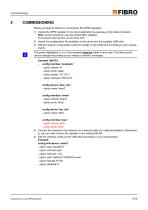
COMMISSIONING Please proceed as follows to commission the WPM repeaters: 1) Create the WPM repeater in the cloud application as gateway at the desired location. Note: As the password, use the printed MAC address. This should look like this: ac-23-3f-c0-7f-f9 2) Import the configuration file available on the cloud onto the supplied USB stick. 3) Edit the network configuration (network.config) on the USB stick according to your requirements. The points highlighted in red in the example must be edited in any case. The other points can be changed according to your needs or remain unchanged. Example...
Open the catalog to page 5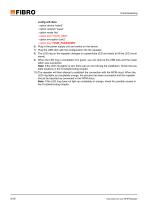
Commissioning config wifi-iface - option device 'radio0' - option network 'wwan' - option mode 'sta' - option ssid 'YOUR_SSID' - option encryption 'psk2' - option key 'YOUR_PASSWORD' 6) Plug in the power supply unit and switch on the device. 7) Plug the USB stick with the configuration into the repeater. 8) The LED ring on the repeater changes to a green/blue LED and starts to fill the LED circuit slowly. 9) When the LED ring is completely lit in green, you can remove the USB stick and the installation was successful. Note: If the LED ring lights up red, there was an error during the installation....
Open the catalog to page 6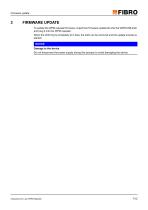
Firmware update FIRMWARE UPDATE To update the WPM repeater firmware, import the Firmware update file onto the WPM USB stick and plug it into the WPM repeater. When the LED ring is completely lit in blue, the stick can be removed and the update process is started. NOTICE Damage to the device Do not disconnect the power supply during this process to avoid damaging the device.
Open the catalog to page 7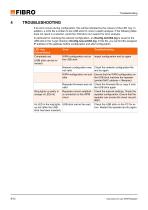
TROUBLESHOOTING If an error occurs during configuration, this will be indicated by the colours of the LED ring. In addition, a LOG file is written to the USB stick for more in-depth analysis. If the following table does not result in a solution, send the LOG file to our support for error analysis. In particular for checking the network configuration, an ifconfig.old.XXX.log is saved to the USB stick in the "Logs" directory ifconfig.new.acXXX.log. In this file, you can find the assigned IP address of the gateway before configuration and after configuration. LED ring Colour/status Import configuration...
Open the catalog to page 8
C Cloud application 5 Company network 4 Configuration 8 Configuration file 5 Connect Network cable 5 WLAN 5 Copyright 2 4 E Error 6 cause 6 Error analysis 8 T Tools Monitoring 4 Troubleshooting 6 U USB stick 5 6 W WLAN 4 WPM Cloud 4 WPM cloud 6 WPM configuration 8 8 WPM System Extension 4 F Firmware file 8 Firmware update 7 file 7 G Gateway 5 IP address 8 I Installation 6 L LAN 4 LED circuit 6 LED ring 6 7 8 LOG file 8 M MAC address 5 8 N Network 5 Network configuration 5 Network settings check 8 network.config 5 P Password 5 Power supply unit 6 Press control 4 R Repeater restart 8 Repeater configuration...
Open the catalog to page 11
Business Area Standard Parts LÄPPLE AUTOMOTIVE FIBRO LÄPPLE TECHNOLOGY FIBRO GMBH www.fibro.de/downloads-springs-gas spring
Open the catalog to page 12All FIBRO GmbH catalogs and technical brochures
 FIBRO STANDARD PARTS YOUR SYSTEM PARTNER
1364 Pages
 Flex Cam Unit
88 Pages
 RECIRCULATING BALL BUSHES
12 Pages
 THE CLEVER OPTION PILLAR CAM
2 Pages
 AERIAL CAM UNIT 2016.27.
38 Pages
 Standard parts
1355 Pages
 GROUND PRECISION COMPONENTS
247 Pages
 Guide Elements
330 Pages
 NUOVI PRODOTTI NELL´AREA CURSORI
197 Pages
 COMPOSITE PLATE SYSTEM
32 Pages
 Composite Plate System
32 Pages
 Catalog PDF (Peripherie)
63 Pages
 Catalog PDF (Elastomer)
33 Pages
 Catalog PDF (Fibrochemie)
21 Pages
 Standard Parts SYNOPSIS
32 Pages


Archived catalogs
 Projection Planning Manual
64 Pages
 In-Die Tapping Units (FTU)
12 Pages
 2490.14. Compact gas springs
6 Pages
 Spacer for die release
4 Pages
 BOLT LOCK SYSTEM
16 Pages
 ROTARY TABLES
7 Pages
 Spring Plungers
4 Pages
 Pneumatic transporters
4 Pages
 Electro-mechanical transporters
12 Pages
 Standard Parts SYNOPSIS
16 Pages


