


NCGuide
1 /3Pages

NCGuide
1 /3Pages
Catalog excerpts

INTELLIGENT SIMULATOR SOFTWARE Efficient gains in productivity using PC simulation Simple and efficient. The 2 keywords FANUC had in mind when designing a product for familiarisation with CNC controls. PC systems, an integral part of any workplace are the obvious choice for our simulation software. The NCGuide simulates CNC operator environments for programming and operation and includes the FANUC MANUAL GUIDE i. FANUC development tools as used by machine builders and OEMs can be also handled in the simulation environment. NCGuide runs on standard PC equipment with no need for additional hardware. PC simulation: Feature, advantage, benefit • The simulation emulates the CNC exactly, meaning that programs can be written, tested and optimised on the PC bringing productivity gains by working off the machine. • NCGuide fits to a classroom situation making both educational and industrial training easily implementable and resulting in better trained staff
Open the catalog to page 1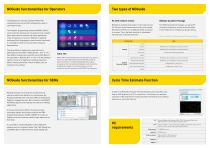
Two types of NCGuide The NCGuide can simulate standard FANUC CNC configurations as well as CNC configurations used on real machine tools. The shopfloor programming software MANUAL GUIDE i can be selected, allowing users to generate even complex parts away from the machine and where appropriate, under the guidance of a tutor. If NCGuide is properly configured then the programs created can be transferred to a suitable machine tool for practical testing and demonstration. The three different display sizes used with series 30i/31i/32i are selectable in NCGuide (8.4”, 10.4" or 15"). Two different...
Open the catalog to page 2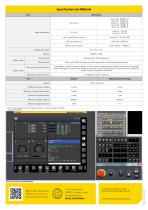
Clurerti Preset uas15>wi ftdMne 0U J1 ■ fflj C43 H? MW. , HJ S«H1 GlfrW DSfl. Ilf, 1 F88. ti®. FfiH_ W. Sr.ffl '.cwi rtocren rt'. ■ ■■fti [tar.HE lurt r i 1 -'--a i rn, i.TJ' . :■. t1 ni ■J--. ttic; uj 1 MMIU Itii iw [J§ &Vm W1 Wq IT.T WTTfo i koce5 ihu- nr' i sadiw1 is1123J j£j Watch the video about FANUC solutions for advanced machining Find more about FANUC software tools for development fanuc.co/software Technical data is subject to change without prior notice. All rights reserved. © 2017 FANUC Europe Corporation S.A. 1] will vary depending on the model. Series 30i - when you...
Open the catalog to page 3All FANUC Europe Corporation catalogs and technical brochures
 R-30iB Plus
2 Pages
 iRPickTool
7 Pages
 MT-LINKi
5 Pages
 FANUC LVC
2 Pages
 M-20iD/25
2 Pages
 LR Mate 200iD
1 Page
 LR Mate 200iD/7C
1 Page
 ARC Mate 100iD
2 Pages
 ARC Mate 100iD/10L
2 Pages
 Collaborative robots
13 Pages
 Drive System
16 Pages
 Integrated Laser System
7 Pages
 CNC Controls Product overview
20 Pages
 Force Sensor
7 Pages
 ROBOCUT
17 Pages
 ROBODRILL
19 Pages
 iHMI
iHMI4 Pages
 iR Vision
9 Pages
 FANUC Robots Brochure
56 Pages
 CRX-20iA/L
1 Page
 R-2000iC/165F
1 Page
 FANUC 3D Area Sensor
5 Pages
 FANUC Multi Group Motion
2 Pages
 ROBOSHOT
19 Pages
 FANUC Secondary Encoders
2 Pages
 LASER C3000i-C
2 Pages


Archived catalogs
 FANUC ROBONANO a-NMiA
2 Pages
- FANUC industrial robot
- FANUC articulated robot
- FANUC 6-axis robot
- FANUC floor-mounted robot
- CNC milling machine
- FANUC handling robot
- Vertical CNC milling machine
- Injection molding machine
- 3-axis CNC milling machine
- FANUC compact robot
- Horizontal injection molding machine
- FANUC ceiling-mounted robot
- FANUC high-speed robot
- FANUC assembly robot
- FANUC 4-axis robot
- FANUC packaging robot
- Loading robot
- FANUC applications robot
- EDM
- FANUC welding robot