
- Catalogs
- FAFNIR GmbH
- VISY-Setup V 3.1.0


VISY-Setup V 3.1.0

VISY-Setup V 3.1.0
The VISY-Setup is a configuration program for the VISY-X system, designed for precise filling level measurements in tanks at filling stations. It integrates VISY-Stick sensors, VISY-Command analysis systems, and VISY-Setup software, facilitating communication with filling station computers via serial interfaces.
The software requires an IBM-compatible computer running Windows 95, 98, ME, NT, 2000, or XP, a CD-ROM drive, at least 4 MB of free hard disk space, and a free serial interface.
Prior to installation, any older versions of VISY-Setup should be uninstalled. The installation involves inserting the CD-ROM, navigating to the installation file, and following on-screen instructions.
VISY-Setup is menu-driven, allowing navigation through submenus and functions using a mouse or keyboard. Unsupported functions are indicated in grey.
Configuration must follow a specific sequence, connecting the VISY-Command system to a PC via a serial interface. The program supports both manual and automatic serial port detection, requiring configuration data such as hardware and software versions, communication addresses, and sensor settings.
Options include temperature compensation, permissible filling rates, and manual or automatic creation of tank tables. These tables can be copied, inserted, or saved to files.
The system provides status and error messages to assist in troubleshooting.
This section details the version history of the VISY-Setup software.
Specifies the minimum version required to support the measurement analysis system functions.
Users must enter the appropriate code for the host computer, found in the VISY-Setup configuration table, through the 'Control Unit' menu.
The extension interface allows data transmission to additional devices and should be activated if such devices are connected. Wireless mode activation may require system reset and data reinitialization.
This setting defines the period (1-99 hours) after which an error message is displayed if no data is received from sensors, aiding in battery life management and data accuracy.
This function checks the connection and function of measuring value sensors, supported by interface cards VI-2 and higher, requiring sensors with serial numbers above 1000.
The system allows setting the date and time manually or by transferring from a PC, supporting automatic daylight savings time adjustments.
Users must input the serial number, fixed offset, and product type for each sensor, with alarm configurations for product and water levels.
The VISY Command system can store a measuring table with up to 128 pairs of values, enhancing volume calculation accuracy. A minimum of 10 pairs is required, starting with "0 mm" and "0 litres" and ending with the tank's diameter and capacity.
Temperature compensation is necessary for mineral oil products due to high volume expansion, with a setting of -19.9°C deactivating this feature.
This rate, expressed as a percentage of total tank volume, aligns with the overfill prevention sensor setting.
Manual entry is necessary for non-standard tanks, while VISY-Setup can automatically calculate tank tables, though less accurate than manufacturer-provided tables.
Tank tables can be copied to the clipboard, saved to a file, or inserted from a file for future use.
Displays current measurement values for each tank, including probe status, product and water levels, and alarms.
Configuration data can be saved for backup and reloaded in case of system failure.
Status codes indicate the operating condition of measuring value sensors, with specific codes for wireless operation issues and data transmission problems.
Error messages relate to data interpretation and execution issues, suggesting system resets or technical support if persistent.
Version updates include enhancements like multilingual support, expanded serial interface compatibility, and wireless function expansions.
Catalog excerpts
The configuration program VISY-Setup is part of the VISY-X system (Volume Information System). The VISY-X system can be used to perform accurate, continuous filling level measurements in up to 16 tanks at filling stations. The product temperature and the water level on the tank bottom are measured simultaneously. The system consists of one to eight or one to sixteen measuring value sensors VISY-Stick, the measurement analysis system VISY-Command 8 or VISY-Command 16, and the configuration software VISY-Setup. The VISY-Stick measuring value sensors are supplied with electric power via the VISY-Command...
Open the catalog to page 4
VISY-Setup Version 3.1.0 Page 5/52 >
Open the catalog to page 5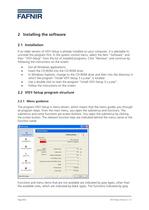
If an older version of VISY-Setup is already installed on your computer, it is advisable to uninstall this program first. In the system control menu, select the item "Software" and then "VISY-Setup" from the list of installed programs. Click RemoveӔ and continue by following the instructions on the screen. Exit all Windows applications. Insert the CD-ROM into the CD-ROM drive. In Windows Explorer, change to the CD-ROM drive and then into the directory in which the program "Install VISY-Setup 3.x.y.exe" is located. Use a double-click to start the program "Install VISY-Setup 3.x.y.exe". Follow...
Open the catalog to page 6
types are functions, which are provided in the software, however, which at present are not supported by the measurement analysis system VISY-Command. 2.2.2User interface and conventions The VISY-Setup program can be operated by means of the mouse or, should you work with a notebook without mouse connection, by means of the keyboard. This manual describes the operation by means of the mouse. Keys available for required functions are indicated in the VISY-Setup menu. If this is not the case, or if there are other possibilities of operation, this is mentioned accordingly. Key designations are indicated...
Open the catalog to page 7
The configuration of the measurement analysis system VISY-Command must be performed in the order described in this chapter. All the values you have entered or modified are transferred to the measurement analysis system VISY-Command and saved there by clicking on the screen button "Accept". > Before configuring the measurement analysis system VISY-Command, you must put it into operation (VISY-Stick and power supply connections) and connect it to a PC or notebook via a serial interface cable - see also "Application of System VISY-X. VISY-Stick and VISY-Command"). If the measurement analysis system...
Open the catalog to page 8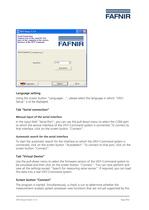
Language setting Using the screen button "Languages", please select the language in which "VISY-Setup" is to be displayed. Tab "Serial connection" > Manual input of the serial interface In the input field "Serial Port", you can use the pull-down menu to select the COM port to which the service interface of the VISY-Command system is connected. To connect to that interface, click on the screen button "Connect". > Automatic search for the serial interface To start the automatic search for the interface to which the VISY-Command system is connected, click on the screen button "Autodetect". To connect...
Open the catalog to page 9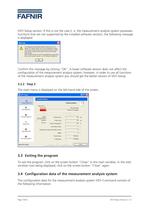
VISY-Setup version. If this is not the case (i. e. the measurement analysis system possesses functions that are not supported by the installed software version), the following message is displayed: Confirm this message by clicking "OK". A lower software version does not affect the configuration of the measurement analysis system, however, in order to use all functions of the measurement analysis system you should get the better version of VISY-Setup. 3.2.2Step 2 The main menu is displayed on the left-hand side of the screen. > To exit the program, click on the screen button "Close" in the main...
Open the catalog to page 10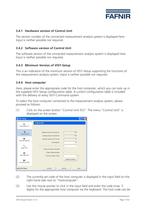
3.4.1Hardware version of Control Unit The version number of the connected measurement analysis system is displayed here. Input is neither possible nor required. 3.4.2Software version of Control Unit The software version of the connected measurement analysis system is displayed here. Input is neither possible nor required. 3.4.3Minimum Version of VISY-Setup This is an indication of the minimum version of VISY-Setup supporting the functions of the measurement analysis system. Input is neither possible nor required. 3.4.4Host computer Here, please enter the appropriate code for the host computer,...
Open the catalog to page 11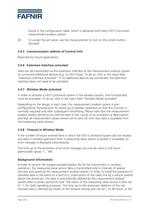
found in the configuration table, which is delivered with every VISY-Command measurement analysis system. (4)To accept the set value, use the mouse pointer to click on the screen button [Accept]. 3.4.5Communication address of Control Unit Reserved for future applications 3.4.6Extension Interface activated Data can be transmitted via the extension interface of the measurement analysis system to connected additional devices (e.g. to VISY-View). To do so, click in the input field "Extension Interface activated". If no additional devices are connected, the extension interface does not need to be...
Open the catalog to page 12
case of favourable transmission conditions (constant clear view between the transmitter and receiver antennas), a value of a few hours is sufficient for the timeout. In the case of unfavourable conditions (e.g. highly frequented station with dome pits in the roadway or parking space areas, it is advisable to increase the timeout accordingly in order to avoid unnecessary error messages. 3.4.9Search for probes Using the function "Search for probes", you have the option of checking the measuring value sensors with respect to their proper function and correct connection without performing any previous...
Open the catalog to page 13
(4)Following expiration of the search, the following values are displayed for each individual measuring value sensor of the 16 possible tanks. Serial number Version (software version) Length / mm (length in millimetres) Floaters (number of floats) If no functional measuring value sensor is found at one or several of the connections, the corresponding line in the table will remain empty. (5)To accept the serial number of the found measuring value sensors directly into the VISY-Command measurement analysis system, click on the screen button "Accept". Prior to the above-described acceptance of the...
Open the catalog to page 14All FAFNIR GmbH catalogs and technical brochures
 TORRIX M12 MOBILE
2 Pages
 TORRIX XTS
2 Pages
 TORRIX 6
1 Page
 LPG Sensors
8 Pages
 SEPARIX
8 Pages
 Process Automation
28 Pages
 O²-PID
4 Pages
 VAPORIX Flow and Control
40 Pages
 Wallmounting Typ 907
4 Pages
 QE 200
4 Pages
 UM 2.1/2.2/2.3
20 Pages
 TORRIX HART
28 Pages
 TORRIX RS485 Modbus
16 Pages
 TORRIX M12
40 Pages
 LS 300 / 500
7 Pages
 76 A / NB 220
5 Pages
 SECON-X
4 Pages
 PRESSURIX
12 Pages
 Insite360
4 Pages
 Plugs
Plugs12 Pages
 UM 2.1/UM 2.2/UM 2.3
20 Pages
 TORRIX-HART
28 Pages
 DIVELIX
8 Pages
 CONDURIX-HART
28 Pages
 CONDURIX
24 Pages
 VAPORIX
12 Pages
 VISY-X
24 Pages
 Accessories
3 Pages
 VISY-Command Web
4 Pages
 VISY-Reed
4 Pages
 VISY-RF
2 Pages
 VISY-Stick
15 Pages
 VISY-TD Display
2 Pages
 VISY-View Touch
2 Pages
 TORRIX
10 Pages
 TORRIX CI
1 Page
 TORRIX RS485
3 Pages
 UM-X Transducer
3 Pages
 TEMPERIX
8 Pages
 VISY-Input VISY-Output
4 Pages
 VISY-Command
5 Pages
 LPG-Sensoren
8 Pages


Archived catalogs
 76 / NB 220
2 Pages
 FAFNIR Hart Setup
9 Pages
 COMS Leaflet
4 Pages
 HPH Ex d
3 Pages
 VISY-Monitor
2 Pages
 2019 VISY-Stick Flex
2 Pages
 2016 VISY-Stick Flex
2 Pages
 VISY-X LON
10 Pages
 SEPARIX
23 Pages
 VAPORIX Flow/Control
32 Pages
 VISY-Setup V2.10
42 Pages
 VISY-View
24 Pages
 VISY-Stick and VISY-Command
24 Pages
 Overfill Prevention (GWG)
12 Pages


- Temperature probe
- LCD display panel
- Industrial display panel
- FAFNIR level switch
- FAFNIR liquid level switch
- FAFNIR level sensor
- FAFNIR liquid level sensor
- Analog I/O
- Round plug
- Interface software
- Thermocouple temperature transducer
- Float level switch
- FAFNIR analog level sensor
- Control display system
- Automatic test kit
- Stainless steel level detector
- Leak monitor
- Network software
- Information display