
- Catalogs
- FAFNIR GmbH
- FAFNIR Hart Setup


FAFNIR Hart Setup

FAFNIR Hart Setup
The FAFNIR HART-Setup is a configuration tool for FAFNIR HART devices, allowing users to display and change HART configuration parameters, save current configurations, and load configuration files to adjust connected devices automatically.
System Requirements
- Computer: Requires Windows 95, 98, 2000, XP, or Vista with at least 3 MB of free hard disk space and a free serial or USB port. Note that USB-to-RS232 converters are not supported.
- HART Modem/Resistor: A HART modem is necessary for communication. Recommended models include VIATOR and SmarResearch interfaces. A resistor between 220 Ω and 1100 Ω must be used in series with the current loop.
Installation
- Connections: Connect the HART modem to the computer and attach the HART resistor.
- Program Installation: Run the installation executable and follow the instructions.
Program Usage
- Startup: Launch the program via the Windows start menu. Select the appropriate COM port for the HART modem.
- Main Form: The program polls for a HART device on startup. If no device is found, options include rescanning or scanning addresses 1-15.
- Multidrop Mode: Enables polling of multiple devices. The "Life List window" shows all devices found.
- Menu Options: Includes loading/saving configurations, rescanning, changing COM ports, and enabling/disabling Multidrop Mode and auto-refresh.
Program Configuration
The configuration file "FAFNIR-HARTSetup.ini" allows customization of program behavior, though editing is typically unnecessary.
Versions
Details changes and improvements across different software versions, from initial release to the current version.
Appendix
- Licence Conditions: Software is protected by copyright, and commercial use is prohibited.
- Warranty Limitation: No liability for damages from software use.
- Forwarding: Redistribution is restricted without FAFNIR's consent.
- Miscellaneous: Legal information and recognition of trademarks.
Catalog excerpts

Technical Documentation FAFNIR HART-Setup The configuration tool for the FAFNIR HART devices Edition: 09/2016 Version: 6 FAFNIR GmbH
Open the catalog to page 1
FAFNIR HART-Setup
Open the catalog to page 2
1 Introduction The program “FAFNIR HART-Setup" (former TORRIX HART-Setup) is the configuration tool for the FAFNIR HART devices. The program includes the following features: • Displaying and changing of the most important HART configuration parameters • Saving of current configuration parameters • Loading a configuration file and adjusting the connected HART device automatically In the technical documentation of your FAFNIR HART device you will find more information about HART. • Operating system: Microsoft Windows 95, 98, 2000, XP or Vista • Min. 3 MB free hard disk space • One free serial...
Open the catalog to page 3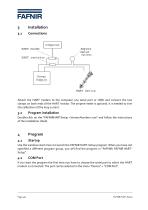
Attach the HART modem to the computer (via serial port or USB) and connect the two clamps on both ends of the HART resistor. The ampere meter is optional. It is needed to trim the calibration of the loop current. 3.2 Program installation Double-click on the "FAFNIRHARTSetup <VersionNumber>.exe" and follow the instructions of the installation shield. Use the windows start menu to launch the FAFNIR HART-Setup program. When you have not specified a different program group, you will find the program in "FAFNIR\ FAFNIR HART-Setup". If you start the program the first time you have to choose the serial...
Open the catalog to page 4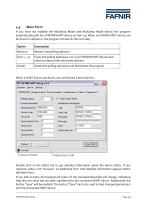
4.3 Main Form If you have not enabled the Multidrop Mode (see Multidrop Mode below) the program automatically polls for a FAFNIR HART device on start-up. When no FAFNIR HART device can be found on address 0, the program will ask for the next step: Double-click on the status bar to get detailed information about the device status. If any response code is not "Success", an additional form with detailed information appears below the Main Form. If you edit an entry the background colour of the corresponding field will change, indicating that the new value has not been transferred to the connected...
Open the catalog to page 5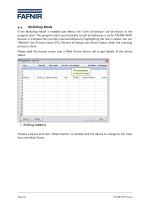
Multidrop Mode If the Multidrop Mode is enabled (see Menu) the “Life List window” will be shown at the program start. The program starts automatically to poll all addresses 0-15 for FAFNIR HART devices. It indicates the currently scanned address by highlighting the row in yellow. You can “Refresh” the Primary Value (PV), Percent of Range and Device Status when the scanning process is done. Please hold the mouse cursor over a filled Device Status cell to get details of the device status. Choose a device and click “Select Device” or double-click the device to change to the main form (see Main Form)....
Open the catalog to page 6
Menu "Load Config...": Loads a configuration file and adjusts the connected device to the parameters defined in the file. "Save Config As.": Reads the current parameters of the connected device and saves them in a user defined configuration file. "Rescan" / "Life List": Polls for a FAFNIR HART device. Do not mix up with the "Refresh"-Button. "COM Port": Changes the serial port. "Multidrop": Enables/disables the Multidrop Mode "Auto refresh": Enables/disables the automatic refresh of the tabs "Analog Output" and "Device Variables" 5 Program Configuration In the installation folder of FAFNIR HART-Setup...
Open the catalog to page 7
Page 8/9 FAFNIR HART-Setup
Open the catalog to page 8
Licence conditions The software and accompanying material are protected by copyright. You are not allowed to remove any copyright information from the software. FAFNIR guarantees that the data mediums (floppy disks/CD-ROM), on which the software has been recorded, are without any errors upon the time of handover to the customer. FAFNIR does not guarantee the functionality of the software. No liability shall be accepted for any damages resulting from the use or installation of the software. All rights to the program shall remain with the manufacturer. The use of the program is permitted. The commercial...
Open the catalog to page 9All FAFNIR GmbH catalogs and technical brochures
 TORRIX M12 MOBILE
2 Pages
 TORRIX XTS
2 Pages
 TORRIX 6
1 Page
 LPG Sensors
8 Pages
 SEPARIX
8 Pages
 Process Automation
28 Pages
 O²-PID
4 Pages
 VAPORIX Flow and Control
40 Pages
 Wallmounting Typ 907
4 Pages
 QE 200
4 Pages
 UM 2.1/2.2/2.3
20 Pages
 TORRIX HART
28 Pages
 TORRIX RS485 Modbus
16 Pages
 TORRIX M12
40 Pages
 LS 300 / 500
7 Pages
 76 A / NB 220
5 Pages
 SECON-X
4 Pages
 PRESSURIX
12 Pages
 Insite360
4 Pages
 Plugs
Plugs12 Pages
 UM 2.1/UM 2.2/UM 2.3
20 Pages
 TORRIX-HART
28 Pages
 DIVELIX
8 Pages
 CONDURIX-HART
28 Pages
 CONDURIX
24 Pages
 VAPORIX
12 Pages
 VISY-X
24 Pages
 Accessories
3 Pages
 VISY-Command Web
4 Pages
 VISY-Reed
4 Pages
 VISY-RF
2 Pages
 VISY-Stick
15 Pages
 VISY-TD Display
2 Pages
 VISY-View Touch
2 Pages
 TORRIX
10 Pages
 TORRIX CI
1 Page
 TORRIX RS485
3 Pages
 UM-X Transducer
3 Pages
 TEMPERIX
8 Pages
 VISY-Input VISY-Output
4 Pages
 VISY-Command
5 Pages
 LPG-Sensoren
8 Pages


Archived catalogs
 76 / NB 220
2 Pages
 COMS Leaflet
4 Pages
 HPH Ex d
3 Pages
 VISY-Monitor
2 Pages
 2019 VISY-Stick Flex
2 Pages
 2016 VISY-Stick Flex
2 Pages
 VISY-X LON
10 Pages
 SEPARIX
23 Pages
 VAPORIX Flow/Control
32 Pages
 VISY-Setup V 3.1.0
40 Pages
 VISY-Setup V2.10
42 Pages
 VISY-View
24 Pages
 VISY-Stick and VISY-Command
24 Pages
 Overfill Prevention (GWG)
12 Pages


- Temperature probe
- LCD display panel
- Industrial display panel
- FAFNIR level switch
- FAFNIR liquid level switch
- FAFNIR level sensor
- FAFNIR liquid level sensor
- Analog I/O
- Round plug
- Interface software
- Thermocouple temperature transducer
- Float level switch
- FAFNIR analog level sensor
- Control display system
- Automatic test kit
- Stainless steel level detector
- Leak monitor
- Network software
- Information display