

Minitime

Minitime
The MiniTIME-SA is an access control device capable of storing codes and cards autonomously. It can store a MASTER-CODE and up to 500 user codes. The MASTER-CODE length ranges from 6 to 14 characters, while user codes range from 4 to 14 characters. An optional kit with 12 passive SA cards can be used if a keyboard is not present.
Electrical Characteristics
The device operates on a power supply of 12 to 24 V, both AC and DC. It has specific consumption rates depending on the input voltage and can handle maximum relay contact tensions of 60 Vdc and 125 Vac.
Operative Modes
Upon activation, the device checks for a MASTER CODE. If absent, the system waits for it to be set, indicated by blinking lights. Once set, the system operates in access control mode, waiting for a valid card or code.
Settings
The device settings are organized into 8 menus, each accessible by entering the menu number followed by the master-card/# key and the master code. Key menus include:
- Menu 1: Inserting a user code/card
- Menu 2: Deleting a user code/card
- Menu 3: Activating a user code/card
- Menu 4/5: Data Import/Export
- Menu 6: I/O Configuration
- Menu 7: Reader B Configuration
- Menu 8: Internal/External reader activation
Reset Functions
Reset functions are useful for managing the "anti-pass-back" feature, allowing the user to set the status of all titles to absent or present based on the reader used.
Installer Notes
Special care should be taken to position the device in a protected zone and to place a reader head outside the reader to manage the alarm contact effectively.
Catalog excerpts
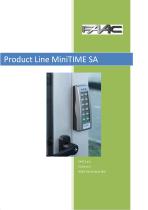
Product Line MiniTIME SA FAAC S.p.A. Via Benini 1 40069 Zola Pr
Open the catalog to page 1
MiniTIME SA: Installation Guide and User Guide
Open the catalog to page 2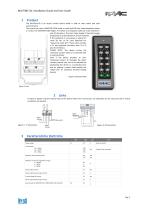
MiniTIME SA: Installation Guide and User Guide 1 Product The MiniTime-SA is an access control device which is able to store codes and card autonomously. The central can store a MASTER-CODE (code or card) and 500 user codes (keyboard codes or cards). The MASTER-CODE length, if inserted as a keyboard code has to be between 6 and 14 characters. The User Codes lenght (if inserted trough keyboard) has to be between 4 and 14 charaters. If the keyboard is not present a special 12 cards kit has to be used (optional kit: “passive SA cards kit"). These cards emulate a 12 key keyboard (numbers from 0 to...
Open the catalog to page 3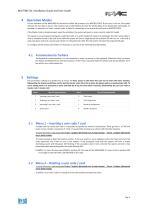
MiniTIME SA: Installation Guide and User Guide Operative Modes On the activation of the MINITIME‐SA the device verifies the presence of a MASTER CODE. If this cose is not set, the system will wait for this code to be set. This situation can be identified by the fact the all the lights of the device blink rythmically. To proceed it is necessary to insert a master code, in detail it is necessary to use a card that will work as MASTER CODE. If the Master Code is already present upon the activation, the system will work in access control mode (AC mode). The system is on permament waiting for a valid...
Open the catalog to page 4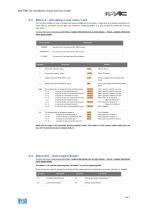
MiniTIME SA: Installation Guide and User Guide 5.3 Menu 3 – Activating a user code / card This function enables to user to change the access configurations for either a single user or a group of locations. For every title it’s possible to set the gate and “direction” (absent/present), it is also possible to enable the anti pass back check. To enter the menu read paragraph Errore. L'origine riferimento non è stata trovata. – Errore. L'origine riferimento non è stata trovata. TIPO DI COMANDO Executes the C command on the NNN location Executes the C command on the FFF location Executes the C command...
Open the catalog to page 5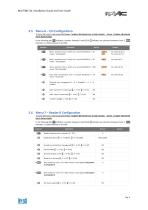
MiniTIME SA: Installation Guide and User Guide 5.5 Menu 6 – I/O Configuration To enter the menu read paragraph Errore. L'origine riferimento non è stata trovata. – Errore. L'origine riferimento non è stata trovata. In the following tab: TTT indicates a number between 0 and 65535, F indicates one character between 0 and 1, NNN indicates a number between 0 and 500. COMANDO Relè 1 activation time in tenths of a second (0÷65535), 0 30 means “ relè disabled”. Relè 2 activation time in tenths of a second (0÷65535), 0 30 means “ relè disabled”. Alarm activation time in tenths of a second (0÷65535),...
Open the catalog to page 6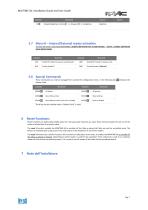
MiniTIME SA: Installation Guide and User Guide COMANDO Wiegand/MagStripe Interface F = 1 → Wiegand, F = 0 → MagStripe 5.7 Menu 8 – Internal/External reader activation To enter the menu read paragraph Errore. L'origine riferimento non è stata trovata. – Errore. L'origine riferimento non è stata trovata. Enable RF module for passive cards (Default) Disable RF module for passive cards Disables Reader B (Default) 5.8 Special Commands These commands can only be managed from outside the configuration menu. In the following tab MC indicates the Master‐Code. COMANDO Reset titles archive Reset settings...
Open the catalog to page 7All FAAC SpA catalogs and technical brochures
 Resist T-PS-TPS
1 Page
 TAG - 10
2 Pages
 VIPER 400
6 Pages
 XTR B
XTR B4 Pages
 S800 ENC
4 Pages
 J SERIES BOLLARD
8 Pages
 Automated system R180
3 Pages
 Parking and access control
15 Pages
 Gearmotor 746 ER
2 Pages
 Operator for swing gatesS418
4 Pages
 Gearmotor C720
4 Pages
 930 AUTOMATIC SLIDING DOOR
6 Pages
 A100 AUTOMATIC DOORS
6 Pages











- Actuator
- Linear actuator
- Electric actuator
- Mechanical lock
- Indoor shutter
- Metal door
- Wireless remote control
- Remote control with buttons
- Door lock
- Security door
- Fuse box
- Light barrier
- Automatic door
- Safety lock
- Stainless keypad
- Multibeam light curtain
- Exterior door
- RFID reader-writer
- Stainless steel door
- Safety light curtain