
- Catalogs
- Ever Elettronica
- ATOMIC Environment Introduction


- Products
- Catalogs
- News & Trends
- Exhibitions
ATOMIC Environment Introduction

ATOMIC Environment Introduction
Atomic is a micro programming language designed for the EVER SDM, MD, SW, and SM family drives. It allows users to create simple applications without needing more complex drives. The language features a few powerful instructions and is programmed using a PC with the Atomic environment and compatible drives.
Hardware and Software Components
The Atomic environment requires specific hardware and software components, including a CD for installation and an RS232 cable. Various software kits are available for different drive models, each with specific firmware versions.
Technical Specifications
Atomic supports 15 macro instructions, 8 storable user applications, and a maximum program size of 640 bytes. It allows multitasking with up to 8 user tasks and supports 4-byte integer numbers. The execution time is less than 1 ms per instruction.
Advantages
Atomic offers a simple and fast way to build user cycles, supports various application requirements, and does not require learning instruction syntax. It integrates f4d2 technology advantages and simplifies debugging. Full support and training are provided by EVER Elettronica.
Instructions Set
The instruction set includes motor handling, arithmetical, application flow control, Boolean, and set instructions. Each instruction type has specific parameters and functionalities, such as MOVE, STOP, ADD, SUB, MUL, DIV, BOOL, and SET.
Application Execution
Upon startup, the SDM drive retrieves parameters from NVRAM and executes the user application. It continues to function as a CANopen/MODBUS standard slave and checks for emergency conditions, pausing the application if necessary.
Language Syntax
The Atomic environment uses a Windows application with wizards and dialog boxes, eliminating the need to write instruction syntax manually. Users can add or edit macro instructions through function buttons that open parameter-setting windows.
System Diagnostic and Configuration
Diagnostic tools provide system information, while configuration windows allow setting start drive parameters and managing user variables. Utility windows facilitate program transfer and control of application syntax.
PC Environment Configuration
Additional utility windows are available for setting Atomic software parameters.
Catalog excerpts
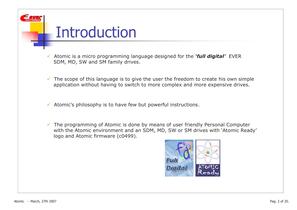
Atomic isa micro programming language designed forthe full digitalђ EVERSDM, MD, SW and SM family drives. The scope of this language is to givethe userthe freedom tocreate his own simpleapplication withouthaving to switch tomore complexand more expensive drives. Atomics philosophyis to havefew but powerful instructions. The programmingof Atomic is done by meansof user friendly Personal Computerwiththe Atomicenvironment and anSDM, MD, SW or SM drives withґAtomic Ready logo and Atomicfirmware (c0499). > Atomic -March, 27th 2007Pag. 2 of 20. size="-1">
Open the catalog to page 2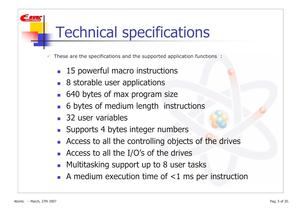
Theseare the specificationsand the supported application functions : 15 powerfulmacro instructions 8 storableuser applications 640 bytes of max program size 6 bytes of medium length instructions 32 user variables Supports4 bytesintegernumbers Access to all the controllingobjects of the drives Access toall the I/Os of the drives Multitaskingsupportup to8 user tasks A medium executiontime of <1 msper instruction > Atomic -March, 27th 2007Pag. 5 of 20. size="-2">
Open the catalog to page 5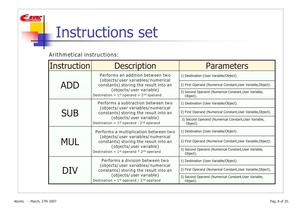
2) First Operand(Numerical Constant,User Variable,Object). > st nd 3) Second Operand(Numerical Constant,User Variable,Object). Destination= 1 operand+ 2 operand > 2) First Operand(Numerical Constant,User Variable,Object). 3) Second Operand(Numerical Constant,User Variable,Object). Destination= 1 > st operand-2 > nd operand > 2) First Operand(Numerical Constant,User Variable,Object). Destination= 1 > st operand* 2 > nd operand 3) Second Operand(Numerical Constant,User Variable,Object). > 2) First Operand(Numerical Constant,User Variable,Object). 3) Second Operand(Numerical Constant,User Variable,Object)....
Open the catalog to page 8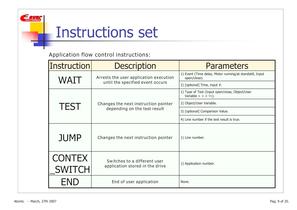
1) Event(Time delay, Motor running/at standstill, Inputopen/close). > 2) [optional] Time, input #. 1) Typeof Test (Input open/close, Object/UserVariable< > = !=). > 2) Object/User Variable. 3) [optional] Comparison Value. 4) Line number ifthe test result is true. > None. > Atomic -March, 27th 2007Pag. 9 of 20. size="-1">
Open the catalog to page 9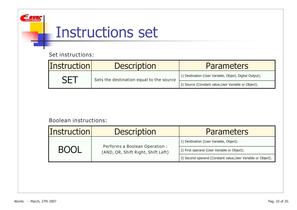
Set instructions: Instruction Description Parameters > 1) Destination(User Variable, Object, DigitalOutput). Setsthe destination equal tothe source 2) Source(Constant value,User Variableor Object). Booleaninstructions: Instruction Description Parameters > 1) Destination(User Variable, Object). Performs a Boolean Operation:(AND, OR, Shift Right, Shift Left) 2) First operand(User Variableor Object). 3) Second operand(Constant value,User Variableor Object). Atomic -March, 27th 2007Pag. 10 of 20. size="-4">
Open the catalog to page 10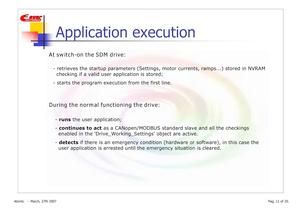
-retrievesthe startup parameters(Settings, motor currents, ramps...) storedin NVRAMchecking ifa valid user application is stored; -startsthe program execution fromthe first line.- > runs the user application;- continues to act asa CANopen/MODBUS standard slave and allthe checkingsenabledin the 'Drive_Working_Settings' objectare active. - detects if there is an emergency condition(hardware or software), in this case theuser application is arrested untilthe emergency situation is cleared. > Atomic -March, 27th 2007Pag. 11 of 20. size="-1">
Open the catalog to page 11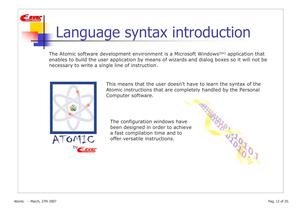
The Atomicsoftware development environment isa Microsoft Windows > (tm) application that enables to buildthe user application by meansof wizardsand dialog boxesso it will not be necessary to writea single line of instruction. This means thatthe user doesnt have to learnthe syntaxof the Atomic instructions that are completely handled bythe Personal Computer software. The configurationwindows have beendesignedin ordertoachievea fast compilation time and to offerversatile instructions. > Atomic -March, 27th 2007Pag. 12 of 20. size="-1">
Open the catalog to page 12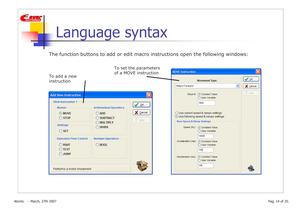
Toset the parameters of a MOVE instruction Toadda new instruction > Atomic -March, 27th 2007Pag. 14 of 20. size="-1">
Open the catalog to page 14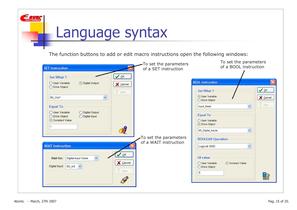
Toset the parametersof a SET instruction Toset the parameters of a WAIT instruction Toset the parametersof a BOOL instruction > Atomic -March, 27th 2007Pag. 15 of 20. size="-1">
Open the catalog to page 15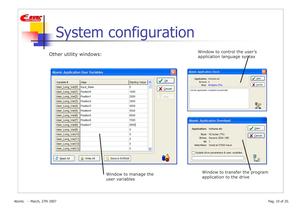
Window tocontrol the users application language syntax Window tomanagethe uservariables Window to transfer the program applicationtothe drive > Atomic -March, 27th 2007Pag. 19 of 20. size="-1">
Open the catalog to page 19All Ever Elettronica catalogs and technical brochures
 SW4 Titanio drivers
2 Pages
 SW3A Titanio drivers
2 Pages
 SW1 Programmable Drives
3 Pages
 High Efficiency stepper motors
28 Pages
 Integrated servomotor SM2A
2 Pages
 Application catalogue
28 Pages
 Stepper drivers catalogue
64 Pages
 SM1A integrated systems
2 Pages


Archived catalogs


- Electromotor
- DC electromotor
- Synchronous motor
- Planetary gearbox
- Coaxial gearhead
- EC motor
- Electromotor for industrial applications
- Precision gearhead
- 24 V motor
- Compact electromotor
- IP55 motor
- High-efficiency electromotor
- Pump motor
- Stepper motor
- Permanent magnet motor
- Motor controller
- 220 V motor
- High-torque motor
- IP54 motor
- 48 V motor