

MC.NET

MC.NET
MC.NET is an advanced software solution designed for the external control of ERWEKA hardness and combination testers. It supports a range of devices from the manual TBH 325 to the fully automated MultiCheck 6, allowing for full device control, automated testing, and unlimited storage space. The software integrates with a network MS SQL database, enabling data from multiple devices to be stored and accessed easily, ensuring data integrity with advanced Audit Trail features.
- Full Device Control: Users can manage all aspects of the hardness testers through an external computer.
- Automated Testing: The software facilitates the creation and execution of test methods efficiently.
- Network Database: Data can be stored locally or on a network database, allowing for centralized data management and reducing redundancy.
- Audit Trail: Tracks all changes with full data integrity, conforming to 21 CFR part 11 regulations.
- Electronic Signature: Digitalizes the audit and approval process, eliminating the need for manual signatures.
MC.NET allows for efficient method management by using templates for creating new methods. User management is flexible, supporting Active Directory and ensuring only authorized personnel have access to specific functions.
The software includes a hardness diagram feature for visual confirmation of tablet hardness measurements, aiding in quality control. Reports are generated with unique protocol numbers, and results are stored in the database for easy access and review.
Technical specifications are subject to change without notice. For more information, users are encouraged to visit the ERWEKA website or contact them via email or phone.
Catalog excerpts

Advanced Software for ERWEKA Hardness Testers
Open the catalog to page 1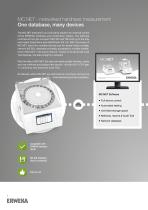
MC.NET - networked hardness measurement One database, many devices The MC.NET software is our innovative solution for external control of the ERWEKA hardness and combination testers. The software controlls all from the compact TBH 325 and TBH 425 up to the fully automated EasyCheck and MultiCheck 5/5.1/6. With the power of MC.NET, data from multiple devices can be stored inside a single, network MS SQL database and easily accessed by multiple installations of MC.NET in the same network. Thanks to its advanced Audit Trail features, the data integrity is ensured. With the help of MC.NET, the user...
Open the catalog to page 2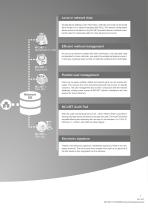
Local or network data All data (device settings, batch information, methods and more) can be stored either locally or in a network database (MS SQL). The network configuration allows access to all data from any MC.NET powered devices, therefore reducing the need to create base data for many devices to just once. Efficient method management As soon as a method is created with all its information, it can be easily used as template for future methods. Just select the suitable template and use it. In this way, creating a larger number of methods is efficient and comfortable. Flexible user management...
Open the catalog to page 3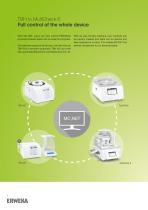
TBH to MultiCheck 6 Full control of the whole device With MC.NET, users can fully control ERWEKAs physical hardness tester with an external computer. The software supports all devices, from the manual TBH 325 to the semi-automatic TBH 425 up to the fully automated EasyCheck and MultiCheck 5/5.1/6. With its user-friendly interface, new methods can be quickly created and tests can be started and later analyzed in no time. This makes MC.NET the perfect companion to our physical tester.
Open the catalog to page 4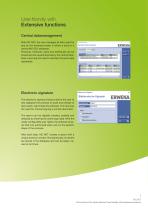
User-friendly with Extensive functions Central datamanagement With MC.NET, the user manages all data used for and by the hardness tester, in either a local or a central MS SQL database. Products, methods, users and testresults can be shared across several devices by the central database, removing the need to maintain the same data repeatedly. Electronic signature The electronic signature feature allows the user to fully digitalize the process of audit and release of test results, right inside the software. This removes the need for manual signing a printed document. The report can be digitally...
Open the catalog to page 5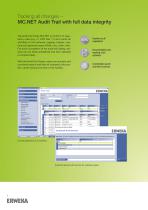
Tracking all changes – MC.NET Audit Trail with full data integrity The audit trail inside MC.NET is conform to regulatory rules (e.g. 21 CFR Part 11) and tracks all activities of the software, logging change, user, time and (optional) reason (What, who, when, why). For quick completion of the audit trail dialog, reasons can be either predefined and then selected or entered freely. With the Audit Trail Viewer, users can quickyly and conviently search and filter all changes to the system, never loosing overview of the system. Conform to all regulations Documentation and tracking of all activities...
Open the catalog to page 6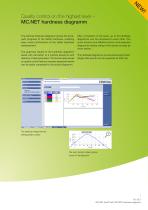
Quality control on the highest level – MC.NET hardness diagramm The optional hardness diagramm shows the forcepath progress of the tablet hardness, enabling easy visual confirmation of the tablet hardness measurement. The graphical results of the hardness diagramm assist with derivation of a method aswell as with selection of test parameters. The function also serves as quality control feature, because expected results can be easily compared to the actual diagramm. After completion of the tests, up to 20 hardness diagramms can be compared to each other. The zoom function and different colors...
Open the catalog to page 7
Contact Are you curious and want to find out more? Head over to our website and download our product brochures, watch videos of our equipment in action or find the ERWEKA dealer of your country. ERWEKA GmbH Pittlerstr. 45 63225 Langen Germany Technical specifications of products described are stated without warranty and subject to change at any time without further notice. v.1.0.3.20
Open the catalog to page 8All ERWEKA catalogs and technical brochures
 SVM II
8 Pages
 RRT 10 BioDis
8 Pages
 AR 403
12 Pages
 SVM Tapped Density Tester
8 Pages
 GT-Series
8 Pages
 ZT Series
8 Pages
 TBH 425
5 Pages
 TBH 325
5 Pages
 TBH 125
5 Pages
 MultiCheck 6
8 Pages
 EasyCheck
8 Pages
 USP 4 DFZ ll
12 Pages
 MediPrep Series
6 Pages
 RoboDis II+
20 Pages
 DT 950
12 Pages


- Dynamic agitator
- Batch agitator
- Grinding mill
- Crushing plant
- Fully automatic filling machine
- Cloud-based software
- Liquids filling line
- Vertical homogenizer
- Digital tester
- Stationary crushing plant
- Stainless steel homogenizer
- ERWEKA benchtop hardness tester
- Laboratory shaker
- Automatic tester
- Visualization software solution
- ERWEKA industrial tester
- Digital display hardness tester
- Pelletizer
- Solid mixer