


- Company
- Products
- Catalogs
- News & Trends
- Exhibitions
Ersa CAD Assistant 3D

Ersa CAD Assistant 3D
- Intuitive Interface: The software offers a graphic and tabular user interface for easy programming.
- Auto-Routing: This feature optimizes cycle times by automatically determining the most efficient paths.
- Error Prevention: A plausibility check prevents errors during program creation.
- 3D Visualization: Provides a visual control mechanism to verify program files.
- Program Duplication: Allows duplication of program steps for time-optimized generation for multi-up panels.
- Exclusion Areas: Definition of exclusion areas prevents crashes.
- File Compatibility: Supports image formats (.jpg, .bmp) and CAD formats (.dxf, .step).
- Windows-compatible PC with a minimum dual-core processor (>2.5 GHz).
- Dedicated graphics card with at least 512 MB and OpenGL driver.
- Minimum 2 GB RAM and 1 GB free hard disk space.
- Monitor resolution of at least 1920 x 1080 pixels.
- Compatible with Windows XP, Windows 7, and Windows 8.
Catalog excerpts
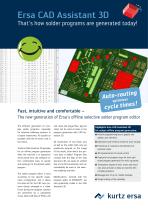
cycle times-' Fast, intuitive and comfortable - The new generation of Ersa's offline selective solder program editor plex solder programs, especially for selective soldering systems, is of great importance. As quickly as possible, and free of errors, that is The Ersa CAD Assistant 3D provides for an offline program generation while the machine is in operation! At the same time, the software of- fers comfortable ways to quickly and easily get to the desired solder The solder program editor is built according to the specific equip- ment configuration, and it shows tems clearly arranged in a table. Errors during the program creation check. Both CAD files of PCBs (.dxf and .step) and image files (jpg and program generation with CAD As- All movements of the fluxer axis as well as the solder bath axis are graphically entered on the image of the board, after which the pro- cess data is added. Program files created with the help of the CAD Assistant 3D can easily be verified immediately be used in the selec- tive soldering machine. Modifications, entered with the program editor of ERSAOSFT, are also graphically visible in the CAD Highlights Ersa CAD Assistant 3D for unique offline program generation: Intuitive programming due to graphic and tabular user interface Optimized cycle times by means of auto-routing Prevention of crashes by the definition of exclusion areas 3D representation for visual control Duplication of program steps for time-opti- mized program generation for multi-up panels Transparent display of dots, tracks and exclu- sion areas ensures to keep an overview with complex programs Management of up to 3 solder modules Simple scaling of the assembly
Open the catalog to page 1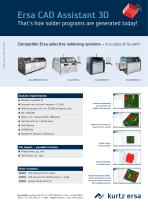
Ersa CAD Assistant 3D Subject to changes | © 2013 by Ersa GmbH That‘s how solder programs are generated today! Compatible Ersa selective soldering systems – in a class of its own! Ersa ECOCELL System requirements: Windows-compatible PC Processor: min. dual core, frequency > 2.5 GHz Dedicated graphic card: min. 512 MB and OpenGL driver Intuitive programming due to graphic and tabular user interface Min. 2 GB RAM Monitor: min. resolution 1920 x 1080 pixels Hard disk with min. 1 GB free space Free USB port Optimized cycle times by means of auto-routing CD ROM drive Windows XP, Windows 7, Windows...
Open the catalog to page 2All Ersa GmbH catalogs and technical brochures
 Ersa wave soldering systems 2024
16 Pages
 X-TOOL VARIO
2 Pages
 SOLDERING TOOLS 2023/24
60 Pages
 Ersa MOBILE SCOPE
2 Pages
 REWORK- & INSPECTION SYSTEMS
44 Pages
 Particle Foam Machines
17 Pages
 Accessory Catalogue 2019
13 Pages
 VERSASCAN & VERSAEYE
5 Pages
 DISCOVER-SMART-TECHNOLOGIES
8 Pages
 Ersa Soldering Primer
32 Pages
 Ersa know-how transfer
2 Pages
 Ersa Catalogue
52 Pages
 Ersa VERSAPRINT 2
12 Pages
 Ersa HOTFLOW 4 Series
16 Pages
 Ersa HOTFLOW 3 Series
16 Pages
 Ersa MULTI WAVE
16 Pages
 Ersa VERSASCAN & VERSAEYE
8 Pages
 Ersa SERVICES
12 Pages
 Ersa Product Range
40 Pages


Archived catalogs
 Ersa wave soldering systems
16 Pages
 Ersa VERSAPRINT Stencil Printer
12 Pages
 Ersa SMARTFLOW 2020
8 Pages
 Ersa Festival of Innovations
8 Pages
 SOLUTIONS 4YOU
6 Pages
 Fine-Pitch Installation
1 Page


- Industrial robot
- Analysis software solution
- Process software
- Articulated robot
- Real-time software
- Windows software
- Computer-aided design software
- 6-axis robot
- Inspection system
- Interface software
- Visualization software solution
- Simulation software solution
- Programming software solution
- Automated software
- Screen printing machine
- Machine software
- Applications robot
- Creation software
- Automatic screen printing machine
- Camera inspection system