

BrightLink 430i

BrightLink 430i
BrightLink provides interactive projection solutions designed for educational environments, including ultra-short-throw and short-throw projectors, and interactive modules with HDMI connectivity. These solutions aim to replace traditional interactive whiteboards, offering flexibility and cost-effectiveness.
- Ultra-Short-Throw Projectors: Models such as BrightLink 475Wi, 480i, and 485Wi support dual pen interaction, WXGA and XGA resolutions, and interactive areas from 60" to 100" diagonally.
- Short-Throw Projectors: Models like BrightLink 425Wi, 430i, and 435Wi offer interactive areas up to 113" diagonally with single pen input and manual calibration.
- BrightLink Solo: This module adds interactivity to any long-throw or ceiling-mounted projector, supporting areas up to 102" (XGA) and 96" (WXGA).
BrightLink projectors feature advanced connectivity, including wireless file sharing and network management, and support various operating systems with built-in annotation tools for PC-free interaction.
Designed for easy installation, BrightLink solutions offer automatic calibration and driverless operation, integrating with educational software like Promethean ActivInspire and SMART Notebook.
Epson provides comprehensive training resources, including welcome kits, videos, webinars, and on-site professional development to facilitate effective use in educational settings.
BrightLink solutions are cost-effective alternatives to traditional interactive whiteboards, offering larger interactive areas at a lower cost, with a cost calculator available for evaluating savings.
Optional accessories include document cameras, large whiteboards, height-adjustable mounts, cable management kits, and active speakers to enhance learning experiences.
This document outlines Epson's multimedia projectors and accessories, emphasizing features, benefits, and support programs for educational institutions.
- Wireless Pendant Microphone (ELPMC02): Enhances voice projection to prevent strain and ensure audibility.
- DC-06 Document Camera: Provides XGA resolution for displaying 3D objects and documents.
- BrightLink Mobile Cart: A portable cart for Epson ultra-short throw projectors with locking wheels and a folding arm.
Epson offers affordable projector accessories to enhance multimedia presentations for schools and teachers.
Available to K-12 and higher education institutions, offering extra warranty, replacement coverage, and technical support without purchase requirements.
Epson products align with grant funding sources, providing educators with information to utilize these funds.
Epson emphasizes sustainability with energy-efficient 3LCD technology, recyclable products, and participation in the SmartWay Transport Partnership.
Epson's projectors focus on image quality, reliability, and low total cost of ownership for educational scenarios.
Epson's innovations include the first electronic mini printer and color liquid crystal video projector, contributing to the modern projector industry.
Epson projectors use 25% less electricity per lumen compared to 1-chip DLP systems, reducing energy costs.
Items included with Epson projectors are interactive pens, batteries, cables, and software.
For more details, visit Epson's website or contact their offices in the U.S. and Canada.
Catalog excerpts
Work Across the Board Interactive Projection Solutions for All Learning Environments
Open the catalog to page 1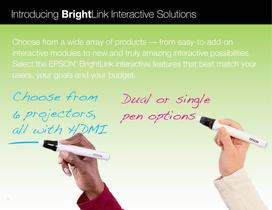
Introducing BrightLink Interactive Solutions Choose from a wide array of products — from easy-to-add-on interactive modules to new and truly amazing interactive possibilities. Select the EPSON BrightLink interactive features that best match your users, your goals and your budget. ® Choose from 6 projectors, all with H DMI 1 Dual or single pen options
Open the catalog to page 2
Interactive Modules Short-Throw Interactive Projectors Ultra-Short-Throw Interactive Projectors There are several products to choose from with HDMI connectivity — ultra-shortthrow and short-throw projectors, or interactive modules with plenty of options. Eliminate the constraints and expenses of interactive whiteboards. Outshine other projectors and transform almost any wall or dry-erase board — and even tables — with BrightLink solutions. BrightLink Solo™ BrightLink 425Wi, 430i, 435Wi BrightLink 475Wi, 480i, 485Wi Interactivity for ANY brand of projector Interactivity with versatility Switch...
Open the catalog to page 3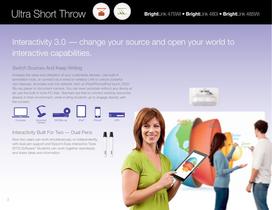
Ultra Short Throw BrightLink 475Wi • BrightLink 480i • BrightLink 485Wi Interactivity 3.0 — change your source and open your world to interactive capabilities. Switch Sources And Keep Writing Increase the value and utilization of your multimedia devices. Use built-in annotation tools, or connect via a wired or wireless LAN to unlock powerful new features. Annotate over the network, from an iPad/iPhone/iPod touch, DVD/ Blu-ray player or document camera. You can even annotate without any device at all; use the built-in tools PC-free. Teachers are free to connect existing resources already in their...
Open the catalog to page 4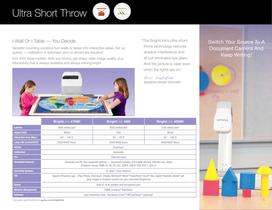
Ultra Short Throw i-Wall Or i-Table — You Decide “ The BrightLink’s ultra-short- Versatile mounting solutions turn walls or tables into interactive areas. Set up 4 quickly — calibration is automatic and no drivers are required. Pick from three models. With any choice, get sharp, clear image quality, plus interactivity that is always available and always shining bright. throw technology reduces shadow interference and all but eliminates eye glare. Switch Your Source To A Document Camera And 2 Keep Writing. And the picture is clear even when the lights are on.” Eric Sabatini Seventh Grade teacher...
Open the catalog to page 5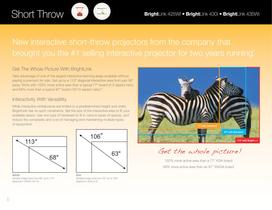
Short Throw BrightLink 425Wi • BrightLink 430i • BrightLink 435Wi New interactive short-throw projectors from the company that brought you the #1 selling interactive projector for two years running. 9 Get The Whole Picture With BrightLink Take advantage of one of the largest interactive learning areas available without paying a premium for size. Get up to a 113" diagonal interactive area from just 36" away. Work with 102% more active area than a typical 77" board (4:3 aspect ratio) 10 and 69% more than a typical 87" board (16:10 aspect ratio). Interactivity With Versatility While interactive...
Open the catalog to page 6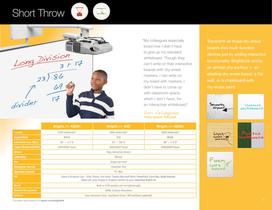
Short Throw “My colleagues especially loved how I didn’t have to give up my standard whiteboard. Though they can’t write on their interactive boards with dry-erase Transform all those dry-erase boards into multi-function devices just by adding interactive functionality. BrightLink works on almost any surface — an markers, I can write on existing dry-erase board, a flat my board with markers. I wall, or a chalkboard with didn’t have to come up dry-erase paint. with classroom space, which I don’t have, for an interactive whiteboard.” Lori Velazquez Third grade teacher BrightLink 425Wi Lumens Aspect...
Open the catalog to page 7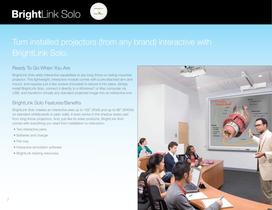
BrightLink Solo Turn installed projectors (from any brand) interactive with BrightLink Solo. 1 Ready To Go When You Are BrightLink Solo adds interactive capabilities to any long-throw or ceiling-mounted projector. This lightweight, interactive module comes with a pre-attached arm and mount, and requires just a few screws (included) to secure it into place. Simply install BrightLink Solo, connect it directly to a Windows® or Mac computer via USB, and transform virtually any standard projected image into an interactive one. BrightLink Solo Features/Benefits BrightLink Solo creates an interactive...
Open the catalog to page 8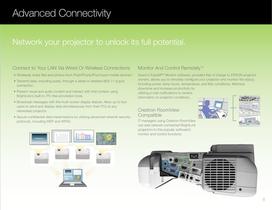
Advanced Connectivity Network your projector to unlock its full potential. Connect to Your LAN Via Wired Or Wireless Connections Monitor And Control Remotely12 11 • Wirelessly share files and photos from iPad/iPhone/iPod touch mobile devices. Epson’s EasyMP® Monitor software, provided free of charge to EPSON projector owners, allows you to remotely configure your projector and monitor the status, including power, lamp hours, temperature, and filter conditions. Minimize downtime and increase productivity by utilizing e-mail notifications to receive information on projector conditions. • Transmit...
Open the catalog to page 9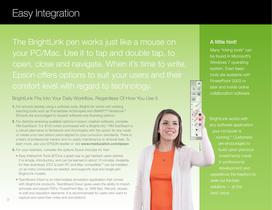
Easy Integration The BrightLink pen works just like a mouse on your PC/Mac. Use it to tap and double tap, to open, close and navigate. When it’s time to write, Epson offers options to suit your users and their comfort level with regard to technology. BrightLink Fits Into Your Daily Workflow, Regardless Of How You Use It 1. For schools already using a software suite, BrightLink works with existing 13 teaching tools such as Promethean ActivInspire and SMART™ Notebook. Schools are encouraged to request software-only licensing options. 2. For districts reviewing available options in lesson creation...
Open the catalog to page 10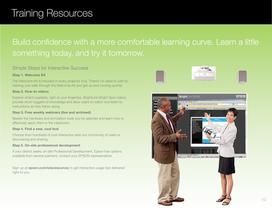
Training Resources Build confidence with a more comfortable learning curve. Learn a little something today, and try it tomorrow. Simple Steps for Interactive Success Step 1. Welcome Kit The Welcome Kit is included in every projector box. There’s no need to wait for training; just walk through the Welcome Kit and get up and running quickly. Step 2. How-to videos Explore what’s available, right at your fingertips. BrightLink Bright Spot videos provide short nuggets of knowledge and allow users to watch and listen to instructions as they follow along. Step 3. Free weekly webinars (live and archived)...
Open the catalog to page 11All EPSON catalogs and technical brochures
 RapidReceipt™ RR-60
2 Pages
 EU-m30
2 Pages
 EcoTank ET-2800
2 Pages
 Expression Photo XP-8700
2 Pages
 DFX-9000
2 Pages
 LX-350 Impact Printer
2 Pages

Archived catalogs
 WorkForce Pro C Series
12 Pages
 Expression Premium XP-820
4 Pages
 Epson LQ-590 Impact Printer
2 Pages
 discproducer
6 Pages
 LQ-680Pro Impact Printer
2 Pages
 SurePress L-4033 Brochure
4 Pages
 ProdSpecSht_
2 Pages
 MM85HD
4 Pages
 brochure_g5550
8 Pages
 specs_v500
2 Pages
 vs315w
4 Pages
 specs_g5750wunl_v2
8 Pages
 wf545_sl
2 Pages
 PLPC_9700UB
4 Pages
 brochure_g5950
8 Pages
 brochure_1771w
4 Pages
 specs_pl4300_v1
6 Pages
 g5750wu
8 Pages
 g5450wunl_v2.pdf
8 Pages
 PLHC_8700UB_ProdSpecs
4 Pages
 specs_g5550nl_v2
8 Pages
 z8455wunl
8 Pages
 brochure_475wi-480i-485wi
6 Pages
 specs_pl4300_v1.pdf
6 Pages
 MM62
MM624 Pages
 specs_g5950nl_v2
8 Pages
 wf-ds-30
2 Pages
 specs_1261w
4 Pages
 1965
19656 Pages
 specs_pl4100_v1
6 Pages
 specs_915w-v2
4 Pages
 V700_V750
2 Pages
 V33
V332 Pages
 d6000
d600010 Pages
 brochure_ex5210
4 Pages
 specs_pl4200w_v1
6 Pages
 brochure_z8255nl
8 Pages
 brochure_mg50
4 Pages
 ds-7500
2 Pages
 brochure_ex7210
4 Pages
 ds-70000
2 Pages
 lw400
lw4002 Pages
 GT20000
2 Pages
 ds-6500
2 Pages
 EpsonSurePressL4033A
4 Pages
 Expression Home XP-200
2 Pages
 FX-890
2 Pages
 Epson SureColor S30670
2 Pages
 PLPC_9350
4 Pages
 WP4520_4533_4590
2 Pages
 Epson Stylus Pro WT7900
5 Pages
 WorkForce Pro WP-4010
2 Pages
 GT2500
2 Pages
 WorkForce Pro WP-4520
2 Pages
 Expression Home XP-410
4 Pages
 Epson Stylus Pro 11880
8 Pages
 Epson Stylus® Pro 3880
8 Pages
 GTS50
GTS502 Pages
 LQ-590LQ-2090
2 Pages
 g5550nl_v2
8 Pages
 GT30000
2 Pages
 Epson Stylus Pro 7900
1 Page
 GT_1500
2 Pages
 g5550
g55508 Pages
 WorkForce® 840
2 Pages
 GTS80
GTS802 Pages
 brochure_g5650w
8 Pages
 brochure_425w-v2
6 Pages
 WorkForce Pro WP-4090
2 Pages
 FX-2190
2 Pages
 brochure_wf2520
2 Pages
 ds-50000
2 Pages
 specs_95-v2
4 Pages
 mg850hd
4 Pages
 7900_9900
8 Pages
 WorkForce Pro WP-4590
2 Pages
 V500
V5002 Pages
 specs_1221
4 Pages
 V330
V3302 Pages
 Pro_C_Series
12 Pages
 FX890
FX8902 Pages
 Expression Photo XP-950
4 Pages
 brochure_a837
2 Pages
 art725sl
2 Pages
 ColorWorks™ C3400
2 Pages
 WorkForce Pro WP-4023
2 Pages
 lw300
lw3002 Pages
 OmniLink TM-L90-i
2 Pages
 Expression Photo XP-860
4 Pages
 OmniLink TM-T70-i
2 Pages
 prog7000-series
24 Pages
 workforce WF-2630
2 Pages
 workforce WF-2650
2 Pages
 p400
p4002 Pages
 WorkForce WF-2660
2 Pages
 LW-700
2 Pages
 C3400lt
2 Pages
 WF7110
2 Pages
 EpiqVision Mini EF11
2 Pages
 EX3210 Multimedia Projector
4 Pages


- Industrial robot
- Articulated robot
- 6-axis robot
- Handling robot
- Compact robot
- High-speed robot
- Assembly robot
- Label printer
- EPSON industrial printer
- Packaging robot
- Ceiling-mounted robot
- Loading robot
- Thermal transfer label printer
- Applications robot
- High-precision robot
- Robot for the food industry
- Palletizing robot
- EPSON color printer
- Robot for the electronics industry
- EPSON desktop printer