
- Catalogs
- EMKO Elektronik
- Temperature and Relative Humidity Transmitter

- Products
- Catalogs
- News & Trends
- Exhibitions
Temperature and Relative Humidity Transmitter

Temperature and Relative Humidity Transmitter
Overview
This document is an instruction manual for the PRONEM-midi temperature and relative humidity transmitter, designed for various applications including HVAC building controls, poultry automation, greenhouse applications, food manufacturing and storage, cold storage chambers, pharmacy and medical supplies storage, air conditioning chambers and automation, textile applications, and clean rooms and laboratories.
Key Features
- Analogue outputs for temperature and humidity with high accuracy and long-term stability.
- Compact and practical design with low thermal drift.
- Selectable current or voltage output signals for both temperature and humidity.
- Available in duct mount and wall mount types.
Dimensions and Installation
The device dimensions are provided for both duct and wall mount types, with specific measurements for probe length and cable diameter requirements (compatible with PG7 cable gland, cable diameter between specified ranges).
Programming and Operation
- Programming mode is accessed by pressing the 'P' button for 5 seconds in the main screen mode.
- The upper display shows the selected parameter, and the lower display shows its current value.
- Parameters can be incremented or decremented using dedicated buttons; pressing 'P' saves the value and moves to the next parameter.
- If no interaction occurs for 60 seconds during programming, the device returns to the main screen.
Parameters and Settings
- Temperature and humidity measurement ranges and accuracy are specified, with typical values at 25°C.
- Output signal stability is detailed for both voltage and current outputs.
- Operating conditions include supply voltage, operating temperature range, and elevation limits.
- Protection class and device weight are specified.
- Communication parameters such as Modbus slave address, baud rate, parity, and stop bits can be configured.
- Temperature unit can be set to Celsius or Fahrenheit.
- Offsets for temperature and relative humidity can be adjusted within defined limits.
- Backlight duration after button press is configurable between 8 and 60 seconds.
Technical Specifications
| Parameter | Value |
|---|---|
| Measurement Range (Humidity) | 0 to 100% RH |
| Measurement Range (Temperature) | -40 to 80°C (-40 to 176°F for LCD type) |
| Accuracy (Humidity) | ±2% RH typical at 25°C |
| Accuracy (Temperature) | ±0.3°C typical at 25°C |
| Output Signal | Current (4-20 mA) or Voltage (0-10 V) selectable |
| Supply Voltage | 9-30 VDC max 9 mA |
| Protection Class | IP65 (except sensor) |
| Weight | Approx. 120 g (with 8 mm probe) |
Communication Interface
The device supports Modbus communication with configurable slave address, baud rate, parity, and stop bits. Parameters and device information such as software version, calibration date, and serial number are accessible via Modbus registers.
Calibration and Error Handling
- Calibration date is displayed in year, month, and day format.
- Error messages include sensor connection errors and communication errors due to electrical noise or connection issues.
Ordering Information
Order codes are generated based on device type, installation type (wall or duct), output signal type, probe length, power supply, and optional features such as LCD display and backlight. Notes specify availability of features depending on output signal and communication interface.
Electrical Connections
- Detailed wiring diagrams are provided for current and voltage output configurations, with or without external power supply.
- Temperature output connection is mandatory for devices using current output.
- If temperature output is unused, it must be connected to the power supply negative pin.
Applications
The transmitter is suitable for precise environmental monitoring and control in HVAC systems, agricultural automation, food and pharmaceutical storage, air conditioning, textile manufacturing, and laboratory environments.
Summary of Best Practices and Limitations
- Ensure correct cable diameter for PG7 gland to maintain IP protection.
- Use programming mode carefully to configure parameters; device returns to main screen after inactivity.
- Verify correct wiring according to output type to avoid malfunction.
- Regular calibration is recommended to maintain accuracy and stability.
- Backlight feature is configurable but limited to devices with display option.
Catalog excerpts
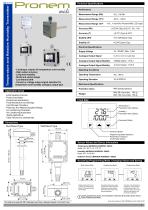
Temperature and Relat�ve Hum�d�ty Transm�tter Techn�cal Spes�f�cat�ons Performance Measurement Range FRHM Measurement Range FTM°C Measurement Range FTM°F /I°F1118,(°°F 7for Pronem M�d� LCD type. Accuracy FRHM Stab�l�ty FRHM Electr�cal Spes�f�cat�ons Supply Voltage Analogue Output S�gnal Analogue Output S�gnal Stab�l�ty Analogue Output S�gnal Stab�l�ty kE analogue outputs for temperature and hum�d�ty kH�gh output accuracy kLongkterm stab�l�ty kSmall and useful des�gn kLow thermal dr�ft kCurrent or voltage output s�gnal select�on for temperature and hum�d�ty analogue output type Operat�ng Cond�t�ons Operat�ng Temperature Operat�ng Elevat�on Mechan�cal Spes�f�cat�ons Protect�on Class /HVAC Bu�ld�ng Controls /Poultry Automat�on /Greenhouse Appl�cat�ons /Food Manufacture and Storage /Cold Storage Chambers /Pharmacy and Med�cal Suppl�es Storage /A�r Cond�t�on�ng Chambers /A�r Cond�t�on�ng Automat�on /Text�le Appl�cat�ons /Clean Rooms and Laborator�es Appl�cat�on Areas W�th :% mm probe+ ,2v gr W�th ,:% mm probe+ ,v2 gr Boyutlar Front S�de Temperature Ø Parameter Index D�splay Hum�d�ty Ø Parameter Value D�splay Decrement Button D�mens�ons Duct Mount Type Wall Mount Type Increment Button Programm�ng Mode Select�on Ø Parameters Trans�t�on Ø Conf�rmat�on Button Temperature FMODBUS ADDRESS: :OOOUM Scale+ /w2111)2 °C 7/I111,(° °F. Sensor Values and Dev�ce Informat�on Hum�d�ty FMODBUS ADDRESS: :OOOEM Scale+ 621116,22 RH Software Vers�on FMODBUS ADDRESS: :OOO:M Access�ng Programm�ng Mode0 Chang�ng Values and Sav�ng Programm�ng Mode Programm�ng Mode Ma�n Screen Mode Programm�ng mode can be accessed by press�ng the P button for v seconds at Ma�n Screen Mode1 The cable to be used w�th PG7 cable gland must have a d�ameter between : mm and °IW mmI At programm�ng screen9 upper d�splay shows wh�ch parameter �s selected and lower d�splay shows the current value of the selected parameter1 The value of the parameter �s changed by us�ng Increment and Decrement but
Open the catalog to page 1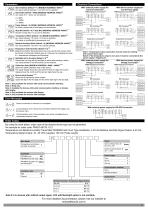
Electr�cal Connect�ons Slave Address RDefault + =3 RMODBUS ADDRESSx 7)))=3 Any slave address between C and 5L7 can be selected6 Baud Rate RDefault + /8))3 RMODBUS ADDRESSx 7)))93 Any value of V4 C and 5 can be selected6 W�th external power supply for Current Connect�on RHyTemperature Connected V = )UVV C = C)5VV 5 = 9(LVV R=3 Par�ty RDefault + ) RNONE33 RMODBUS ADDRESSx 7)))T3 No Par�ty4 s�ngle par�ty of dual par�ty can be selected6 W�th dev�ce sensor supply for CurrentUloop usage RHyTemperature Connected Stop B�t RDefault + ) R= Stop B�t33 RMODBUS ADDRESSx 7)))73 Number of stop b�ts OC or 5N...
Open the catalog to page 2All EMKO Elektronik catalogs and technical brochures
 60W Power Supply Module
2 Pages
 EMKO OVEN CONTROLLER-SINGLE
2 Pages
 proop User Manual
193 Pages

- Temperature probe
- Automation software solution
- Resistance temperature sensor
- Digital I/O
- IO module
- Computer-aided design software
- Digital temperature control
- Digital indicator
- Analog I/O
- Design software solution
- Digital IO module
- Panel panel meter
- Battery charger
- Interface software
- Thermocouple temperature transducer
- Temperature controller
- HMI
- Fieldbus I/O module
- Programmable logic controller
- Programming software