

- Company
- Products
- Catalogs
- News & Trends
- Exhibitions
TranAX 4.5 Data Acquisition Software
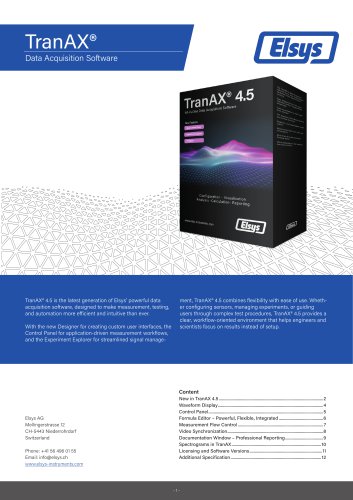
TranAX 4.5 Data Acquisition Software
- Designer for Custom User Interfaces: Enables the creation of customized graphical interfaces for test automation, integrating with the Formula Editor for precise control.
- Control Panel: Focuses on application-oriented workflows, adapting hardware settings based on selected signals or sensors, and storing sensor properties for reuse.
- Experiment Explorer: Replaces the Signal Source Browser, offering efficient signal management and post-processing capabilities.
- Supports multi-waveform layouts and various display modes, including Y-T, X-Y, FFT, and spectrograms, with interactive tools for measurement.
- Central interface for configuring measurement hardware, supporting multiple acquisition modes and channel labeling for accurate data interpretation.
- Embedded scripting environment with a rich function library, supporting report generation, external communication, and post-processing.
- Framework for automated measurement workflows, enhancing efficiency and flexibility in measurement routines.
- Integrates external video recordings with measurement data for precise synchronization and comprehensive analysis.
The document details the features and capabilities of TranAX software, focusing on professional reporting, spectrogram analysis, and report generation. It compares the TranAX LE and Full versions, highlighting differences in features and licensing.
Allows users to create professional reports with features like drag-and-drop layout design, template support, and real-time updates.
Provide a time-frequency representation of signals, useful for analyzing non-stationary signals and enhancing diagnostics.
Enables report creation in Microsoft Excel format, supporting automated and customized reporting with flexible Excel integration.
The Full version offers advanced analysis capabilities and comprehensive reporting, while the LE version is free but with reduced features.
TranAX offers a 30-day trial with full functionality, transitioning to the LE version unless a license key is activated. The Full version requires a paid license key.
Supports Windows 10/11 64-bit, requires an Intel i5 or equivalent processor, 8 GB RAM, and a Full-HD display, with extensive analysis functions.
Catalog excerpts
TranAX'Data Acquisition SoftwareTranAX® 4-5 1 1 W Acquisition Software All-in-one Data TranAX® 4.5 is the latest generation of Elsys' powerful data ment, TranAX® 4.5 combines flexibility with ease of use. Wheth- acquisition software, designed to make measurement, testing, er configuring sensors, managing experiments, or guiding and automation more efficient and intuitive than ever. users through complex test procedures, TranAX® 4.5 provides a clear, workflow-oriented environment that helps engineers and With the new Designer for creating custom user interfaces, the scientists focus on results instead of setup. Control Panel for application-driven measurement workflows, and the Experiment Explorer for streamlined signal manage-
Open the catalog to page 1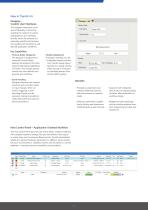
• Flexible Deployment » Embedded directly into the main TranAX design layout » Opened as a dialog window, either through a Formula or via the Measurement Flow Control (MFC) system. Designer -Custom User Interfaces The Designer introduces a new level of flexibility in TranAX by enabling the creation of customized graphical user interfaces directly within the software. It is especially suited for test automation, guided user interactions, and tailored application workflows. • Formula Editor Integration The Designer is programmed using the Formula Editor, allowing full access to the mathematical...
Open the catalog to page 2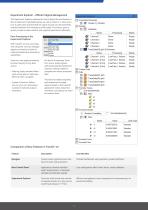
The Experiment Explorer replaces the former Signal Source Browser. It lists all stored and calculated signals as well as results in a clear structure. A particularly practical feature: signal sources can be seamlessly switched between live hardware and file replay. This allows users to quickly compare measurements and organize experiments efficiently. Post-Processing in the Experiment Explorer With TranAX® 4.5, the new Experiment Explorer not only manages signals and results, but also introduces flexible post-processing capabilities. Users can now apply processing functions directly to any data...
Open the catalog to page 3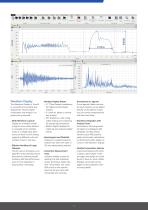
Layout I Measurement Store Data Measurement Row Control Settings Help Waveform Display Plugins AE-Plugin YT FFT Zoom XY Marker Marker+ Documentation Video Documentation & Video Scalar-A Scalar-B Harmonics Control Panel Signal Source Averaging Browser Measurement Flow Control Reset Position Formula Page Misc Controls Formula Editor Controls Waveform Display The Waveform Display in TranAX is a powerful and versatile tool designed for intuitive signal visualization and analysis—no programming required: Display an unlimited number of signal curves either stacked or arranged across multiple zones...
Open the catalog to page 4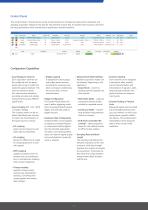
The Control Panel in TranAX serves as the central interface for configuring measurement hardware and adapting acquisition settings to the specific requirements of each test. It provides direct access to all essential setup parameters while maintaining an application-oriented workflow. Configuration Capabilities• Input Range per Channel Each acquisition channel can be configured with an appropriate input range to match the expected signal amplitude. This ensures maximum resolution and prevents saturation, providing accurate and reliable measurements across different signal levels. • Input Coupling...
Open the catalog to page 5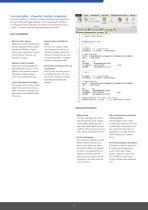
The Formula Editor in TranAX is a robust scripting and computational environment embedded directly in the measurement workflow. It's designed to give engineers and researchers advanced analytic control — without needing a separate programming tool. Key Capabilities• Rich Function Library Offers more than 60 mathematical and programming functions, including arithmetic, trigonometric, array operations, cursor/ time functions, filtering, and spectrum analysis • Modern Coding Features Supports syntax highlighting, adjustable font size, auto-completion, and comment support. The editor enables cleaner,...
Open the catalog to page 6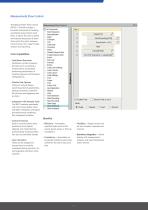
The Measurement Flow Control (MFC) in TranAX provides a powerful framework for building automated measurement workflows. It allows the user to define and execute sequences of tasks that control the entire measurement process, from setup to data analysis and reporting. Workflows consist of sequential tasks such as starting a measurement, saving data, performing calculations, or switching layouts and hardware configurations. Tasks can include delays, launching external applications, adding comments, automatic file naming, and triggering user prompts. The MFC interacts seamlessly with the Formula...
Open the catalog to page 7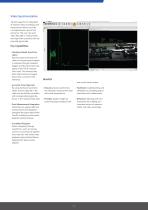
TranAX supports the integration of external video recordings with measurement data to provide a comprehensive view of test scenarios. The user can open video files after a measurement and align them precisely with the acquired signal data. Synchronization between the video and measurement signals is achieved through hardware triggers and the SyncClock Out signal of the TPCE measurement card. This ensures that both video frames and signal data share a common time reference. By using hardware synchronization, events captured in the video can be directly correlated with corresponding signal behavior...
Open the catalog to page 8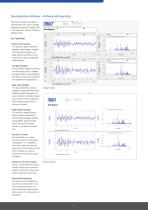
The Documentation Window in TranAX allows the user to design professional reports directly within the software, without relying on external tools. The user can place waveform displays, scalar tables, images, text, and shapes freely on a page (A4/A3, portrait or landscape) and create customized report layouts. He can define headers and footers with logos, text, or images and apply them automatically to all pages, ensuring a consistent and professional appearance. The documentation window updates dynamically. When the underlying data changes, the report content refreshes instantly, and the printed...
Open the catalog to page 9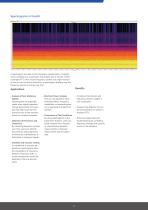
A spectrogram provides a time-frequency representation of signals and is available as a visualization and analysis tool in TranAX. Unlike a standard FFT, which shows frequency content at a single moment in time or over the entire acquisition, a spectrogram displays how the frequency spectrum evolves over time. • Analysis of Non-Stationary Signals Spectrograms are especially useful when signal properties change dynamically. For example, they help reveal how frequencies vary during transient events or complex processes. • Detection of Harmonics and Distortions By observing frequency content over...
Open the catalog to page 10All Elsys AG catalogs and technical brochures
 Low Noise Amplifier LNA-2
2 Pages
 EL-BULT14
3 Pages
 TraNET EPC Datasheet
9 Pages
 TraNET FE 408 DP
5 Pages
 EL-DAQ Data Logger Solution
3 Pages
 Elsys Product Overview
15 Pages
 Reluctance Triggers EL-TRG_R
4 Pages


Archived catalogs

- Rectangular housing
- Data logger
- Process software
- Temperature datalogger
- Measurement software
- Signal amplifying integrated circuit
- Protection housing
- Electronic equipment enclosure
- Programming software solution
- Datalogger without display
- IP65 housing
- Monitoring datalogger
- Data acquisition software
- Programmable datalogger
- Data acquisition unit
- Pressure logger
- CAM software
- Measuring amplifier
- Voltage amplifier