- Catalogs
- Dynamox S.A
- Dynamox Lens


- Products
- Catalogs
- News & Trends
- Exhibitions
Dynamox Lens
Dynamox Lens
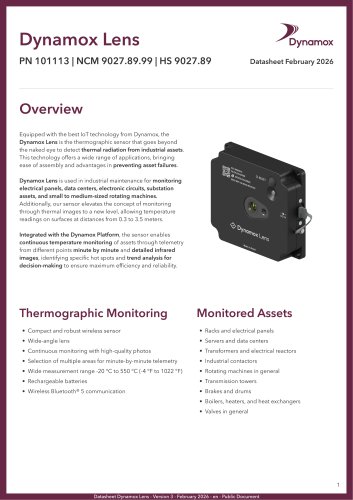
The Dynamox Lens is an advanced thermographic sensor designed for industrial maintenance, capable of detecting thermal radiation from assets. It is particularly useful for monitoring electrical panels, data centers, electronic circuits, substations, and rotating machines. The sensor operates effectively at distances from 0.3 to 3.5 meters and integrates with the Dynamox Platform for continuous temperature monitoring and detailed infrared imaging.
Specifications
- Temperature Range: -20 °C to 550 °C (-4 °F to 1022 °F)
- Resolution: 256 x 192 px
- Field of View: 90° x 73.7°
- Wireless Communication: Bluetooth® 5 and Wi-Fi 2.4 GHz
- Power Supply: Rechargeable batteries or 5V power cable
- Dimensions: 99.1 mm x 87.2 mm x 23 mm
- Weight: 315 g
Features
- Compact and robust design with a wide-angle lens
- Continuous monitoring with high-quality photos
- Minute-by-minute telemetry with multiple area selection
- Rechargeable batteries with 4-hour capacity
Installation Procedure
To install the Dynamox Lens, position the device with the cameras facing the target area, temporarily fix it, and press the button until the LED flashes yellow. Connect to the network generated by the device and access configuration mode via a browser. Adjust the position using real-time images and then permanently fix the device.
Recommendations
For accurate readings, reflective or low-emissivity surfaces should be treated or painted with high-emissivity paints.
Technical Drawing
The document includes a technical drawing with dimensions and key features like the reset button, LED, and USB-C port.
Disclaimer
The information is provided for informational purposes only, and specifications may change without notice. No liability is assumed for any loss or damage arising from the use of this information.
Catalog excerpts
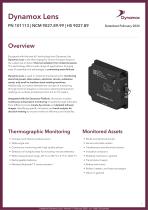
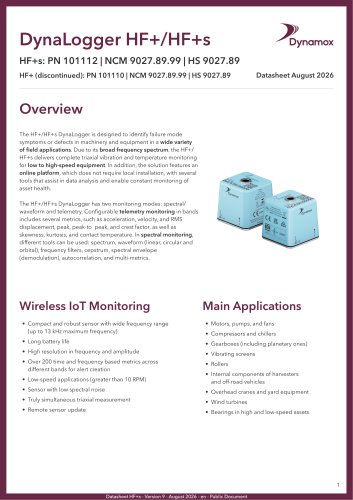
Equipped with the best loT technology from Dynamox, the Dynamox Lens is the thermographic sensor that goes beyond the naked eye to detect thermal radiation from industrial assets. This technology offers a wide range of applications, bringing ease of assembly and advantages in preventing asset failures. Dynamox Lens is used in industrial maintenance for monitoring electrical panels, data centers, electronic circuits, substation assets, and small to medium-sized rotating machines. Additionally, our sensor elevates the concept of monitoring through thermal images to a new level, allowing temperature readings on surfaces at distances from 0.3 to 3.5 meters. Integrated with the Dynamox Platform, the sensor enables continuous temperature monitoring of assets through telemetry from different points minute by minute and detailed infrared images, identifying specific hot spots and trend analysis for decision-making to ensure maximum efficiency and reliability. • Racks and electrical panels • Servers and data centers • Transformers and electrical reactors • Industrial contactors • Rotating machines in general • Transmission towers • Boilers, heaters, and heat exchangers • Compact and robust wireless sensor • Wide-angle lens • Continuous monitoring with high-quality photos • Selection of multiple areas for minute-by-minute telemetry • Wide measurement range -20 °C to 550 °C (-4 °F to 1022 °F) • Rechargeable batteries • Wireless Bluetooth® 5 communication Datasheet Dynamox Lens - Version 3 - February 2026 - en - Publi
Open the catalog to page 1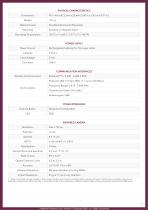
1 - Does not include a power supply. 2 - Main power supply via 5 V source, with the battery providing 4 hours of autonomy, considering a 5-minute telemetry interval and 1 photo per day. 3 - Equivalent noise of the temperature difference (also known as Noise Equivalent Temperature Difference). Datasheet Dynamox Lens - Version 3 - February 2026 - en - Public Document
Open the catalog to page 2
Datasheet Dynamox Lens - Version 3 - February 2026 - en - Public Document
Open the catalog to page 3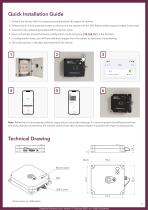
Quick Installation Guide Position the device with the cameras pointing towards the region of interest; Temporarily fix it and press the button on the front of the device until the LED flashes yellow (approximately 5 seconds); Connect to the network generated with the device name; Once connected, access the device configuration mode by typing 192.168.10.1 in the browser; In configuration mode, you will have real-time images from the camera to assist you in positioning; Once the position is decided, permanently fix the device. Note: Reflective or low-emissivity surfaces may produce inaccurate readings....
Open the catalog to page 4
© 2025, Dynamox® is a registered trademark. The contents of this publication are presented for information purposes only. Every care has been taken to ensure the validity of the information contained in this publication, but no liability can be assumed for any loss or damage whether direct, indirect or arising from the use of the information contained herein. We reserve the right to modify or improve the specifications of our products at any time without prior notice. Datasheet Dynamox Lens - Version 3 - February 2026 - en - Public Document
Open the catalog to page 5